Showing posts from December 2010 (28 posts). Show all posts

December 31, 2010

2010 Internal Year In Review (Month by Month)

2010 Internal Year In Review (Month by Month)

With almost 400 posts in the year, you no doubt missed some, and January probably seems like ancient history. That's why at the end of each year, I try to summarize the 12 months that just went by on the blog to see if we all can remember the big news and opinion that passed through this place. Interspersed with the day by day updates, the product launches and feature enhancements, I did manage to expand the family and the house and get more embedded in Web startup land with a new role.

Maybe I blogged about all these changes and maybe I didn't. 2010 saw a resurgence in tech startups after a poor economy shelved many ideas in 2008 and 2009, leading some to even claim there was a bubble. To be honest, I don't think there is one, but a few late stage companies that deserve it got funded at big levels. Now let's make sure to recap.

Reviews for the year 2009 and the year 2008 are of course available for those of you who just stopped by this year.

The word of 2008 was "launched". The word of 2009 was "Twitter". The word of 2010 was probably "Android".

January

I started the year saying computing would get thinner, mobile and connected... noted Apple tablet reruns... discussed iPhone owners first considering Android... begged for OS neutral data... checked Technorati's pulse... got a MacBook Air... said the iPad would sell like crazy... and said you should be driven and never compromise.

February

February reported on Apple's growing chip division... saw Siri launch for artificial intelligence... the introduction of Google Buzz... which validated FriendFeed... based on open standards. Cadmus launched for Twitter relevance... and BuzzGain was acquired by Meltwater.

March

In March, TiVo launched the Premiere line of DVRs... SocialToo protected against Twitter phishing attacks... Google Reader hit Play... while Blogger added templates... and Twitter's Ev Williams bombed in a SXSW interview. Qwotebook launched... my6sense launched an Attention API... and my wife and I announced we were pregnant with baby #3.

April

In April, I belatedly started using Foursquare... I was annoyed with my iPad... but noted confusion from developers in terms of focus... Rick Klau left Blogger to head Google Profiles... I joined the MyLikes advisory board... Twazzup launched a Twitter client... Fabulis launched... Steve Jobs became an e-mail machine, and Facebook started pushing "Like" activity to third parties.

May

I mocked Apple's focus on Flash when AT&T was a bigger enemy... Scout Labs was acquired by Lithium... I expanded use of Google Buzz... I grew tired of the echo chamber and attacks and attended Google IO, which saw the introduction of the Chrome Web store... the Google Buzz API... Google TV and argued iPhone users were in for it. I tested Android for the first time... and said mobile choices came down to your focus.

June

By June I reported Android was pretty good and hit 5,000 tweets. Spotify went social... I joined Qwotebook's advisory board... fell in love with Redfin... tried to be pragmatic... heard rumors of Google Me... and saw Brizzly roll out picnics.

July

July saw Blogger add stats, my kids take to the iPads... a call for data independence... I goofed up and thought Foursquare would buy Brizzly... saw Kosmix introduce a cool Twitter extension... I officially switched to Android... saw the launch of Flpboard and Friendly for iPad... and moved across town where I suffered without broadband for a week.

August

August saw me misinterpret internal Twitter accounts as new features.... I had some dingbat fraudulently use my identity... the storage world got hot with acquisition mania... I announced joining my6sense... and Braden was born the next day.

September

In September, Spotify and Sonos teamed up... while I predicted the future of search... my6sense came to Android... people debated the future of RSS, again... and Google Me rumors had us investigating social layers or networks. By end of month, OneTrueFan launched... and AOL purchased Brizzly.

October

By October, I got the new Apple TV... Tweetbeat launched for real-time Twitter events... Yobongo launched for location chat... Marissa Mayer was moved to location... the attention crisis accelerated... I visited the new Google campus store... and rumors about Apple looking to buy Spotify were false.

November

In November, Lazyfeed launched Lazyscope... and Sonos sent me a wireless iPod dock... I predicted the third wave of the Web would be personal... Blekko and Rockmelt launched... I switched to the Samsung Epic... as did Path... and Hotpot... while Cliqset shut down... and new iPad competition from Android emerged.

December

As the year wrapped, Google Reader came to Android... while Facebook expanded friend discovery... I was featured on CNN to discuss privacy, which led to phone calls... Gawker's database was compromised... and Delicious looked to be dying. I bought the NOOKColor... saw the launch of Beluga... argued iPhone fans were discounting Android... summarized Quora's growth... got hooked on the Samsung Galaxy Tab and tried out Google's Chrome OS laptop, the CR-48.

So that was our year. Launches, new gadgets and new operating systems galore. Discussion of openness and data portability, success and failure. If you've just bumped into the blog, now you'll get a solid idea of what we do here. Even with all these links, the hardest part was making sure I caught all the big stuff. On to 2011.

Batting .400 For My 2010 Predictions in the Tech World

Batting .400 For My 2010 Predictions in the Tech World

At the end of each year, it has been something of a tradition to make wild predictions that few others are making, and then mock myself for those I got wrong. This year should be no different. At the end of 2009, I made concrete predictions for the world of tech, which assumed a strong IPO market, increased acquisitions and some specifics from the big players, including Apple and Google. As usual, I got some right, and others wrong. Let's see how I fared.

History: Predictions for 2010, 2009 and 2008. Results for 2009 and 2008.

1. Twitter Manages to Complete 2010 With No Major Hacking or Security Incidents

Right. After a shaky start to the company's life in terms of both scale and security, Twitter really held its own in 2010. They didn't get hacked and for the most part, they stayed up. There were no large-scale hacking incidents for major users and no strategy docs leaked to TechCrunch. It's the little things.

2. Seeing Android and iPhone, Windows Mobile Will Aim for Parity, and Fail

Right. Fail is a strong word, so maybe I'm presumptuous here. But Windows Phone 7 is absolutely an approach to take on Android and iPhone, and early reports haven't been great in terms of sales. Given the late launch of the product, I would have to take more of a wait and see attitude to see the final result, but thus far, it'd be a stretch to see them in a strong #3 role in the smartphone race.

3. Apple Will End Exclusivity With AT&T, Adding T-Mobile and Verizon

Wrong. Another year went by with AT&T acting as Apple's boat anchor. Rumors again are flaring up around Verizon, but not in time for 2010 to be counted.

4. Facebook Will Announce a Migration Plan for FriendFeed Users

Wrong. FriendFeed is still there, just as it always was, with a dedicated community, not going anywhere. Facebook keeps it alive even though many of the acquired FriendFeed team have since left.

5. Google Wave Will Exit 2010 Still In Beta

Wrong. I expected Google Wave to not be ready enough to consider a solid product, but I certainly didn't anticipate the product being axed outright. Even by Google's standards, that was a very short-lived product.

6. Facebook, Zynga, LinkedIn Will All Go Public

Wrong. Not even close. One thing I hadn't anticipated relative to historic activity was the strong role played by Russia's DST, who has made hundreds of millions of dollars available to late-stage companies like Facebook, Zynga and others. The increased demands of going public at a time when rewards for late stage investment are so high has reduced the need to go public early in a company's life cycle.

7. Chrome OS Netbooks Will Be Available from Major Retailers

Wrong. I may have a Chrome OS Notebook, but it came straight from Google in an early trial. It's too early for this product to be sitting at Best Buy or Fry's, but maybe this changes next year some time.

8. Many Social Media Experts Will Launch Mediocre Agencies

Right. I am sure this is true and don't even have to go back it up. :) Even in looking at some of the lesser-read tech blogs that infiltrate my Google Reader, I can see a lot of folks took side jobs as independent consultants focused on social media, and it doesn't seem they are all that differentiated. Feedback from companies I have worked with in various roles indicates they are pitched often by SMEs with sleazy tactics.

9. Google, Facebook and Apple Will All Make $1B+ Acquisitions

Wrong. Not that it was Google's fault of course. The company made very visible overtures to Groupon and allegedly to Twitter as well, with no success. Facebook remains cheap, while Apple did its spending on Quattro Wireless and Siri early in the year, at prices less than a billion bucks.

10. The Real-Time Search Market Will Consolidate

Right. Very much so. OneRiot got out of the real-time search game altogether and launched an ad network. Twazzup's founders launched a Twitter client and later the Facebook iPad app Friendly instead of focusing on search. Collecta and Topsy are still out there, but I would venture a guess that most users will just turn to Twitter and Google for real-time search instead of going to the lesser-known startups.

Total score? 4 out of 10, just about where I usually bat, not because I am a bad guesser, but because I don't like guessing the obvious and would rather have some fun with each year's predictions. In 2009's predictions, I scored 4 1/2, and only 1 1/2 for 2008. Maybe I'll break 50% next year and maybe not.

The Top 15 Stories on LouisGray.com in 2010

The Top 15 Stories on LouisGray.com in 2010


With almost 400 stories in 2010 posted on the blog, some definitely rose higher than others in prominence, due to breaking news, interesting insight or simply sharing my personal experience, as my view on the technology landscape changed, as did my preferences. While total posts on the site were down almost 30 percent year over year, thanks to the addition of baby #3, a new job that sees phone calls as likely at midnight as any other time, and greater filters on my side, to avoid feeding the echo chamber of repetitive tech bloggers, there are a number which gained more traction than any other. From a quick visit to Google Analytics, it seems my move from iPhone to Android gained the most attention, by far, as did discussion of Apple, Google, Facebook and social media strategies.

To see last year's results, catch: The Top 15 Stories on LouisGray.com in 2009

The Top 15 stories authored in 2010, in order of highest traffic to least:

1. Why I Turned In My iPhone and Went Android
July 10, 2010

Despite this being far and away the biggest story on the site in 2010, I didn't expect that to be the case, nor did I do anything useful to hype it. Having made the choice to go Android, turning in my iPhone earlier in the week, I felt it made sense to explain my choice. About 20 minutes to midnight on a Saturday, when nobody should be reading tech blogs, I summarized my thoughts. Robert Scoble, an hour or so later, said he couldn't kick the Apple iPhone habit. Bizarrely the post hit Techmeme and for much of Sunday, was the 2nd biggest story on the Tech Web. I was inundated with comments from Apple fans telling me I was a fool.

But that wasn't the end of it. John Gruber of Daring Fireball linked to the story on Monday, and said the piece was "thoughtful" but assumed Android would eventually be better than iOS, not that it is now. That kept traffic flowing, and I honestly couldn't read every comment as it hit my e-mail. I moved them all to archives, and later caught up.

2. While Apple Slept On Their Hobby, Google Executed
May 20, 2010

Second in the Apple vs Google discussion was a recap I made of the Google TV unveiling at Google IO. Since the post, Apple TV reloaded with a new stream-oriented box, and Google TV has had a slow start, but at the time, Google seemed to be making a lot more headway and noise about its product while Apple had been remarkably silent.

3. iPhone 4 Is Nice, But It's Not Enough to Slow Android
June 7, 2010

A clear tilt in my thinking of iPhone vs Android before I made the full switch, I looked closely at the iPhone 4 unveiling, with some glimmer of hope that Steve Jobs and team would do such a grand invention that I'd be a fool to switch sides. Unfortunately, the iPhone 4 looked very nice - the best Apple had ever done - but it was hardly revolutionary. Combined with the market forces behind Android, it seemed clear to me where momentum was headed.

4. 50 Startups Worth Watching
June 9, 2010

Showcasing Symbaloo, a Paladin client, I organized my thoughts on 50 top startups mid-way through the year that I was watching. Foursquare and Spotify topped the list, with others, like Blippy and Quora also featuring prominently. Interestingly, I had posted my6sense at #14 overall, more than two months before taking a fulltime role with the company in late August.

5. How to Bring Your Google Buzz Entries to Twitter
February 11, 2010

With Google Buzz just having launched under much visibility, many folks wanted to make their Buzz posts synchronize with other services. The addition of Google2Twitter made it simple.

6. Unfriending, Unfollowing, Unsubscribing... Less Is More
November 29, 2010

The multitude of connections we all have in our many social networks can at times become overwhelming. In the interest of getting more signal and less noise, I dramatically reduced the number of connections I had on both Facebook and Twitter, and even started trimming Google Reader feeds.

7. iPhone Armageddon: A Week With Android & EVO
June 1, 2010

Having gained the HTC Evo from Google IO, I opted to give the device a fair shake, rather than be dismissive of it, as I had anticipated I would. What I found was surprisingly good, and led to my eventual switch to Android, helped by the minor upgrades of iPhone 4.

8. Why I am Using Google Buzz as An Alternative to Facebook
May 8, 2010

While Google Buzz has been slammed by a number of tech sites for the gulf of what it delivered against their overhyped expectations, I found the site very useful, bringing the aggregation I always liked of FriendFeed to a new place. I outlined how I could use Buzz as an alternative to Facebook.

9. Should Social Profiles Live On When People Die?
July 3, 2010

One of the creepier things about Facebook was my often seeing the site request I reconnect with people who had passed on. Clearly, they hadn't updated their profile in some time, but the catch was they couldn't. Michael McKean, my example, had died due to leukemia and would never post a status update again. But Facebook suggested we talk more. Algorithm fail.

10. Facebook Starts Mandatory Profile Linkage to Public Pages
April 29, 2010

Facebook underwent many different updates to one's profile during the year. In April, those things you liked couldn't just sit as text on your profile, but were automatically connected to public fan pages of those items, be they bands, brands or products. It seemed a little pushy to me, and something that benefited the network moreso than its users.

11. Author: Zuckerberg has "Total Control" over Facebook
June 23, 2010

Speaking of Facebook (3 in a row!), after I attended a presentation from The Facebook Effect's author, David Kirkpatrick, I highlighted his comments, which said Mark Zuckerberg had "total control" over the site. This key quote was enough to gain the interest of Huffington Post's Technology section, who linked it up and drew a good amount of traffic.

12. Friendly: The Best Facebook Experience for iPad
July 24, 2010

One of the biggest successes on the iTunes store for iPad apps was Friendly. Friendly replicated the Facebook experience on the big screen, and in the absence of Facebook having an official iPad application, the company's developers had a gold mine on their hands. I knew it was a big deal and was first to write about it. It's leading the pack more than five months later.

13. The Third Wave of the Web Will Be Uniquely Personal
November 7, 2010

Working at my6sense, I think a lot about personalization and prioritization of content, so the best things come to you as an individual, not as a demographic. The more I thought about it, the more it seemed we were on the cusp of a big wave - one toward personalization, following on the founding of the Web to share information and the ongoing movement toward social. Shortly after my post, stories written by founders at Gravity and Trapit, both posted on TechCrunch, echoed my views.

14. New Apple TV Extends Fragmentation, Cupertino Style
October 1, 2010

Once the new Apple TV came into our home, I was excited to see what it could deliver, but soon found myself wanting, as the channel lineup on the device was dramatically reduced from its predecessor. With a focus on streaming, Apple was unable to sign enough deals that made the entertainment options on the product similar to what one could expect. This kind of fragmentation was annoying, and reminded me of the many similar complaints that critics would through at Android and its array of devices.

15. We Apple Fans Are In Mac Tablet Rumors Reruns
January 2, 2010

If 2010 was all about tablets, and specifically the iPad, we were already buzzing about it by January. For this longtime Mac fan, it seemed like deja vu all over again. Unlike year after year of previous rumors, however, this one came true.

I would like to say that 2010 was the fifth year in a row with more than 500 posts, but it wasn't. Every day I go without posting I feel guilty, but it is just as important for me to drive quality through the site and share with you what I'm thinking, sitting in an interesting intersection of the Web, from the big tech giants and the smallest startups. Already curious what the top 15 stories of 2011 will be.

The ChromeOS CR-48 Experience: Fast, Promising, Early

The ChromeOS CR-48 Experience: Fast, Promising, Early


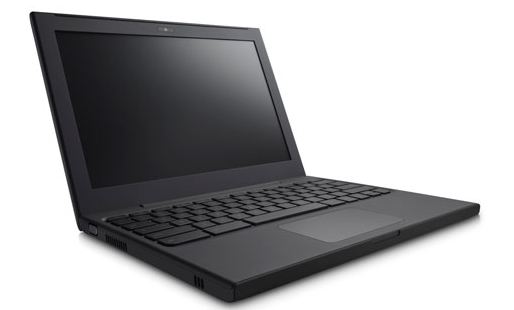
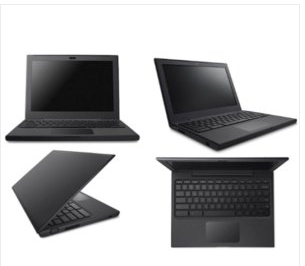
While the tech elite gained notifications early in the month that their Google ChromeOS-powered CR-48 notebooks were on their way, and thousands of others flocked to submit their names to become one of the lucky chosen 60,000 few to get access to what could be the first version of the next big operating system, my e-mail box remained empty. I must have groused about it enough that my wife finally took to her blog to lodge complaint with Google (somewhat tongue in cheek). Come Christmas morning, the last surprise for me was that she had subsequently conspired with some well-thinking Google staffers to make the device available for the holiday (along with some fun Android figurines). While I had to scowl at her end-run which delayed my access to the notebook, I finally put my ego aside and have been using the CR-48 intermittently for about a week, and have found it to be filled with intriguing promise, even if this is clearly not the final package.

The major hypothesis of the ChromeOS plan is that the future is the Web. Web sites, Web services and Web applications. As such, the main differentiation between the ChromeOS powered notebook and that of more traditional laptops running Windows or Mac is that there is very little of the desktop metaphor, with a local hard drive to save all of your documents and run your software applications. Running ChromeOS is much like a terminal that only runs the Web browser. Like the Hotel California, you can try to quit the app, but you can never truly leave.

First impressions with the Chrome OS are very smart. After taking a photo with the bulit-in Webcam to take your profile photo and finding the nearest WiFi point, you connect with your Google ID, and the service pulls in bookmarks you may have synchronized across your Chrome browser. If you are a person who lives on the Web, you're practically set. Theoretically, all your e-mail, your social networks, your favorite Web sites, and even your documents (if you use Google Docs) are right there. What more could you possibly want?

The hardware, the less revolutionary but still nice to have, half of the equation, is extremely minimalist. Black all the way around. Quiet. Very quiet. It wakes up quickly from having the screen closed, and is quite smooth. After years of seeing my keyboard YELL AT ME with letters in full caps, the Google CR-48 is soothingly lower case. Even the CAPS LOCK key is gone, replaced with a search button - not that I found myself using that any more than just typing a word in the browser bar and hitting return if I truly wanted something. The trackpad is not the best in the world, but you can get used to it.

For someone raised in the desktop metaphor with applications, the feeling that I can't get out of the browser and "get to my files" is a bit disconcerting and takes some rethinking. Jokingly, I saw it as if a person had been placed on house arrest. Sure, you can still watch TV and get food from the fridge, and maybe even have visitors over, but you can't do anything outside beyond looking out the window. The lock-in seemed forced, even if I understood why. It's something of the nature where it's assumed Google knows best for me, even if the user is left wondering if its their own best interests that are being served, or that of the company.

At the early stage of ChromeOS's life, it's tempting to list those things you can't really do. You have a Webcam, but it doesn't work to take photos for some Web services, as neither Brizzly and Facebook could recognize it, while Gmail's built in video chat could. You can download Zip files from e-mail attachments, but not unpack them. Taking screenshots looks like an impossibility.

That brings us to the Chrome Web store, the accepted place to run applications in the browser. Nicely laid out, reminiscent of iTunes, there's a great number of options there, but it's early days, so for every well thought out app, there are others that just serve as shortcuts to existing services, or lower-quality apps. Believers will have to be patient as the iTunes Store was not a huge winner back in 2003 either, and it will take time for developers to learn how to code for Chrome OS.

Included with the CR-48 notebook is embedded 3G wireless from Verizon, which makes the device very appealing for mobile computing. In the interest of not adding another 3G bill beyond that from my two Samsung Sprint devices, I did not enable this, but obviously could see the value.

Like many of Google's products, the device and the underlying OS is very useful from day one. It's clean. It's fast. Its battery is very good and the compatibility of practically all sites and services on the OS is very good. But also like other Google products, to fully adopt the direction takes something of faith, that improvements and compatibility with more hardware and more flexibility is on its way.

To have consumers purchase Chrome OS laptops, once they hit the market, serious efforts will need to be taken to convince people why putting everything in the cloud, and abandoning (for the most part) applications they know well, will help their lives. It's not just enough to built an intriguing device, but to also successfully sell the story around the device. For the thousands of brave souls who have access to the CR-48, getting the new laptop is fun, but also free. In parallel, we will need to see growth in applications and services to take advantage of ChromeOS, to ensure confidence we can close down our Macs and our Windows machines and go completely Google.

In a Year of Tablets, I'm Hooked on the Samsung Galaxy Tab

In a Year of Tablets, I'm Hooked on the Samsung Galaxy Tab


This morning, I looked around the room and see three tablets in three corners. My wife's iPad was charging on one side of the room, while her Barnes and Noble NOOKColor was on the nightstand. By me was the Samsung Galaxy Tab. Three tablets, three manufacturers, all with different uses.

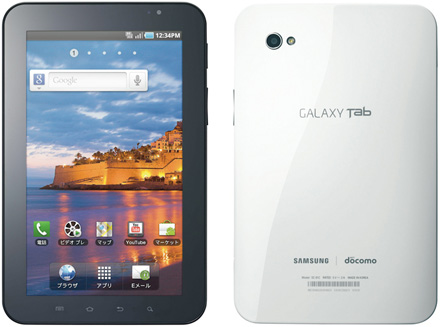
It struck me very clearly how 2010 was the year that tablets finally came to be useful household items, accelerated by Apple of course (after years of rumors), but in the end, the one I've been using the most has been the Samsung Galaxy Tab. I have found the 7 inch form factor extremely inviting, and it's going with me practically everywhere, thanks to built in 3G support.

Tablets? The iPod Touch, Samsung Epic, NOOKColor, Galaxy Tab and iPad.

At risk of falling into "most recent gadget acquired" syndrome, the Galaxy Tab is absolutely my favorite and most-enjoyed electronic gizmo of the moment. It takes what I've already enjoyed about Android, including significant customization, flexibility and integration with all my Google Services, and brought it to a bigger, high quality screen, and a very fast processor that runs every app I throw at it.

The Galaxy Tab vs the iPad In Size

Sitting in between my Samsung Epic phone and the MacBook Air, in terms of size, the Galaxy Tab is big enough to present full-colored demos to potential business partners, while also being small enough to put in an inside jacket pocket or jeans back pocket. The device is lightweight and easy to maneuver one handed, which has come increasingly handy when reading books, RSS feeds, Twitter or anything else when balancing a 4 month old baby. In contrast, the iPad's weight and bulk, not to mention heavy metal exterior, fails in this regard. The Galaxy Tab has a smooth plastic exterior that easily grips to your hand, but isn't so harsh as to be uncomfortable if rested on the chest or lap (real-world use case, people!).

My Galaxy Tab Home Screen

Many people have remarked that the Galaxy Tab is essentially a larger Android phone. That is true. In fact, to my surprise, when purchasing the Tab, Sprint assigned a phone number to the device, even though it is not configured to make phone calls. It seems the exact same hardware went into the device, plus a bigger screen, battery and CPU. So if you're already an Android user, you'll be pleased to find it running Android 2.2 and doing just as you would expect. This is very similar to Apple's unified OS strategy between their tablet and iPhone.

The Galaxy Tab's screen is the best I've tried. It is extremely clear and has high quality icons for apps and all services. The larger screen also allows for 5 icons to be stacked horizontally, unlike the standard 4 for most Android phones, which doesn't sound like a big deal until Android widgets built for the "four icons across" size show room remaining.

Like the iPad and the Barnes and Noble NOOKColor, the Galaxy Tab's battery is very good. While practically every smartphone I have used has been fragile to venture far from a power source, all the tablets have had significant lifespan and can go days without a charge. I've taken the Tab with me on car trips and used the 3G network (from the passenger seat mind you), to use Google Talk and answer e-mail, or catch up on the various social networks. I've even used the Galaxy Tab to take Christmas photos and video tape the twins running at the park - although holding the Tab in front of me to record them no doubt looks very silly compared to today's compact cameras.

With CES looming around the corner, and Motorola promising to launch a new tablet with a new version of Android, it's possible the Galaxy Tab's position at the top of Android tablets could be short lived. But it's clearly a real contender to the crown. It's fast, it's flexible, and the 7 inch form factor is extremely compelling. If you are looking for something smaller than the iPad or simply prefer Android, you'd do yourself a service to try out the Tab and add it to your arsenal.

The Quora Phenomenon - Peaking on Value & Authenticity

The Quora Phenomenon - Peaking on Value & Authenticity

Unless you've been completely logged out of all social networks, taking the post-Christmas week off as part of a tech detox, you have no doubt bumped into discussion of Quora, the red-hot question and answer site that has taken Silicon Valley by storm. Already an intriguing site that has seen well-respected people who do not typically participate on Q&A sites answer probing and provocative questions about their current or former businesses, the site has seen an explosion of new users, spawning an ever-growing array of discussions on practically any topic. And unlike the more mainstream Q&A sites, which have decayed into primary sources for jokes exposing the vacuousness of the below-average American, quality so far has remained strong on Quora, spawning hopes that this time, the formula is done right.

The mission of Quora is a simple one, theoretically, stated as a continually improving collection of questions and answers created, edited and organized by its users. This makes it share some commonalities with Wikipedia, with the community self-policing what answers are correct or incorrect, through voting them up or down, be it due to the users' identity or the value of the answer itself. The more accurate and transparent the answer, the more likely to be accepted by the community, of course.

Some of the Answers I Voted up on Quora

The site has been especially interesting for Silicon Valley insiders, who have used it as a forum to ask advice on fundraising, how to operate in a startup, or ask investigative questions about companies' origins. The seeming exclusivity of the site, where top bloggers, entrepreneurs, VCs and business people are interacting with the same people who enjoy their products has been extremely attractive - especially when they truthfully answer burning questions we've all had.

More than a year ago, I said that any successful social site needed to nail three points, namely: Technology, Community and Relevancy. Quora has delivered on all three, rapidly tying people to relevant topics, connecting them with people from other networks or just within the site, and providing an intelligent platform that helps surface quality.

One of my Answers on Quora

The attention to quality is especially critical for Quora. The community's ability to edit questions or answers manages to keep discussion accurate, while logs are kept for each edit, so one can see if responses are being redirected. Answers can be voted up by the community, and it's clear who is doing the voting, providing another layer of authenticity to the service.

Another big value for Quora is the return to long-form discussions. In a world of Twitter and Facebook, where discussions are measured in character counts, Quora's rich question and answers, complete with nested replies, seem much more fulfilling. Robert Scoble called this an ingredient of major blogging innovation, which helped kick off the spike in users, but even if it's not revolutionary, it's great to see more in depth discussion than abbreviations, hashtags and @replies.

Where I have heard people express concern about Quora is what could happen if it breaks into the mainstream and becomes diluted as sites like Yahoo! Answers have, suffering from the chatroom phenomenon that doomed other sites targeted toward casual discussions. Safeguarding Quora from this is the use of one's real identity, connected through Facebook or Twitter, and the community's ability to downvote or mark as "Not Helpful" responses that don't pass muster.

(See also: Skeptic Geek: Is Quora Becoming What Google Buzz Should Have Been?)

What I think is more risky than more people jumping into the fray is people simply declining to participate. The site is gaining huge value today from people candidly and transparently providing good answers to sometimes tough questions. If they choose to stop, putting a rein on the openness, the value can be lost, meandering into a world where users simply discuss products or trends. It may also simply be at the peak of its Hype Cycle, before falling into Gartner's famed Trough of Disillusionment. But this feels a lot more sticky than a fly-by-night idea. The site is becoming a valuable repository for insight into people and services, and each discussion smartly leads you to new people and new related topics, helping keep your interest level high.

Without falling into the real-time sieve that can drown casual users of sites like Twitter and FriendFeed, Quora does maintain the feeling of newness. The site's front page shows notifications for activity on your network or previous history, and shows trending people and topics. If there's something going on in the site relevant to you, it has a good shot at finding your attention - without seeing items fall from the top in a never-ending waterfall.

The Quora Front Page, With Recent Activity

I've recently used Quora to discuss the popularity of Google Reader, why people still use FriendFeed, and why my6sense utilized implicit behavior to rank content. Many others are dropping interesting questions and receiving interesting answers.

I am hoping the site does not become yet another place to count followers and connections, but the numbers are going up. You can find me on the site here: http://www.quora.com/Louis-Gray.

December 29, 2010

Hey LinkedIn, YooHav a Site Scraper Called YooHav.com

Hey LinkedIn, YooHav a Site Scraper Called YooHav.com


Editor's Note: Nicholas James reports YooHav is using the "LinkedIn" template by SocialEngine.

Mass e-mail spam to introduce a social network isn't usually the most advisable way to get press. But after multiple e-mails dripped into my in box today talking of YooHav.com, a new social network to connect with friends, I opted to give the newbie entrepreneur the benefit of the doubt and at least give them a look.

But the first page, asking me to sign up, tells me all I need to know about the service - which obviously and blatantly ripped off LinkedIn's look and feel, including colors, page layout and even the cheap looking clip art you see if you are not logged in. And it gets worse once you start to check out other pages on the site, including dead-end invitations and single-sourced "blog" entries. A total mess.

LinkedIn's Home Page (Logged Out)

YooHav.com's Sign Up Page (Look Familiar?)

Not interested in signing up to another site and providing yet another place to have my contact details misused, YooHav is going to get a big skip from me.

Just as Reeder claimed iPad RSS app copycat MobileRSS had mimicked practically every design attribute last week, LinkedIn will no doubt see the similarities between its own site and that of YooHav.

YooHav features a black text logo with its last few letters encapsulated in a blue box with rounded corners. So does LinkedIn. YooHav features soft blue text to explain its service. So does Linkedin. Yoohav features three bullets explaining its goals next to three pieces of clip art. So does LinkedIn. In fact it's the same three... YooHav's sign up form is in a rectangular box with a rounded blue top. So is LinkedIn's. YooHav then prompts for you to Search for someone by name. So does LinkedIn.

It's pretty obvious what's going on here. At the very least, YooHav has very clearly ripped off LinkedIn's look and feel in a shortcut to make what they bill as "an all-purpose tool for finding friends". I have no clue what they intend to do with your data if you register, or even if there's something legitimate going on underneath the illegitimate makeup.

I invited myself to sign up. Nice e-mail address and title, YooHav.

On Twitter, Shel Israel asked if new social networks like Yoohav get people to join by sending e-mail spam. Hopefully not, but this one is so obviously dirty, you'd have to be twelve degrees of naive to fall for it.

Bubbalon: Fun Ratings, Reviews and Sentiment Sharing

Bubbalon: Fun Ratings, Reviews and Sentiment Sharing

On the Internet, it seems there's little more we enjoy doing than telling people what we like and what we don't. Facebook's Like button is becoming ubiquitous, and there are many sites that let you review movies you've seen, give star ratings to products you've purchased and restaurants you've visited. Yelp, Amazon and Rotten Tomatoes have built successful businesses with reviews at the core. Reviews are also a major reason I became so hooked on Blippy - not just getting to share my purchase habits, but to tell you why and learn from your own experience. A new-ish startup called Bubbalon recently caught my eye, and they've managed to make community ratings and reviews of products, people and events fun - delivering a sentiment rating that you can dive into, not just globally, but across your friends, or even across demographics you choose.

The objective of Bubbalon is to surface how people feel about products, brands or people. Of course, to encourage participation, users are provided ratings derived from their activity on site, from rating sites to leaving comments, adding objects and acting as a moderator.

Rating McDonald's On Bubbalon

Unlike some niche sites that focus on a specific topic, Bubbalon's treasure trove of objects is open-ended, from big brands like McDonald's and Samsung Electronics, to products like the iPhone 4 and Samsung Epic 4G, people, like Glenn Beck, or even blogs. It turns out louisgray.com has racked up 10 reviews - most positive.

A Discussion on Diet Coke Where I am Outnumbered

But beyond the total rating scores, reviews and comments, Bubbalon has more than a simple slider for each object. The site remembers your own rating for each object, of course, but also shows the world's average score, an average score from your friends on the site (which you can synch with Facebook), and if you're aggressive, you can even tell it to show you a rating based on gender, location and age criteria. This way, if you want to really find out what 18-40 year old guys in California think about McDonald's, you can get that score.

Reviewing Samsung and Adding a Comment

Incredibly, one of the more interesting popular items on Bubbalon has been the East Coast Blizzard 2010 page. While some folks are calling it "Bad", many more are saying the storm is "Excellent", saying they love the snow. This current event is one of many News items that have hit Bubbalon, from the BP Oil Spill to the Ground Zero Mosque, and the Rescue of Chilean Miners.

While I am newer to the site, and many other folks have a great deal more history, you can find my profile here. It'd be a great way to quickly drop in and add sentiment to any of the products or people you like or dislike. Bubbalon demoed at the TechCrunch Disrupt event this fall and was written up by Down the Avenue, including aspects of their location sync with Foursquare. There's an option, should you dare, to pull your Foursquare checkins to Bubbalon and rate them there.

You can follow Bubbalon on Twittter at @bubbalon. I am on Bubbalon at http://bubbalon.com/user/1011.

December 26, 2010

The iPhone Fanboys Can't Handle the Truth On Android

The iPhone Fanboys Can't Handle the Truth On Android

The big news in this weekend's blogosphere circles around predictions that 2011 will be even more dramatic a success for Android than 2010, and unsurprisingly, the iPhone-aholics are coming out of the woodwork to tell us that this is a terrible thing, cornering the discussion into one where we are supposed to believe Google's march into smartphones is only winning due to price, and that the iPhone 4 (and its successors) are dramatically "better", however that is measured, than Android alternatives. This position is no better exemplified than by Robert Scoble's post saying Fred Wilson and Fortune are Right About Android (but I hate it). This follows onto Fred's position that entrepreneurs and VCs need to get ahead by investing in Android and not iOS. This mirrors my comments from July when I said mobile app developers should look to Android before iPhone and iPad.

The differences between Apple and Android this time around are not like Apple and Microsoft of 1995, even if this is the lazy man's way out to compare the two battles. Scoble says, pleadingly, "I sure hope Steve Jobs has one of those moments where he shocks the world again and keeps this game interesting." I'll tell you what, this game already is interesting, and not because the rest of the world is waiting to see what Cupertino develops in an effort to copy its innovation extremely quickly.

I once felt the same way about my iPhone and still feel the same way in many regards to my MacBook Air (even though I am currently typing this on the CR-48). But the reality is not that Apple has held the exclusive to innovation in this space over the last 12-24 months or even longer. Android led the way in true multitasking on the phone, offers a superior GPS experience with top-notch places and maps, and is years ahead of Apple on voice search, it seems.

On Christmas, a friend of mine asked if I had ever shown my kids "Ivor the Engine" on YouTube, similar to Thomas the Train who is well known here. Even though I was uncertain to the pronunciation, I simply clicked the voice search button on my Samsung Epic, said "Ivor the Engine YouTube" into the phone, and I had a video playing in full color in seconds. Android made that happen, and while I am eager to see Apple integrate Siri, who it purchased at the beginning of 2010, I believe the tremendous investment Google has made in search and voice search specifically will keep them ahead here.

The truth is that Android can go feature by feature against iPhone now. iPhone is not yards ahead of the competition, and while there may be some clear places where Apple is ahead, it comes down to an individual's preference now, including their choice to have a keyboard (which Apple seems not interested in doing), their choice of carriers (still limited here, even if Verizon comes to the party), or many other factors. This is not like the Microsoft of the 1990s, where Apple's lead was obvious and Windows 95 was arguably the first usable OS on that platform to be considered Mac-like.

The way you can tell when tech connoisseurs have crossed the line from data to emotion is when they use blanket phrases like "In my usage of the Android-based Samsung Nexus S, I’ve found it’s still behind Apple’s iPhone in almost every way," which Scoble drops in his post. If you strongly believe a high pixel density Retina Display is demanded, great. If you think FaceTime is something you use all the time and it trumps Qik, great. But blanket statements don't work for the true nature of the mobile landscape today. Android really is that good.

When I first took the plunge into Android after Google I/O, I was almost as wary as when I had to sit down with a Windows NT box for my first Valley job. I was sure it would be terrible or I would be lost. But I kept being surprised by how the device just made sense, and how the device in many ways was better than my experience on the iPhone. In the six months since, we've only seen Android phones improve, with the expansion of Samsung's Galaxy S series, the Droid Incredible, and the introduction of Android tablets like the Galaxy Tab and Barnes and Noble's NOOKColor. I voted again on Android this Christmas when I bought my wife the NOOKColor, which she'll be using to read voraciously at the expense of her iPad use, with a slimmer form factor and reduced weight.

What was wrong about Microsoft's monopoly position in the 1990s was that they used their market strength to thwart innovation and win with business muscle and side deals rather than through value. That is not what is playing out here again. That Apple has opted out of some business relationships and reduced its potential routes to market while Android hasn't is their choice, and it's making them a ton of money. Apple is still winning as a company and will be a strong #2 in this market, and #1 in profit, as that's their focus.

If the assumption is true that Android is expanding primarily due to low-end handsets, we should be asking Apple for an iOS compatible option at a lower price point. Where is the MacBook or Mac Mini of iPhones? If the company ends up being niched at the top in price while others are providing more options, that can't be a strike against Android, but instead a business decision on the part of Cupertino.

The world of mobile is better with a strong and smart Apple in it. But don't get blinded by the Apple fans trying to define Android as a cheaper, inferior solution. It's not. Get your hands on any high quality Android device at a Sprint store or a Verizon outlet or an AT&T store or a Best Buy to try them out. Even an open minded Apple fan can respect what's happened and should be able to see innovation taking place as well as serious market momentum.

2010 In Web Services: My Top Ten Sites

2010 In Web Services: My Top Ten Sites


As with my top gadgets list for 2010, this year's list is personal. It's what I use, and what I found had the most impact for me in 2010, which I found myself using every day. The services themselves are limited to being Web-based, so I am not talking about those which are primarily iOS or Android apps, but if they do have a mobile equivalent it helps. What I've found in the way I use the many Web services and sites that take my time is that I may find things first, and I don't always enjoy those which are most popular, but once I do find real value, I am as loyal as they come.

That said, here are the sites that had significant impact on me and my family in 2010. Your mileage may vary.

1) Redfin

2010 saw the arrival of baby #3 in our family. Braden, who joined us in late August, made his potential known at the beginning of the year, and this forced us to start planning a process to move up and out of our condo. With Bay Area housing prices a volatile, yet always expensive, thing, we had to use the best resources available to help navigate the housing search.

Without any hesitation, I can say Redfin saved us. We set the required criteria for potential homes to fit our growing brood, and started getting alerts in the Spring as we set favorites, getting to learn the trends in each sale and seeing the macroeconomics of the market in a microscope. Needless to say, if a home wasn't listed on Redfin.com, we didn't find it, and it's their loss. Even after buying our home in July and moving across town, I frequently use it to follow home sales in the area, and keep sure that we got the best deal for the best place we could afford.

Redfin quite possibly saved us hundreds to a thousand or more a month, or could even have meant another bedroom afforded or a shorter commute. The value is unmistakable.

2) Mint.com

Planning for both the sale of our condo and purchase of our home simultaneously, while navigating the growth of Paladin and transition to my6sense this year, has required an eagle eye into our finances, seeing how our spending has trended, up and down, and managing money flow. Mint.com has become an essential stop for keeping tabs on our home value, 401k status, bank and credit accounts to show us whether we broke even each month, or if we didn't, what the root causes were.

Planning ahead and our focus on the specifics led to our loan operators' excitement when they found we actually had already paid the 20% down on our new home, and I heavily leveraged Mint.com to balance the process, even as we had to close our purchase before the sale of our condo had closed. Doing it without Mint.com would have been a complete pain.

3) Google Reader

Even with the rise of real-time news, Google Reader's ability to catch all my RSS subscriptions in one place is unmatched. Though I have actively scaled back some of the busier or more redundant sites of late to get more time back, Reader is a cornerstone for my information consumption. It, of course, is also a major player in feeding my6sense. That I had encouraged comments and sharing of content from my Google Reader shares led to an easy transition to Google Buzz when it arrived earlier this year as well.

4) Spotify

Thanks to early tech blogger access, I have enjoyed the mainlining of music Spotify has offered for the entirety of 2010, and I've been enjoying Spotify for about 16 months by this point, without the service making US support official. Spotify is practically a music nirvana, with all the best stuff just a search away, on my Mac, our iPads or any of my Android devices. The tie-in with Sonos doubles down on the brilliance as well, delivering all the world's music anywhere in my house. For anybody in love with Last.fm, Pandora, Napster, Rhapsody, Rdio or the rest, Spotify is like getting called up to the big leagues from the minors. Practically the only time I ever visit iTunes now is to download application updates for our iPads.

When I hear new albums from my favorite artists have debuted, I don't go to Amazon.com like I once did, or iTunes. I just go to Spotify, and it seems they are always there. The fact I can call up any song and choose any point in that song and never suffer buffering or sound quality issues is seemingly magic.

5) Twitter

Twitter became even more useful in 2010 than in early years after I dramatically scaled back who I followed, set up customized lists, and gained the ability to sort the service's many updates by relevance, or show only those with links, in my6sense. Removing the link-free updates from Twitter practically put the service on the same pedestal as Google Reader RSS. On the desktop, I continue to use Tweetie for Mac, with its integrated multi-account support, tracking Paladin clients and my6sense, including keyword searches, @replies and any other discussions that could flare at any time.

To use Twitter in isolation from the rest of the Web would starve you of oxygen. But at this point, using the rest of the Web and avoiding Twitter could be similarly bad. News breaks on Twitter and your brand and products can win or lose 140 characters at a time.

6) OneTrueFan

I am gaga over OneTrueFan, not because of the gamesmanship, or even due to its top news feature just launched, but instead due to the potential for discovery from peers of mine to new sites and sources for news. OneTrueFan helps me find out where established folks who I respect are getting their news, or what services they find critical. OneTrueFan manages to be incredibly useful while also being fun. When on the desktop, I use OneTrueFan's browser bar to share articles to Twitter and Facebook, knowing I'll be rewarded for bringing new readers to the story, and to see just how effective my shares were - much like Bit.ly analytics for the entire Web.

This is the second go-round for this team, who spawned and sold MyBlogLog to Yahoo! years ago, who promptly put it through their "How to Botch an Acquisition 101" course. The band is back together and you should wait for some sweet sweet music as they build a horizontal social network that spans all the sites you visit.

7) Google Buzz

For a long-time FriendFeed devotee, the debut of Google Buzz earlier this year, delivering smart aggregation by a company promising to support it, was like manna from heaven. Pad on linking with Google Reader shares, and you could see serious potential. I wasn't as big a fan of it being locked down into a Gmail experience, but believed in its open standards pedigree and corporate promises for fast innovation. I also was one of the few who heard their caution about not taking Facebook and Twitter head-on, but looking to foster a community within Gmail.

Public bumps stalled the service's potential growth out of the gate, and while I enjoy the community a great deal there, and visit every day, it is not as big as it could be, never having launched a dedicated site, where I would spend much more time, and quietly working on its innovations, not making good news when it was available. Without having any detailed insight, I think it is safe to assume that Buzz and the Buzz experience will play a strong role in whatever Google's future social plans for 2011 will be.

8) Blippy

Speaking of amazing services with public privacy bumps that didn't get the press eating out of their hand, Blippy has evolved to play a much bigger role in my online experience than I had first anticipated. Blippy in my mind is the next step after you've first told us you "like" something, and then "checked in" on Foursquare. Blippy shows you what you did when you got there, with your own money. The company is making a real product graph to help connect consumers and bring intelligent reviews to your purchase streams.

Blippy now has pulled in about $100 million in purchases through its site. That's a good chunk of consumer data. Aren't you intrigued by what brands would want to know about these folks? Don't you want to know how Blippy will leverage this gold mine? I do.

9) Zillow

The companion piece to Redfin, Zillow helps provide value estimates for homes practically anywhere - even if they are not on the market, with trends showing if the prices are rising, falling or stable, with 1 year and 5 year histories being especially useful. As someone who just bought a home, I get a lot of fun out of keeping Zillow open on my phone as we walk the kids around the neighborhood to get an idea of the homes we are passing, and their history, or simply getting incremental updates to see if the value of our home has increased since we bought it five months ago. (It has)

10) IceRocket

Yes, Icerocket. Icerocket is the best blog search and Twitter search tool on the planet, period. That you're not using it every day means you haven't figured out why you should. I check IceRocket to watch for mentions of my activity and content in Facebook, Twitter, Blogs, Video and Photo sites daily, as well as those for companies I interact with.

Missing the Buzz? Check out http://louisgray.icerocket.com/ to see what IceRocket has on me or http://my6sense.icerocket.com/ for my6sense, for example. Technorati has changed its focus. Google Blog Search seems neglected at best. IceRocket may not have the brand pizazz, but it's the best.

So who didn't I mention? Quora? Quora's cool, and maybe in 2011, it will play a bigger role, but it hasn't yet made a major impact for me in how I use the Web. Foursquare? That's a mobile experience for me. In June, I wrote up 50 startups worth watching, and that included many of these as well as others. So for a broader scope of companies I am seeing, that's not bad (from 6 months ago). Why isn't Facebook here and Twitter is? Good question. I do use Facebook a lot, but that's like telling the world I use e-mail. Duh. I didn't feel a need to tell you I use Blogger either. That's obvious. So where are you spending the most time, and am I crazy to put sites like Blippy, IceRocket and OneTrueFan so high?

December 25, 2010

2010 In Hardware: Top Ten New Gadgets In Our Home

2010 In Hardware: Top Ten New Gadgets In Our Home

2010 has been a fantastic time to be a tech geek and gadgets fan. Led by the rise of tablets to give technophiles another item between a phone and a laptop to take with them constantly, and flamed by the fans of competition between Google's Android and Apple's iOS, the users are reaping the rewards.
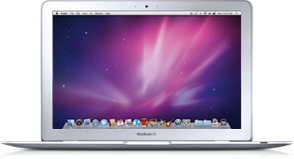
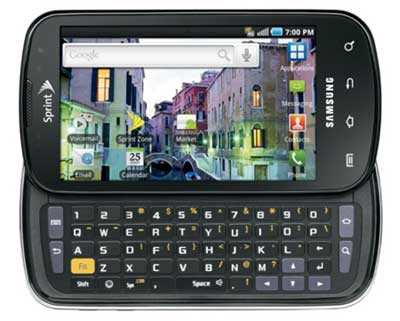
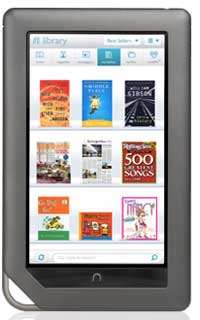
We now expect to have always-on connections to high speed Internet. We expect to have access to all our data in the world from any device, and to be able to find practically any media and play it anywhere. With this backdrop, I'd like to briefly outline the top ten new devices that entered our world in 2010 in hardware, and why they made the list. The order may surprise you. Keep in mind that this reflects my personal experience and preference, and doesn't suggest one is any more "successful" than the rest in terms of sales or market penetration. Sometimes, as an early adopter geek, it makes sense to go a different way.

1) Sonos S5

The addition of the Sonos S5 wireless music system to our home has been transformative. I liked the first demo unit I received, that I purchased it, and later bought two more, when my family and I traded up our living space and finally had room to support excellent sound in every corner of the house. Now, I take it for granted that I can tap into my computer, my iPad, or any of my Android devices and pull down streaming radio, satellite radio, Last.fm or even Spotify.

The Sonos S5 sound and form factor is such a dramatic win that it has been the centerpiece of many gatherings with friends and family who marvel at how great the sound is and how fast I can get almost any song in the world, all managed from a mobile device. The addition of a Wireless Dock to support iPods or iPhones is a big boost too for those living in a world of iTunes.


2) MacBook Air

At the beginning of the year, I shed a few pounds, not from some New Year's Resolution, but from going down from a MacBook Pro to my MacBook Air. The Air is speedy, light and is the first step at moving to the cloud, almost by necessity, thanks to its 128 GB SSD disk, about half what the Pro offered. While the Air was a 2009 model, and is already out of date compared to the newest offerings from Cupertino, it is running great and goes everywhere with me.

3) Samsung Galaxy Tab

Regardless of Steve Jobs' comments, the 7 inch tablet form factor is impressive. I haven't fully written up my experience with the Galaxy Tab yet, but it brings the best of the world of Android in a design that fits simply in one hand - perfect for e-mail, photography, surfing the Web, Facebook, or reading books. It starts on the fly with full access to the Android Market, and actually fits in your jeans pocket, or inside jacket pocket. The device is actually very fast as well. It is inevitable to be compared to the iPad, which came first, and some may find it crazy to choose the Galaxy Tab over the iPad, but I've never really warmed up to the iPad, which is used much more by my kids than me. With the Air and Galaxy Tab, the iPad is essentially the odd one out.

4) Apple iPad

The iPad is going to be #1 on many different lists this year, from sales to innovation. For years, Apple was rumored to be working on a tablet device, and in 2010, it finally came, to tremendous success, just as the iMac and iPod and iPhone before it had. It replicated the iPod experience in a much larger screen, and is the go-to device for my toddlers. The sheer weight and bulk of the device made it less of a fit for me, especially when squeezed by the MacBook Air, but I'd be naive in saying the iPad didn't break open the market for tablets in a big way.


5) Samsung Epic 4G

Having caught the Android bug, and finally having found a phone network (Sprint) that didn't drop every other call (I'm looking at you, AT&T), I was excited by the great number of solid reviews of the Epic 4G, and its inclusion of a full-featured keyboard. The device runs all my Android apps, connects to all my email services in the cloud, takes great video and photos, and yes, lets me type very quickly when answering longer emails or chat sessions. The biggest major drawback I have with the Epic is its poor GPS support, which art times can be debilitating. Regardless of this, I am quite happy with the Epic.

6) Barnes and Noble NOOKColor

I recently wrote up my experience with the NOOKColor, which delivers a nice slim 7-inch Android tablet masquerading as an eReader. It's got smart integration with Barnes and Noble's book supermarket, and syncs with the NOOK app, so I can begin reading a book on one device and pick it up on a second. Added support to transfer my own music and rich media files via USB make it smarter than a dumb eReader and getting to the Web is a few clicks away. While it doesn't come with full Android Market, it has proven extensible, so I would watch this space closely.

7) Google Chrome CR-48 Notebook

Reviewing or ranking my experience with this 2010 device isn't really fair. Turns out I got it today. I have high expectations with the direction Google is taking with the ChromeOS and making our lives more cloud-centric. It's a big reason I started migrating to the Air in the first place at the beginning of the year. My initial impressions are as expected, with tight integration to the Chrome browser (essentially the full experience), a great thin frame and nice keyboard. The trackpad, pilloried by others, still needs some work. Putting a beta product on a pedestal against established innovative leaders like the MacBook Air is not fair, but I would bet that a mix of ChromeOS and Android features will lead to some interesting product pushes in 2011 and 2012 from these teams.

8) HTC Evo 4G

The Evo 4G I picked up at Google I/O this Spring was my first dive into the world of Android, and the way it performed against my aging iPhone 3G was remarkable - giving fast performance and real multitasking in a place I had never expected. The Evo's GPS and access to the Android Market made it very solid, and put me on a strong phone network for voice for the first time in years. The drawbacks to the Evo, including bulk and low battery life, mixed with the lack of a hardware keyboard had me switching to the Epic with no hard feelings.

9) Apple TV (2010 Edition)

Established Apple TV owners since the first 40 GB generation, the long-awaited development of the new Apple TV was well anticipated, and landed with a mixed experience. The machine is incredibly small and fast access to Netflix or streamed videos and TV is great, but the greatly reduced library was a disappointment. Truth be told, the best Netflix access in our home is actually with our Nintendo Wii, so the Apple TV only really gets use when we want a movie in the evening.

10) TyPad for iPad

With the launch of the iPad came the launch of iPad accessories. One of the more useful for me was the TyPad, which combined an elegant looking iPad case with a full-fledged bluetooth keyboard. If you're one to type out full e-mails on the iPad, the TyPad is very cool. The only downside is that once I had a keyboard, I found myself also reaching for a mouse or trackpad. Old habits die hard.

Christmas also brought a second NOOKColor into our home as I bought one for my wife, so now we have two iPads, two NOOKColor devices, and one Samsung Galaxy Tab, so we have 5 tablets to go with our three laptops (counting the CR-48). I am curious to see if 2011 will be as strong. But if you haven't checked out the Sonos S5, Galaxy Tab or are in the market for a new laptop, try out the Air or CR-48. Great stuff this year.

December 22, 2010

Ex-Googlers Launch Beluga for Mobile Group Chat

Ex-Googlers Launch Beluga for Mobile Group Chat

Simple social apps, from photo sharing to intimate networks, to group texting services are gaining in momentum with the success of TextPlus, GroupMe, Path, Instagram and others. A new entrant to the scene is a company called Beluga, not to be confused with the Fail Whale, headed up by a small team of 3 ex-Googlers who hold pedigrees from Google AdSense, Google AdWords and Gmail. The slick product has dedicated applications for both Android and iPhone platforms, and chat archives are accessible through the company's Web site as well.

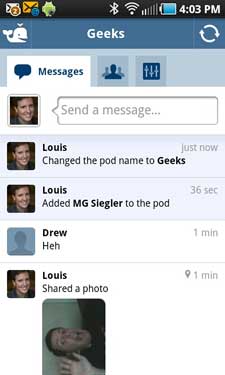
Diving into the trend of more intimate social networking, where you can share with a small group of people instead of broadcasting to an unfiltered list of friends on Facebook and Twitter, Beluga asks you to create "Pods", like groups, of people, and you can send text messages, complete with photos and embedded emoticons, to those in the Pod. The service helpfully taps into your phone Address Book so you don't have to remember everybody's number, and it lets you connect with Facebook to find friends who may already be in Beluga as well.


Beluga Pods and Conversations, With Photos


As one tech friend suggested (within Beluga), the service is actually a lot like Brizzly's Picnics feature, but mobile. I quickly found myself sharing photos of my kids to both my wife and my mom within the app, and setting up separate lists for Geeks or other contacts.


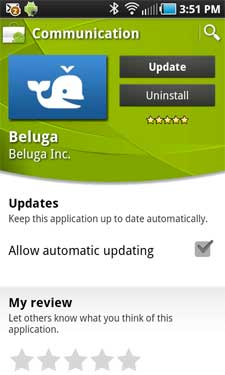
Beluga On the Android Market and One Photo In Line


Behind the app are a trio of former Google employees, including Ben Davenport, Co-founder and CEO, who sports Google AdSense on his resume, Lucy Zhang, Co-founder and President, who helped design AdWords, News and Docs while at Google, and Jonathan Perlow, also a co-founder, and CTO, who was a senior staff engineer at Google, with responsibility as the tech lead of the Gmail front-end team. He also lists Gmail Chat and Mail Goggles among his successes.

The Web View of Beluga Pods In Action

Beluga's approach asks you to "Start a Conversation". Add a person by name, email or phone number, and keep adding until you have the right folks. Then you can start sharing. On Android, the app leverages your existing photo gallery or prompts you to take new photos if you like.

For recipients who are not yet Beluga members, texts come from a 703 area code number, and include texts from both the initiator of the conversation and all respondents. If you have Beluga installed, new updates can come as notifications within the app, and don't live in your central messages folder.

textPlus has forged the way in this market with innovative pieces, including Communities, and photos, both items Beluga has from day one. You can find Beluga on the iTunes store or in the Android Market. If we're already connected on Facebook, you'll find me in your Beluga as well.

As for the name? No fail whales yet that I can see. So that can't be the reason.

December 20, 2010

Don't Fear Being Fireballed or Slashdotted if on Blogger

Don't Fear Being Fireballed or Slashdotted if on Blogger

It can be difficult to plan for an unanticipated spike in Web traffic. One of the most amusing parts of reading Macolyte John Gruber's Daring Fireball blog is the near certainty that at least once per day, one of the poor saps he links to goes down due to the resulting crush of curious onlookers. It happens so frequently that it's practically second nature to see him update a post saying the link has been "Fireballed", opting instead to point to Google's cache of the original. This phenomenon, of course, is not a Gruber exclusive. For years, otherwise innocent bloggers have been Slashdotted, TechCrunched or even Scobleized, seeing their sites crack under pressure. But from what I can tell, if you're hosted on Blogger, this isn't an issue at all. The company was just recognized for perfect uptime during a survey by Royal Pingdom, and I've seen my own site spike in traffic following controversial posts with no ill effects.

Blogger was not always known for a stellar uptime record. In late 2006, the service practically had to write "a novel" about continued outages. In fall of 2007, I railed against Google for ignoring users during another major outage. But services mature and times change.

Royal Pingdom's Downtime Report. Blogger Scores a Zero.

With the backdrop of Tumblr's highly-publicized downtime of more than a day earlier this month, Royal Pingdom also spotted occasional outages at WordPress, TypePad and Posterous, each of whom looked great compared to Tumblr's unfortunate blip, but not as spotless as the often overlooked Blogger.

Getting Slashdot, Scoble and Spiegel Bumps Simultaneously


While escaping system-wide downtime is a major win in itself, that doesn't speak to the services' ability to scale under pressure. Gruber recommends the WP Super Cache Plugin for WordPress, letting users serve more than a page a second, as it's self-hosted WordPress blogs that often get crushed with one of his links. But I've been linked from Daring Fireball a few times and lived to tell the tale. Same for Slashdot, Techmeme, Hacker News and the Huffington Post, all of which are capable of sending solid and sustained traffic on good days.

Techmeme, Hacker News and Scoble Don't Bring Down Blog

Similar to how Google is well known for its Web site never going down, I have to assume Blogger has mastered Google's distributed architecture, and makes no single blog, or its hotspotting, an instrument for failure. This blog didn't slow or go down when tens of thousands of visitors dropped by this July to tell me I was an idiot for switching from iPhone to Android. It also didn't go down when I questioned the usefulness of Google Wave last year, or when the Huffington Post liked my recap of David Kirkpatrick's Facebook Effect.

Not Even Daring Fireball Could Take the Blog Down

Even the largest services have occasional downtime. Facebook was down last week, intentionally, due to a code push ahead of schedule. Twitter has had its share of bumps, though the site has gotten much better in the last year, and even Facebook subsidiary FriendFeed went down this weekend. But Blogger users are sitting pretty knowing their blogs are going to be up and responsive, even under pressure.

December 19, 2010

NOOKColor Combines Specialization, Potential & Android

NOOKColor Combines Specialization, Potential & Android

In a world full of multi-purpose gadgets which ping, beep and blink at you to signal more messages coming your way to demand your attention, there's something remarkably comforting about a device like Barnes & Noble's NOOKColor, which is designed not to distract you with many things at once, but instead, to bring a powerful reading experience. I've been using the NOOKColor as my primary reading device for the last month, and it's easy to see what the product does very well. The availability of instant access to popular titles on demand, color magazines and newspapers, included apps and simple access to the Web if you want to take a break between books has made the NOOKColor an easy add to our house. I am reading more, and saving money as well as bookshelf space by going fully electronic.

Electronic book readers are not new, of course. Amazon's Kindle epitomizes the market, while the NOOKColor is B&N's second go at it, after their first generation black and white device claimed 20% share. The iPad has its iBooks application, and Sony is still somewhere out there with its eReader. But the NOOKColor hits a very interesting middle point of being impressively designed for reading, while building on extras in the background that actually make the device have incredible potential - including apps from their specialized market, and a real Web browser that can tackle even the oddest of page layouts, thanks to its Android core.


My NOOKColor Library, Reading the Big Short


I've long been interested in an electronic book reader device, but none of the Kindle's iterations have been appealing to me - looking like a 1980s throwback with 1950s TVs' color options. The iPad's iBooks application is nice, but the device honestly seems too heavy and cumbersome for long periods of reading. In contrast, the NOOKColor's reading space is about the size of one paperback's page, and is easily held with one hand, flipping pages with the other.

While it can be tempting for Android fans to beg the NOOKColor to add the full Android market and essentially become a low-priced 7-inch tablet, its focus on access to new reading material and having a versatile reading experience define the product. B&N's expertise is in its cultivated lists and access to titles, along with offering WiFi access in every store, along with the ability to preview any book while on their network, just as you could thumb through any book in any retail store. A nice twist.

Browsing Twitter.com On the NOOKColor

One of the reasons I was intrigued by the NOOKColor was its promise to bring interactive children's books that could be read aloud by professionals, and not tired dads. Sure enough, those titles are widely available, with all the bright color imagery in most youth titles these days. But for my age, I was more than happy to pick up the latest Stephen King and John Grisham novels, finally get access to The Big Short by Michael Lewis and yes, even read Decision Points by our 43rd president - something I had no dream of doing in hardcover. Using a fun feature, I was able to post that I'd finished the book to Twitter. You can even post your status mid-way through the book if you want to keep social connections updated.

You wouldn't even know you were running Android 99% of the time you use the device. The home button displays your purchased items, and a second click brings up options for the B&N store, your library, and more. Where Android kicks in are "Extras", which includes some apps, like Pandora and Chess, and "Web". While you're probably not going to make the NOOKColor your primary Web surfing device, it's great to have in the background if you absolutely must check a few news sites, blogs, or even Twitter. As the Market offerings expand with the NOOKColor's growth, I would expect the app experience to play a larger role, of course.

In contrast to my experience with my Android phones (the HTC Evo and the Samsung Epic 4G), battery on the NOOKColor is fantastic. I haven't had it go head to head with the iPad or the Samsung Galaxy Tab, but all three tablets can go days without a charge, and see several hours of use without decrease.

The NOOKColor can also be connected to a laptop via MicroUSB, to transfer files, charge, or pass over screenshots. I pulled MP3 files from my laptop to the NOOKColor and can listen to music in the background as I read, or I can take pictures of my kids and make them the device's wallpaper. This makes it much more like a simple Android tablet than a simple reader.

I Can Update Social Services With my Reading Status

The NOOKColor is only $249, which is lower than the Galaxy Tab or iPad, and comes with integrated WiFi, but not 3G. The low price is enticing, and actually plays into the same strategy of Apple's iPod, with the device leading to more software sales. I am now buying books for $10 again, when I had pretty much walked away from long-form reading off the Web. You can even buy editions of the Wall Street Journal for a buck, if you like. The device's form factor is sturdy and comfortable and is playing a major role in our home's gadget hierarchy.

You can find out more at Barnes & Noble's NOOKColor site. Sales have been fast and furious, so it's probably too late to pick one up for Christmas, but it should be on your personal list, even if you're not gifting it to someone. It's the best reading device in our house, and it's got a Web browser to boot.

December 17, 2010

Delicious' Decline Already Evident In Traffic, Sharing Trends

Delicious' Decline Already Evident In Traffic, Sharing Trends

The age-old guidance of buying low and selling high has appeared to escape the halls of Yahoo!. If we ignore the Microsoft and Yahoo! acquisition dance of 2008, which ended up in Yahoo!'s staying independent, but losing dramatic market capitalization, search market share, and accelerating an employee exodus, both voluntary and involuntary, it's still clear the company intends to wring all the remaining value out of its vestigial pieces before selling - effectively promising low to no returns on every deal.

Yesterday's news leaked that Yahoo! had plans to kill or spin off a number of Web services, including Delicious, Alta Vista, MyBlogLog and others. Given the abandonment and mismanagement of these properties, this is not too surprising.


Alta Vista's mismanagement goes back more than a decade. In 1999, I wrote a story (this is pre-blog, so I'd love to say "post") on Internet Valley's Web site about how Compaq was not leveraging Alta Vista after they acquired Digital Equipment Corp. (See: Warning: Compaq is On the WWWarpath) The site is a shell of its former self, once being my go-to search site.

But Delicious is what has everyone up in arms, as the company was among the first Web 2.0 darlings, and is still widely used, as the Web's definitive bookmarking site. I've personally tagged more than 3,000 items in the last few years, most of them capturing external links to the blog. Yahoo! has managed to take a site with a deep bench of fans, considerable use, and make it obvious they would love to give it away. It's not even clear if anybody really works on it any more, or if it's just being maintained by the company's techies.

Compete.com Shows Traffic Freefall at Delicious

On this background, both Web traffic stats and sharing statistics from third party sites show the party long since ended at Delicious. Compete, whose traffic graphs are anything if not suspect, still manages to display some trendlines right, showing a decrease in traffic of nearly one half in the last year. In parallel, AddThis, the social sharing site, shows decreased Delicious bookmarking, down by 14% in the last three months, the fastest declining site of its kind on the service.

AddThis Displays Delicious Dive To the Bottom of the Bookmarking Pile

The moves Delicious has made have been odd or delayed. The long-awaited "New Delicious" was way behind schedule, and recent bumps made sharing to external services even more difficult. It's as if the company wanted to punish the users it had left.

If you want to get a fantastic return on a sale, the best time to sell is when you don't have to, when things are going fantastic and you have real momentum. Yahoo! has essentially telegraphed to the world that it wants to ditch Delicious to someone, anyone. But the catch is, its users already started ditching it themselves. Buy high, kill.... sell. That's the wrong order of things, Yahoo!.

Google's Blogger Introduces Mobile Templates In Beta

Google's Blogger Introduces Mobile Templates In Beta

In the seemingly never-ending battle between Google's Blogger and Wordpress for the supreme full-featured blogging platform, Wordpress has long had a big lead in terms of presenting a high quality experience on mobile devices. While Blogger simply laid out the site's standard layout on your small screen, expecting you to pinch to zoom or read extremely tiny text, WordPress blog owners could smugly serve up simplified versions of their blog for readers on the go. Today, that gap is gone, as Blogger has introduced, in beta, the first mobile templates for the platform, which are drop dead simple to start using immediately.

Available in the Blogger In Draft version of the platform, users are prompted to "make your blog look great" on mobile devices. If you choose to optimize your feed for mobile, instead of showing the standard layout, simply turn them on and click "Yes." A handy QR code sits next to the decision if you would like to preview just how your site now looks on the mobile platform.

You Can Now Optimize Blogger for Mobile Devices

Just Click Yes, and You're Optimized. That's It!

As you can assume, with millions and millions of Android and iPhone devices out there, as well as scads of feature phones, mobile browsing of the Web is becoming an increasingly important and relevant part of a publisher's experience, so there is tremendous value to optimizing for the small screens as well as the big ones, and now Blogger users, myself included, are no longer on the outside looking in.


The Blogger Experience On Mobile Devices


Once enabled, visiting the blog URL lays out the recent stories in a simple vertical stack, where clicking the right arrow opens up a single post in the mobile view. At the footer of each post, you see applied labels, with the option to return "Home" to the main screen or go to an "Older Post". And should the reader prefer, they can click "View Web version" to see the original.

A Common Question to Non-Optimized Blogger Users

This update, much anticipated, much awaited, is absolutely welcome. Now I won't get grumpy users asking why I haven't optimized my site for mobile instead of RSS.

December 16, 2010

OneTrueFan Adds Personalized Hot News From Your Friends

OneTrueFan Adds Personalized Hot News From Your Friends

OneTrueFan is looking to be more than a badge-creating Web surfer tracking toolbar gimmick. The site, already extremely compelling to me due to the ability to discover new networks and stories from my social connections on Twitter, is adding an intriguing feature today that essentially brings each user their own Hacker News-like top stories summary, pulling from shared pages by one's friends in the network. The concept, a social newspaper, is one used by other sites including Paper.li, but in this case, taps into the power of the toolbar which follows registered users around the Web, and surfaces the most shared stuff in an effort to be sure you don't miss a thing.

Quietly launched at the end of last week and being publicly unveiled today, OneTrueFan has added a "Your Hot News" tab to every user's profile, showing items that are popping throughout your network of connections. Interestingly, not only do the items display the avatars of the people who distributed the shares in their network, but it gives each avatar a weight, as evidenced by size, to show how much downstream impact the sharer had. The bigger, the better.

The Hot News Story On My OneTrueFan Page

OneTrueFan gives site users 'points' for sharing items to Twitter and Facebook, and tracks the number of clickthroughs to their URL shortner, otf.me. One recent share I made of Micah Baldwin's "It All Changes When the Founder Drives a Porsche" article gained more than 1,000 clickthroughs, passing the points to me and making me the OneTrueFan of Micah's blog - which I was already, but now is confirmed by irrefutable science. This clickthrough data contributes to the Hot News section, but in the event other URL shorteners are used, ones Twitter reach comes into play.

Another Top Story Shared By Many Folks In My OneTrueFan Stream

In the days I've tracked my Hot News on OneTrueFan, I've found it to accurately find top stories of the day that are frequently shared. It's not personalized based on my interests, but does a solid job of becoming a more personal Techmeme or Hacker News. Of course, seeing just who shared an article gives me more data to choose whether I want to engage in the item as well.

Like Blippy, I believe OneTrueFan's full potential has yet to be discovered. If I look at what the team is developing, essentially it is a horizontal social network that you can take from site to site with you around the Web, without requiring a centralized login. In fact, you just log in with your Twitter account. I believe in the model of sharing and discovery, and Hot News will make OneTrueFan (or OTF) an even bigger player as a destination site. If you're not on OneTrueFan already, you haven't been listening to me and should go register now.

Gawker's Password Compromise Has Significant Aftershocks

Gawker's Password Compromise Has Significant Aftershocks


Gawker Media's security breach, exposing user e-mails and passwords for the network's many sites, is a mess. Not only were users' accounts uncovered, but the full database was later posted to the Web for anyone to dive through, for better or for worse, gaining the ability to find out affected users who had been exposed. Assuming that users often adopt the same password across multiple Web services, it is a safe guess many folks are on the list whose accounts elsewhere are now at risk.

It just so happens my e-mail address was included in this breach.

Using a public hashtable lookup and decoder, I found that my [email protected] e-mail address, and its corresponding Gawker password, was exposed in the attack. Not a good thing. But the good news is that after the late summer's issues of dealing with a fraudster, and changing all my passwords in many places, I'd already protected myself against this particular password escaping.

LinkedIn Forced a Password Reboot

But my work seems to have been in vain in some respects. First, my LinkedIn account was disabled. It turns out in a proactive move, the company forced all users who had accounts that matched the unveiled e-mail addresses to redo their passwords. In parallel, my Mac.com e-mail, used on Gawker, was disabled by Apple. This story hasn't been revealed in the press, so far as I have seen, and it's quite possible Apple similarly proactively disabled accounts named in Gawker's documents.

Apple Reset My Password As Well, Even Though it Was New

So, once again, I found myself changing my password on my main account with Apple, after proving through a set of online hoops that I was actually me. And again, for the second time in a few months, I am reconsidering my password strategy, and wondering if the time has really come to use services like OpenID and OAuth to avoid the obvious problem of creating unique IDs for every site.

I have no clue how many times I've left comments on Gawker sites. I'd bet it's less than five times. And in exchange for this small number of posts, my LinkedIn account and my MobileMe account are sporting new passwords, while I think in my head of other places the old password may still be alive, susceptible to open hackers who want to take over my digital IDs.

From the tech coverage of the breach I have seen, it looks like Gawker got sloppy and they paid for it. More specifically, all of us impacted have paid for it with greater levels of annoyance and needing to reconsider how we approach our online permissions. I've given my user name and password pairs out to so many sites by this point, it's practically guaranteed the bad data is out there somewhere, on servers owned by companies much less aware and proactive than LinkedIn and Apple.

Gawker screwed up and it's a very major, visible mistake which can't happen too often before site users start to turn a blind eye to registrations, and move on to alternatives. If I can't sign in with my Google or Twitter ID at this point, I don't think I want to add yet another ID that may just fall victim to smarter hackers in the future.

Flipboard CEO Mike McCue (@mmccue) Has An Amazing Day

Flipboard CEO Mike McCue (@mmccue) Has An Amazing Day

One would think that being named to the board of directors of one of the hottest private companies on the Web on the same day they announced a raise of a rumored $200 million would be an incredible achievement in itself. But if this announcement was simply the first part of a 1-2 punch, followed by a major update to the company's signature award-winning application, that's quite a day. That's how Wednesday looked for Flipboard CEO Mike McCue, who ends the day as one of the two newest members on Twitter's Board of Directors, as well as the owner of an increasingly fun to use iPad app that pulls in content from your social streams and RSS subscriptions in an extremely appealing way.

When Flipboard debuted in July of this year, the application brought an immersive magazine-like approach to consuming Facebook and Twitter streams on the iPad. The simplicity and beauty of the app has spawned many competitors to try and bring the look and feel of Flipboard to their apps. New startups emerged calling their products "Flipboard-like" and others were referred to by press as "Flipboard killers". Of course, usually when someone says you're going to be killed, you're actually doing quite well. Such is the case for Flipboard.

Flipboard Adds Google Reader and Flickr

I had the opportunity to sit in a session beside Mike at the Newsfoo conference in Phoenix two weeks ago, and he clearly explained the casual nature of many of the app's users, who flip pages and enjoy the content served up by their friends. While many apps (including my6sense) are aiming for a "less is more" strategy, he relayed that in fact, for this particular experience, "more is more", as users pushed for the addition of Twitter list support and new services. Tonight's addition saw the pull of new services that should impact adoption even more - including that of Google Reader (my personal favorite) and Flickr.

My Google Reader In Flipboard

Now, instead of quirky work-arounds (apologies to Rick Klau) to get to one's feeds, you can add Google Reader and Flickr to Flipboard, making the product more of a great-looking aggregator (albeit service by service one at a time). The application also delivered a much-requested feature to share items out to social networks, alongside a custom URL, making it a more compelling experience.

Links from My Facebook News Feed in Flipboard

Robert Scoble, arguably the loudest evangelist for Flipboard since its launch, says tonight's introduction isn't the one he is waiting for, as he continues to look for intelligence in the app, promised from the company's acquisition of Ellerdale. Obviously, I am eager to see that develop also, but for those folks looking to put their feet up and consume their feeds in a nice way, the addition of these new services is welcome.

As for Mike, that's a pretty good Wednesday. Being named to the board of directors for Twitter and launching a new version of the app isn't half bad. It's pretty close to the 1-2 punch I pulled off with announcing the VP of Marketing role at my6sense on August 23rd and Braden being born on August 24th. But I can see how Flipboard is Mike's baby. What's planned for Thursday? (You can download Flipboard from iTunes here)

Disclosure: I am VP of Marketing for my6sense, which theoretically can be seen as competition for some aspects of Flipboard and Ellerdale.

December 15, 2010

Online Phone Number Revelation Prompts Calls, Texts

Online Phone Number Revelation Prompts Calls, Texts

One of the more amusing byproducts of CNN's article Monday around what they called the "End of Privacy" was that by the author's listing my phone number in the article and prompting readers to "Give him a ring", many people actually did. Lots of people. Starting early morning Monday, and continuing throughout the day and yesterday, I got phone calls and text messages every few minutes. Many people were incredulous that the phone number in the story belonged to a real person who might pick up the phone, while others warned me that I had been listed on the site - fearing I had been the target of an overzealous reporter out to reveal my dirty laundry without my explicitly granted permissions.

While I have had a full meeting schedule this week, and couldn't pick up the phone to talk with every stranger, I did answer every random text message, and listened to the dozens of voice mails I received from all over the country. You'd think most of America had never seen anybody be so brazen as to make themselves easily available to contact. The episode was fun, and further exhibits the bubble that some of us trying to push the envelope of transparency are in when many others continue being extremely cautious.


Monday Morning Had My Phone Ringing Off the Hook


Many of the calls I got were from numbers listed as "Restricted", where Caller ID was no help. Often, when I answered, people hung up, not sure what to do when a real voice picked up, as they hadn't gotten that far ahead in their mind when they dialed. I had quick debates with people who thought I was crazy, and in many other cases, reassured them that CNN had done nothing wrong, simply aggregating content I (or my wife) had previously chosen to make public.


People Felt Compelled To Text Me, Curious


Of all the things in the article, from my kids' information to our filtered purchasing history and other personal details, it was the openness of the phone number that had people thinking I was insane. Early texts warned my that CNN had posted my data, and suggested I change my number. Others wanted to let me know, in the event I hadn't already found out. Some people just wanted to send a text and get a response. But when I tried to explain that putting a phone number on the Web wasn't all that different from having one's personal number in the local yellow pages, it didn't always compute - even after years of having my number publicly posted on my blog, in my e-mail signature, and even in the footer of my RSS feed, so anybody can call for any reason they like.


I Was Warned My Phone Number Was Online


Despite the number being so visible for the better part of five years, it's never really been an issue. Being easily accessible has made it simpler for PR people or company execs to reach out on announcements, or for peers to use me as a sounding board. But with very few exceptions, the choice to be available has been extremely beneficial. (See from Monday: Solving Privacy On the Web: Be Smart, Not Scared)

Not everyone understands this yet, clearly. So when CNN put the number online and said "give him a ring", the combination gave people a level of curiosity that needed to be satiated. Could somebody (me) really be this dumb? Of course. Happy to play the role of the fool if for no other reason than to help people think more about how they approach the big world of the Web.

For more background, you can be sure CNN did not have any intentions to make my life difficult in their story. I participated and provided the reporter with the appropriate links to help flesh out his story. He even did me a favor to clear the opening paragraphs to confirm my approval, and I think the discussion is a great one, even if there are clearly opposing views.

And yes, in case you're curious, I put the phone on vibrate overnight the last few days so my kids didn't wake up. It seemed like a good idea.

December 13, 2010

Solving Privacy On the Web: Be Smart, Not Scared

Solving Privacy On the Web: Be Smart, Not Scared

When it comes to the amount of data I share about myself and my family on the Web, there's little question that I am at the odd end of the bell curve. It's not a secret what my family structure looks like. My kids' real names are out there to be discovered, as is my birthday, hometown, religion, political preference and much more. You can see real photos of me and my family if you search hard enough, and videos too.

I use Foursquare to share location data. I use Blippy to share purchase history, and I even use OneTrueFan to make my Web visits public. This hasn't been done with a reckless approach to privacy where I have thrown caution to the wind, but instead, has been more calculated. I believe the major trends on the Web encourage sharing, and if I can be the one sharing and not reacting, I am ahead of the game.

See CNN: The Internet and the 'End of Privacy' for their insight into my sharing behavior.

Some would look at what I choose to share and could suggest I feel that privacy is "dead". I don't believe this at all. What I do believe, however, is that intelligent sharing and knowledge of where personal data is distributed can bring value. Rather than take a more conservative approach, locking down what in other generations would be secret, I've opted to own what is shared, and to operate my life as if what I was not sharing explicitly would not be a disaster if it eventually were to be surfaced.

One needs to look no further than Facebook, the world's dominant social network, to see how the company's approach to privacy has changed in the last few years. Once a stalwart site prized for how it protected your content from prying eyes, more content has become public in practically each update. While some have suggested the best solution is to lock down one's profile, I have instead assumed the content will eventually become public and discoverable, shared to advertisers. This was one reason I downloaded an archive and self-hosted it, making the full copy available myself. (See: http://www.louisgray.com/facebook/)

But even with my level of publicness comes limits. I don't think it makes sense to chronicle the minutiae of my day through status updates. I don't muddy my main broadcast channels with location details, shopping updates or entertainment. I don't air embarrassing scenes with my wife or my kids. I don't post content of them that would be unflattering. And I try not to bore people with inane blather.

For me, the major reason I don't share some things is not because I am frightened my content will be used against me. After all, it took a simple e-mail account hack to get me fighting back on that front earlier this summer, and it wasn't tracked to my use of any of these sites. The major reason I don't overshare is because I believe it wouldn't add value and it would be boring to all who saw it.

In a conversation I recently had with a reporter from CNN.com, he asked if there were parts of my life I would be reticent to share if my transparency were further peeled back. The answer was essentially no. The trick is to live your life in a way that if your employer or future spouse were checking in on you, you would have nothing to fear. This doesn't mean you can't have a good time, but you should assume a consequence if your actions were to become public. Manage yourself well and what's discovered shouldn't turn an eye.

We live in a world with many imperfect people, and some really bad ones. That's no question. But I don't think being afraid to share and reducing the amount of personally identifiable information is the right approach. It makes more sense to assume the world is full of great people, cultivate the ones where this is known, and to be smart about what you share, and where you do. Watch the big networks to see if you think they are taking liberties with your data and prepare for the eventuality if they do.

December 11, 2010

Facebook's Friend Finder: The Largest People Database?

Facebook's Friend Finder: The Largest People Database?

While most of the press around Facebook's recent enhancements centered on the emergence of new profiles, the world's default social network has recently rolled out a number of other changes that make the site further revealing in terms of what you share, and more interesting, let you tap into the nearly 600 million people on the site to find new connections. The new friend finder, which encourages you to find new people in your hometown, school, employer or more, even lets you tap one degree away and find friends of friends. The result is a rich people discovery database that makes friending more likely thanks to shared connections.

What has made Facebook compelling ahead of practically every other social network out there in the last decade is the focus on real personal identities, connections to a shared history and experience. As the network starts to surface more relevant and popular content in the news feed and gets to know what you like in a more personal way, this will no doubt continue. Thus it was no surprise to see Facebook CTO Bret Taylor (formerly FriendFeed's CEO) say "Facebook is completely personalized. Every time you visit, you get a unique personal experience." in a recent interview with Forbes.

Facebook Says to Find Friends from Your Life

Key to making the site more personal is getting more and more information about you into the network, which makes their guess about what interests you and what you might find as interesting advertising more accurate. One aspect to getting to know you better and keeping you immersed in the site is more connections, both in quality and quantity.

The new Facebook "Find Friends" Browser suggests you should "Find friends from different parts of your life", prompting you not only to follow the recommended folks they serve up with rich profile photos and mutual friend counts, but also to search based on Hometown, Current City, High School, College, Employer, and most interestingly to me, to Mutual Friends. So you could essentially walk down a mutual friend's list of connections. The more mutual friends the suggestion would have, the more likely they are to be a friend of yours, or so it would seem.

Facebook Recommended Friends Due to Mutual Connections

While this is valuable, it also hints this is an incredible tip of the iceberg. You could already select multiple attributes, for example finding "Mutual friends of Jesse Stay" and selecting "Sunnyvale, CA". I found two folks in that search, and 24 who named their hometown as San Francisco, and were "Mutual friends of Rick Klau". Extend this to what you like, and that's a clear next step. Friends of yours in Sunnyvale who like The Smiths? Go. Friends of yours in Denver who like Twitter? Go.

There's no real equivalent of this massive database on the Web. There are good friend recommendation services from Twitter and Google Buzz, of course, but Facebook has all the names, and the metadata of each individual connection means this little improvement could go a long way. As Facebook surfaces more and more public information from what was once previously private, imagine the world's personal database searchable. There's no longer the six degrees of Kevin Bacon at work here. Just one starting point. Browse your friends here: http://www.facebook.com/find-friends/browser/

Not On Google's Chrome Netbook List? There's Always eBay.

Not On Google's Chrome Netbook List? There's Always eBay.

Even for Google, this week was a big one in terms of announcements. In the first two days, the company unveiled its new Nexus S smartphone, running Android 2.3 (Gingerbread), powered by Samsung, and also introduced the new Chrome OS, running on custom Google hardware, along with the much awaited Chrome Web app store.

Interestingly, the distribution of the CR-48 netbooks looks to be limited to about 60,000 units to the bleeding edge early adopters who don't mind things being a little wonky. Unsurprisingly, one of the devices is already on eBay, sporting a price tag of nearly $600.

One more exclamation point, and I'll bid $1,000.

You can't log into an RSS reader or view your Tweet stream without bumping into a tech blogger or influencer who was in Google's good graces and managed to get early access to the first deployment of Google's Web-centric OS with the Chrome Web browser at its core. Shortly after the announcement, many more said they had received e-mail notification they would be soon getting one, and other fans flooded the company's pilot program to fill out a form claiming why they would be worthy to act as a willing beta tester for the Mountain View giant.

The CR-48 Lacks Stickers and Branding. It's Stealthy.

Given the demand and intrigue in the CR-48, it's no surprise those on the outside looking in would want to find a surefire way to try out the netbook, without crossing their fingers and waiting for a blessing from Google proper. On the flip side, it is a little surprising that at least one of those who somehow qualified as a trusted tester is instead trying out the gray market to make a buck.

A few hours into the five day auction, the first two bids have pushed the price up to $560, with $50 shipping in the US. This compares to the price for a new 14-inch Dell Inspiron with 4 GB RAM, a 500 GB Hard Drive, and a 2.4 GHz Intel chip, running Windows 7 Home, on Amazon, retailing for just about $600. There's obviously a premium for getting something first, even if you are getting a netbook with no local storage and an unproven OS.

If you aren't worried about the price and just want to get yourself a new CR-48, take out your credit card and head to eBay. If you think it's a scam, maybe you'll be comforted by the seller's 88 previous sales, and 100% feedback rating. And no, I'm not bidding. I can wait.

December 5, 2010

Android Handset Dreams: Devour, Defy, Be a Magic Legend

Android Handset Dreams: Devour, Defy, Be a Magic Legend

Even if you subscribe to the theory that Apple's operating system and hardware is more sexy than its competitive counterparts, the names for its products in the last decade have become pedantically pedestrian. For the most part, one simply puts the letter i in front of a device. The series of i-Products, from iMac to iBook, iBooks, iPad, iPhone, iPod and iLife has become something of an ongoing joke. Meanwhile, the MacBook portable line was unified under one name, with the word "Power" disappearing from Powerbooks and PowerMacs, dubbed Mac Pros.

In contrast, in what looks to be a fight for attention among an array of devices and carriers, entries for the Android platform are increasingly fanciful, with names that attempt to provide passion and grandeur to the fast-growing mobile operating system.

The first, and most well known, name associated with the Android series is Motorola's Droid. Decidedly masculine, its commercials summoned mechanical assembly line like behavior with harsh lights and noise. Follow-on models to the first Droid didn't just stop with the Droid X and Droid 2, already confusing, but were called "Incredible". It's kind of like McDonald's branding move with the "Big N' Tasty" burger, which implied the rest of its meats were say... less big and less tasty. So what of the Incredible? Would that make the rest of Motorola's line mediocre, or simply, meh? "The Motorola Droid Meh. You kinda want it."

Competitive Android models haven't stopped at Incredible. HTC's models are the stuff of romance novels. The Dream. The Desire. The Hero. The Legend. Magic. Wildfire. I personally use the Epic. And the experience with this phone? I'd say it's very good, but I don't know if Epic is the right word.

Dell, not comfortable with keeping to Fabio covers and steamy paperbacks, instead looked to the sky for inspiration. Their first tablet was called the Streak, and it was accompanied by Android models called Thunder, Smoke and Flash. No doubt Monsoon, Tornado, Hurricane and Tempest are next.

Samsung, not to be left out, started with dramatic tones, Behold and Moment, as in, "Behold! This is the Moment you have been waiting for!" Their Galaxy S series seemed to one-up Dell's look to the sky, and Galaxy became the name for their tablet as well.

One has to wonder if the big saber-rattling when it comes to names is something of overcompensation and shouting to be noticed. Should one extend from Incredible, would Marvelous follow? Fantastic? Awesome? Perfection? Or if you're HTC, do you step deeper into the romance novels and deliver the Lust, Muscle, or Climax?

Lest you think these are simply exceptions to the rule, from the largest manufacturers, look no further than the CSL Spice to see how the manufacturer is trying to heat things up. HTC oddly also had the Tattoo, which probably tries to appeal to your bad boy side. The ZTE Blade continues the rebel appeal. HTC plans the Scorpion, whose sting carries a 4.3" screen a 1.5 GHz CPU and an 8 megapixel camera.

These and many more Android device names can be tracked on Wikipedia, which has a fairly exhaustive list of released and future Android models. It all seems silly to me. Great marketers can find a name that works and stick with it through the line of products, whether it's as pedestrian as the Camry or as nondescript as BMW's 3 and 5-series. IBM had its line of ThinkPads, Nike had its Air. But none of these tried to so clearly titillate its customers.

The oneupmanship in the Android naming sex factor surely has to have an end, and like that topic, one hopes they don't peak too soon, before the real good stuff develops. If sex sells, and Android phones are certainly selling, correlation could be driving causation. I didn't buy my Android because I thought it would make me a hunk. That's beyond saving. I upgraded because I thought it would be useful and productive. So bring on the boring naming conventions. We deserve to be talked to like adults.

Real Valley Stories: My First Interview for My First Job

Real Valley Stories: My First Interview for My First Job

Editor's Note: Very often, I think much of the personal history that used to consume much of blogging is being lost with less personal updates on companies and trends. I am hoping to launch and sustain a regular series called "Real Valley Stories" that discusses my own experiences with work, social and business. This is the first. Your feedback is absolutely appreciated.

My Interview at Internet Valley (October 1998)

A senior at UC Berkeley finishing up my double major in Political Science and Mass Communications (Journalism), I had left the student newspaper for more lucrative greener pastures, not having yet completed my degree. At the time, I didn't know what direction my career would take - though I had some good ideas. I made two versions of the resume, one for being a reporter, which I sent to newsrooms in the Bay Area, and the second, for being a Webmaster of sorts. It being 1998, with the dotcom boom accelerating, that's what gained traction. Soon after I started looking, I landed an interview in Burlingame with a company I had never heard of: Internet Valley (http://netvalley.com/).

The Journey to the Interview

Being a poor college student, I didn't have a car, so I took to the Web and found the best route was to take BART from Berkeley to San Francisco and catch a CalTrain to Burlingame. From there, I figured I would find the address on foot. If I got the job, maybe I could afford the car later, I thought.

My Walk from the Burlingame Caltrain Past Broadway to 577 Airport Blvd.

With the appointment at 4, I took the BART at 1:25 from Berkeley, got to SF around 2, and by 2:30 was on my way to the Burlingame train station. Around 3 pm, I exited, and asked the first passerby I could find where I should go. His ominous answer, "Are you walking or driving?" foretold what would come next. I was to walk up California street, turn on Broadway, walk over Highway 101, turn right and make my way to the building. As I walked and walked, I found myself passing the Broadway Caltrain station, and briskly walk/jogged over the route I had been prescribed. It soon was 3:55, and I found the building, at this point, panting, sweaty and no doubt dusty from my excursion.

The Spartan Startup and the Ugly Web site

Once I entered the building, I looked for Internet Valley and found nothing. But in suite 180, where I was headed, a nondescript door said "Technology Projects". I entered, and found an empty lobby and empty desk. I went further and found two people talking to one another - in Russian. This is who I was to meet.

The interviewer scarcely remembered my resume, so I recapped my work at the student paper, told him of my studies, and explained the process of getting the paper created and online. He seemed impressed with the paper's design, the fact I did it five days a week, and my story of installing a custom search engine with arcane Unix commands through a terminal. But it turned out my design background wasn't to be necessary.

In what in some ways proved to be prophetic, I was told that people in the future would not read full stories online, as they did in print, but that they would skim and scroll, with their attention being caught by bold text and big headlines. The site was ugly. He joked about e-mails he received saying the site looked like it was designed by a 12 year old. But some of what he said had merit. And interestingly, it was my youth and inexperience which attracted me as a candidate to him - with others being set in their ways and preferences.

The Knowledge-Free Negotiation

After we had figured each other out came a new step I hadn't thought much about, and my not being prepared negatively impacted my income for years to come. We had to discuss how many days and hours I could work in Burlingame, and how much I would be paid. But I had no clue. I tried to tease out of him a first figure, but he wouldn't blink. I asked about funding, profitability, investors, and stock options, but it all wasn't very clear. The idea was to put together a working product, find secondary investors, and then go public. Everybody went public. He threw words at me like "stock holdings", "venture capital" and IPO and said I was getting in on the "ground floor", the next level beyond being a cofounder. We could "Go Netscape", he said.

As I hadn't graduated from college yet, and was still at Berkeley, we settled on 20 hours a week in Burlingame and 15 or so at home. But when it came to cash, the only benchmark I had was that the editor in chief at our school paper had made $800 a month, and all I wanted to do was to make more than that. I spat out something stupid like $1,000 a month, not doing the math until later to realize how stupid that was, especially with commuting factored in.

Nothing was signed, and I was told they would get back to me. At one point, they asked "how did you get here?" and when I told them about not having a car, I didn't let on that I got off on the wrong station. Didn't want to sound too dumb, after all.

What Happened Next

As a 1 a.m. email home to my parents that night revealed, I knew I needed a car. The commute was going to be two hours a day otherwise. As I wrote:
"I felt confident about the meeting with both the editor/publisher and the boss, and the company's intent -- to promote the history of Silicon Valley and its companies and media all in one area -- is admirable and something I would be interested in. Even if I were hired and the place went belly-up, it would be good to have on a resume, especially learning all that Windows NT crap. I find out in two days."
Two days later, walking home from school, I got a buzz on my pager - yes, a pager. I called Internet Valley, and was told that I did after all get the job, and that I would be paid more than I had asked for, a massive $1,200 a month. Better yet, I was going to receive a signing bonus, of $2,000, which I could use to buy a car. The idea that I would get a signing bonus, and that my first paycheck would come from a pot of $2,600, was amazing. I said yes, and that's how I got my first job. It's a real Valley story.

December 2, 2010

Follow NFL Football With Game Center on Android

Follow NFL Football With Game Center on Android

Professional sports leagues are warming up quickly to mobile customers who can't be at the game or in front of their TV sets at home. The MLB At Bat application is a top program on iPhones, iPads and Android phones alike, and is so good, I swear I bought it three times - once for each platform. With baseball on hiatus in lieu of NFL contests on the gridiron, leatherheads can get their football fill with the NFL's answer - Game Center. With games being played on Thursday night in addition to Sunday, Sunday Night and Monday night, you could spend a lot of quality time with your favorite phone and favorite team, starting this evening.


Game Center Scores and Current Game Status


Like most sports score oriented applications, the central starting point for Game Center is today's scoreboard, along with the option to see past weeks' results and next weeks' schedule. But live game updates are where the app delivers the most value. You can jump into games being played to grab the game's current situation, view play by play, and relive top plays from the game, including audio.


Play by play and Other Highlights in Game Center


Lest the current game be in timeout or halftime, you can tap over to read headlines and blogs from around the league, view press conference videos, or see high quality photographs from other games - including, yes, cheerleaders, if you're into that.


News and Audio Highlights in Game Center


Like its MLB equivalent, the NFL app is not free, but worth it if you want a single place to catch up with the entire league, or simply want to check in on how your favorite fantasy players are doing. The premium version is $4.99, while the light version is free.

Find the app on AndroidZoom.

RSS Addicts Welcome Google Reader to Android

RSS Addicts Welcome Google Reader to Android

Google Reader has long been the gold standard for feed readers on the desktop. It's been a must-stop destination for me practically every day since 2007. As the world of consumption around the service has changed, with people calling for the death of RSS and mass migration to social services, the product has adapted to more social sharing capabilities, and integration with Buzz, Google's social aggregation service. But until yesterday, Reader was conspicuously absent when it came to the Android Market - pushing RSS addicts (like me) to get their feeds another way, be it through the generic mobile interface Reader offered, through an alternate product, or simply just to wait until getting back to the desktop.

Reader's debut yesterday was absolutely welcome. While many people are saying that Web versions of products should be all you need, consumers have taken strongly to the mobile app mentality best exemplified by the iTunes Store and Android Market. Even if you can get to a site via a mobile client, it's often perceived to be a less fulfilling experience. Reader's new app on Android is the full experience its users were waiting for, and it's a great option for mobile feed consumption - especially if you want to do two things: first, synchronize your read/unread data from mobile to the desktop, and second, share to your Google Reader link blog.

     
My Google Reader Folders and an Item on Android


The app (free, of course) asks you to connect your Google Account, or multiple accounts if you have them, and after a quick synchronization, it pulls in all your unread items. This can be those from feeds you subscribe, or friends' shares that you have added to your list.


Sorting and Sharing in the Google Reader Android App


The Reader app does practically all those things the desktop equivalent does. There's the option to sort by newest, oldest, and by magic. There are also the options to view shares from people you follow, or to explore blogs you might like, based on your other interests. And like the main site, you can star items, like them, add notes, or share them downstream. The app integrates with existing social tools you have on your Android phone, so you can click share out to Seesmic, Gmail, Text Messaging, or whatever you like.


People I Follow and Exploring Google Reader Android


For me, the Reader app icon now occupies a valuable home screen space, next to my6sense and Google Buzz. And if you're curious as to any conflict with Reader and my6sense, just remember that Reader is our only default RSS source in my6sense, and they are a valuable partner, supplying the RSS portion of our aggregation service. The more options people have to get to their information on the mobile is a great thing.

You can find Google Reader in the Android Market, and see their post from yesterday here: The Android Google Reader app is here!

Disclosures: Google Reader is an essential source of content to my6sense, where I am VP of Marketing. In theory, the new app is competitive as well.

OneTrueFan Reaches Second Base With New Site & Badges

OneTrueFan Reaches Second Base With New Site & Badges

My favorite and most useful browser extension in the world is OneTrueFan. The Web history tracker and sharing tool which launched at the end of September has been a must-install for me on any browser that I use (including Safari, Chrome, Firefox and Rockmelt) - letting me gauge my own Web usage history against my peers, share interesting stories to downstream social sites, and in a fun way, discover what sites my friends frequent that I don't, while also learning which sites we have a mutual affinity for. The site just revamped with a major refresh of its offering, helping to quickly surface user statistics, history, fanned sites, and like many services, earned badges.

OneTrueFan's data on my Web browsing history is exhaustive. Just as Blippy tracks my expenditures, and Foursquare tracks my check-ins from place to place, OneTrueFan shows the sites I visit, rewarding me with little alerts saying I've reached the "Level 2" patch on one site, or "earned the Second Base" patch on another. And as my own statistics are increasing, so to is the data on the sites themselves. OneTrueFan's latest Web revamp now clearly displays site leaderboards and activity streams for specific domains (Examples: Twitter and Google).

Three Individuals' OneTrueFan Statistics

While people once acted surprised at tracking people's habits in spending and traveling with the other services, it might seem curious why other friends' Web activity would be of interest to me. But I've been intrigued to see how much other people rely on tech and business publications more than I would have anticipated, or find lesser-known interests, as I find friends who view sports sites, play fantasy football, or share hobbies foreign to me.

One Of My Fanned Sites, Google, With My Stats

As a site owner (see this blog's OTF page), I can now see who else is a fan of the site, having accrued 20 points or more, and who is sharing content from the site. The resulting leaderboard is reminiscent of MyBlogLog, and it should be, as it shares a similar pedigree.

My Pied Piper Patches on OneTrueFan

Like Foursquare, some of the Patches earnable on OneTrueFan are not entirely clear as to their origin, but they will no doubt be in high demand from active users. I've somehow managed 23 "Pied Piper" patches, presumably from leading people back to a site, and 7 "Commitment" patches, which come from visiting a site for 30 consecutive days, or so I'm told. And I've gotten to Second Base with 89 separate domains. Cool, I think.

If you're not using OneTrueFan, I recommend in the strongest terms that you do. And if you're worried about privacy, just remember you can hide any activity you want at any time. Besides, there's always Incognito Mode. Find the new OneTrueFan at http://www.onetruefan.com.