Showing posts with label Blogger (36 posts). Show all posts

January 24, 2012

Blogger Adds +1 Data to Dashboard to Track Popular Posts

Blogger Adds +1 Data to Dashboard to Track Popular Posts

This afternoon, Blogger introduced a small update to user dashboards, letting blog owners see how many +1's their content has achieved across the web, including +1's from Google Reader and search results, from your personal dashboard. Now, in addition to traditional statistics familiar to blog authors, like those found in Google Analytics, you can now see a quick + count next to the number of comments and page views - helping show the impact your most popular posts have received.

As I haven't been very active of late on the blog, I haven't done much to deserve +1's from every corner - something I'm looking to get back to doing shortly. But it's fun to see my August announcement of joining the Google+ team got 105 +1's and the Ten Step Guide to Giving Good Social from July also cracked the 100 +1's mark. And working on the Google+ team, I know that as we don't automate +1 activity, every +1 was done by a human being who took the time to show endorsement of my content.


The Addition of +1 data is displayed in the Blogger dashboard.
Watching how many +1s your content gets, and seeing who your most passionate readers are could play a big role in just what you decide to write about in the future - as page views, retweets and likes have. It's a lightweight way to gauge user satisfaction and get a view into your growing community.

Disclosure: I joined Google in August to work on the Google+ team. Blogger is a Google product.

July 25, 2011

Blogger Enables Static Pages to Link to External Sites

Blogger Enables Static Pages to Link to External Sites

As part of my most recent blog redesign, I added a number of static pages which contain some of my most popular posts, my work history, disclosure badges and event history. Since then, Blogger revamped its publishing back-end, mirroring the design upgrade also seen at Gmail and Google Calendar, as Google extends its recent efforts to enhance the user experience. Somewhere in that mix, I overlooked the added capability to make these static pages not require native content on the blog, as they can also link to external sites. This option was pointed out by George Moga today on his blog, and I've already gone ahead and leveraged his tip.

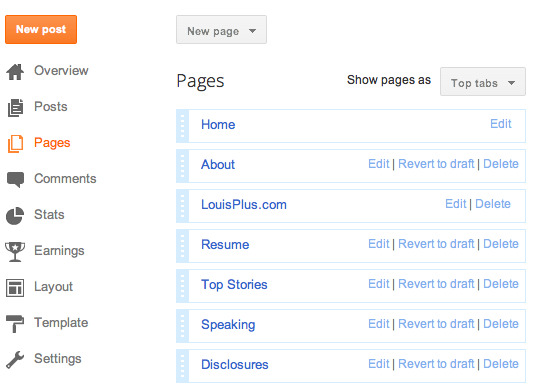
If you are a Blogger user like I am, you can modify your blog template to include this feature by going to draft.blogger.com. Select "Pages" from your blog's overview section, and then hit "New Page" to make a new page, hosted or linked. There are two options - the first being a "Blank Page" for your own content, and "Web address" for the link itself. Simple.

My List of Static Pages on Blogger, Now With LouisPlus.com.

Linking to LouisPlus.com with a Single URL in Blogger

Recently, I acquired the domain name LouisPlus.com for my Google+ content. To be honest, my good friend Drew Olanoff (who also owns DrewPlus.com) bought it, but he promises he'll let me use it. :) In addition to the Google+ icon in my left sidebar, I've now added a link to LouisPlus.com in the header of my blog, thanks to this new redirect feature. So if you're somebody who wants to link to "My Company", or a social network of your choosing, or really anywhere, it's very simple. No hacking needed.

July 17, 2011

My Top Ten Favorite Google Products (2011)

My Top Ten Favorite Google Products (2011)

Google makes a ton of products. Almost two years ago, thinking about it, I posted my top ten Google products at the time. Google Reader was #1, Blogger was #2 and FeedBurner was #3. Since then, G+ has come into play, I switched to Android and Chrome is on fire. It's time for a rewrite.

The Original Post from Sept. 2009: My Top Ten Favorite Google Products

Here's what I would list now. Eager to hear your own top 3, 5, or even 10.
  1. Google+ (Obviously, this is my start page, I am here constantly)
  2. Android (The mobile OS runs my favorite tablets and phones)
  3. Google ChromeOS (Living in the cloud is a game changer)
  4. Blogger (The easiest, most flexible and stable blogging platform)
  5. Google Reader (Still the best place to follow hundreds of sites in one place)
  6. Google Search (The gold standard for finding anything)
  7. Gmail (Finally my default email, and archive. Buzz is a plus.)
  8. FeedBurner (Takes my blog to the rest of the Web, powered by Pubsubhubbub)
  9. Google Voice (Syncs my phone to the Web with auto-blocking of spam calls)
  10. YouTube (If it happened and is worth watching, it's here. Now with movies too!)
Things have obviously changed in just two years. Android, ChromeOS, Google Voice and Google+ were not on my radar much only a short time ago, and now they're essential. Curious to your own insight and what major services (Analytics, Maps, Earth, etc.) I missed.

/via my Google+ Profile.

July 7, 2011

Blogger Revamps User Interface, Cleans Up Nice

Blogger Revamps User Interface, Cleans Up Nice

In the most dramatic overhaul of its blog publishing layout and interface since I switched to Blogger five years ago, the Google-owned service introduced its previously announced interface redesign this afternoon, bringing a high quality look and feel that catches the product up to the many other Google products that have recently undergone UI upgrades, including Gmail and Google Calendar, following the launch of Google +1 last week. The update, now visible to all Blogger users at the Blogger In Draft site (http://draft.blogger.com) surfaces a new statistically-driven dashboard complete with accumulative page views and post counts, and underneath the hood, a new array of icons that match the many different ways bloggers interact with their sites, including new posts (such as this one), static pages, comments, complete with moderation, detailed visit statistics, and UI tweaks to layout and design.

The new layout also promises an "Earnings" tab that will replace the monetization feature, when used in companion with Google's popular AdSense product. (Mine of course remains at a massive $0.00)

The New Blogger In Draft Dashboard

The cascade of improved UIs in Google's products hasn't missed Blogger, so recently rumored, but not confirmed, to be getting a planned name change by other tech blogs earlier this week. Blogger also announced today the addition of a new product manager, Bruce Polderman, giving team three. So don't believe anything that might otherwise tell you this product is going on the backburner as far as Google is concerned.

Blogger In Draft Statistics

Beyond the smarter and more appealing UI in managing posts and statistics, the post editor portion of Blogger is significantly improved as well, giving authors an entire screen to work with in creating their posts, looking much like a Word Processing document, with a standard formatting bar on the top, and post settings, including labels and scheduling, on the right. It makes all previous versions, including the many versions of WordPress I've tried look as clunky as late 1990s era Word for Macintosh ports. The new design of Blogger is very smooth and appealing, so if you are on Blogger, and don't tend to use the Blogger In Draft feature as I do, it's highly recommended.

Blogger Layouts In the New Interface

Blogger's integration with other Google properties, such as Picasa and Google+ also makes the platform more appealing, as you can post photos taken from your phone, sent by Instant Upload, and add them to your blog. And yes, this post was made using ChromeOS, giving the Blogger Web interface a real run for its money.

December 20, 2010

Don't Fear Being Fireballed or Slashdotted if on Blogger

Don't Fear Being Fireballed or Slashdotted if on Blogger

It can be difficult to plan for an unanticipated spike in Web traffic. One of the most amusing parts of reading Macolyte John Gruber's Daring Fireball blog is the near certainty that at least once per day, one of the poor saps he links to goes down due to the resulting crush of curious onlookers. It happens so frequently that it's practically second nature to see him update a post saying the link has been "Fireballed", opting instead to point to Google's cache of the original. This phenomenon, of course, is not a Gruber exclusive. For years, otherwise innocent bloggers have been Slashdotted, TechCrunched or even Scobleized, seeing their sites crack under pressure. But from what I can tell, if you're hosted on Blogger, this isn't an issue at all. The company was just recognized for perfect uptime during a survey by Royal Pingdom, and I've seen my own site spike in traffic following controversial posts with no ill effects.

Blogger was not always known for a stellar uptime record. In late 2006, the service practically had to write "a novel" about continued outages. In fall of 2007, I railed against Google for ignoring users during another major outage. But services mature and times change.

Royal Pingdom's Downtime Report. Blogger Scores a Zero.

With the backdrop of Tumblr's highly-publicized downtime of more than a day earlier this month, Royal Pingdom also spotted occasional outages at WordPress, TypePad and Posterous, each of whom looked great compared to Tumblr's unfortunate blip, but not as spotless as the often overlooked Blogger.

Getting Slashdot, Scoble and Spiegel Bumps Simultaneously


While escaping system-wide downtime is a major win in itself, that doesn't speak to the services' ability to scale under pressure. Gruber recommends the WP Super Cache Plugin for WordPress, letting users serve more than a page a second, as it's self-hosted WordPress blogs that often get crushed with one of his links. But I've been linked from Daring Fireball a few times and lived to tell the tale. Same for Slashdot, Techmeme, Hacker News and the Huffington Post, all of which are capable of sending solid and sustained traffic on good days.

Techmeme, Hacker News and Scoble Don't Bring Down Blog

Similar to how Google is well known for its Web site never going down, I have to assume Blogger has mastered Google's distributed architecture, and makes no single blog, or its hotspotting, an instrument for failure. This blog didn't slow or go down when tens of thousands of visitors dropped by this July to tell me I was an idiot for switching from iPhone to Android. It also didn't go down when I questioned the usefulness of Google Wave last year, or when the Huffington Post liked my recap of David Kirkpatrick's Facebook Effect.

Not Even Daring Fireball Could Take the Blog Down

Even the largest services have occasional downtime. Facebook was down last week, intentionally, due to a code push ahead of schedule. Twitter has had its share of bumps, though the site has gotten much better in the last year, and even Facebook subsidiary FriendFeed went down this weekend. But Blogger users are sitting pretty knowing their blogs are going to be up and responsive, even under pressure.

December 17, 2010

Google's Blogger Introduces Mobile Templates In Beta

Google's Blogger Introduces Mobile Templates In Beta

In the seemingly never-ending battle between Google's Blogger and Wordpress for the supreme full-featured blogging platform, Wordpress has long had a big lead in terms of presenting a high quality experience on mobile devices. While Blogger simply laid out the site's standard layout on your small screen, expecting you to pinch to zoom or read extremely tiny text, WordPress blog owners could smugly serve up simplified versions of their blog for readers on the go. Today, that gap is gone, as Blogger has introduced, in beta, the first mobile templates for the platform, which are drop dead simple to start using immediately.

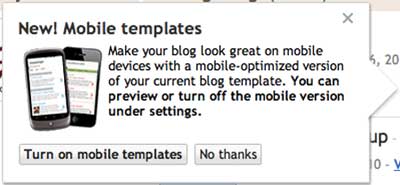
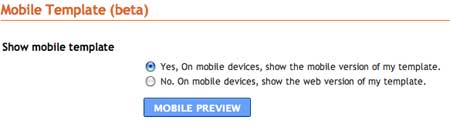
Available in the Blogger In Draft version of the platform, users are prompted to "make your blog look great" on mobile devices. If you choose to optimize your feed for mobile, instead of showing the standard layout, simply turn them on and click "Yes." A handy QR code sits next to the decision if you would like to preview just how your site now looks on the mobile platform.

You Can Now Optimize Blogger for Mobile Devices

Just Click Yes, and You're Optimized. That's It!

As you can assume, with millions and millions of Android and iPhone devices out there, as well as scads of feature phones, mobile browsing of the Web is becoming an increasingly important and relevant part of a publisher's experience, so there is tremendous value to optimizing for the small screens as well as the big ones, and now Blogger users, myself included, are no longer on the outside looking in.


The Blogger Experience On Mobile Devices


Once enabled, visiting the blog URL lays out the recent stories in a simple vertical stack, where clicking the right arrow opens up a single post in the mobile view. At the footer of each post, you see applied labels, with the option to return "Home" to the main screen or go to an "Older Post". And should the reader prefer, they can click "View Web version" to see the original.

A Common Question to Non-Optimized Blogger Users

This update, much anticipated, much awaited, is absolutely welcome. Now I won't get grumpy users asking why I haven't optimized my site for mobile instead of RSS.

July 2, 2010

Blogger Rolls Out Real-Time Stats for All Users

Blogger Rolls Out Real-Time Stats for All Users

Initially targeted as one of the launches included in the service's 10-year anniversary, Blogger tonight introduced integrated Web statistics for its users that rival the more robust Google Analytics, but are simple to manage, and update in near real-time, giving the millions and millions of blogs that rely on Blogger greater insight into their visitor traffic, including top pages, referral data, browser data, and their country of origin.

Like you would expect from any good analytics package, the new offering displays popular search keywords to find out what your visitors are looking for, as well as showing you peaks and valleys in your daily traffic.

Blogger Stats Display Analytics for Every Blog In Real-Time

Top Pages Displayed In Blogger's Stats

The new stats package is available in the service's Blogger In Draft mode, under the "Stats" tab for all users, with no required code to install, or configuration. For those looking for deep details in analytics, including bounce rates, campaigns and ad conversions, Google Analytics is clearly more detailed, but the Blogger statistics are rapidly accessible and bring the information to the users every time they log in.

Pageviews are Cut By Time, Shown In Aggregate

If you're a Blogger user, make sure to draft.blogger.com and click stats to see for yourself.

May 25, 2010

Siobhan Quinn Exits Blogger, Checks In at Foursquare

Siobhan Quinn Exits Blogger, Checks In at Foursquare

After seven years at Google, including the last two and a half as a product manager on the company's Blogger platform, Siobhan Quinn handed in her badge yesterday, and will start on June 7th as the first product manager at the fast-growing, location obsessed, Foursquare, in New York City, joining head of product Alex Rainert. Siobhan is the second of Blogger's three product managers to have recently made a move, following Rick Klau's move to manage Google Profiles last month. I talked with Siobhan today to find out her thoughts on Foursquare's potential, and how the company can transition from one beloved by "Silicon Valley nerds" to a more mainstream audience, delivering real value.

Siobhan initially joined Google in 2003 as part of the Google Accounts team before Accounts had launched, predating even the launch of GMail (in April of '04). She says she worked on the front-end to Accounts, the sign-in system, and new account flow, helping to connect accounts to many of Google's other properties, including Adwords, personalized search, Google Checkout and, of course, Blogger. But she admitted she hasn't written code in a few years, and has been working to push Blogger from its relatively slower pace of updates to one that has seen increased activity, including the recent launch of the Blogger Template Designer and last week's launch of new Webfonts, with a corresponding API.

"That's why I am excited to leave now," she said. "I made an impact on Blogger, and I've been at Google for 7 years. It is time to do something much different."

How different? Siobhan is leaving a company of 20,000 employees to one of just a hair over 20. Foursquare has gained a lion's share of attention in the tech blogosphere for its checkin application, but in reality, the team remains extremely small. And while many of us have blended our interest in Foursquare with a mixture of curiosity and skepticism, she makes a compelling case for the future of the product - as the platform morphs from one focused on badges and gaming to one more centered on reviews and tips from your social graph.

Siobhan postulates that Foursquare tips can become a lot more useful as more people use the service, and start to fill in the system's data, even with what I've always thought were the mundane check-ins as gas stations, fast food restaurants, office buildings, or parks.

"We can make tips a lot more useful," she said. "For example, if you are looking for a dentist in your town, and people in your social graph have reviewed a dentist near you and checked in three times this year, that's powerful for me. That's the dentist I would want to go to. Combining checkins and reviews and your social graph would be a powerful demand generation tool."

For many Foursquare users, the fun in using the application has come from gaining mayorships and accumulation of brightly colored badges. As I joked maybe Foursquare would be moving to offer vice mayorships, deputy mayorships and other titles, she agreed that "there need to be more opportunities for users to win", adding "the mayor should be able to set some laws. Maybe the mayor can design the drink special."

Beyond the recommendation and tip aspect from connected friends within the Foursquare social graph, businesses have many opportunities to leverage checkin activity that hasn't yet been tapped, she said. While Starbucks gained good visibility for offering $1 off Frappuccinos for the store's mayors nationwide, their efforts are the exception and not the rule today.

"If you're at Wendy's and you get three other people to check in with you, maybe you get a free meal," Siobhan suggested. "And then, maybe that makes the restaurant trend and become the hotspot to be. For users who are not in the geeky, trendy, Silicon Valley area, and are offered incentives to add reviews and checkins, they could be included to do that."

Her last role at Blogger centered around many people bringing their offline lives online, and sharing their stories. But Foursquare has the power to impact offline behavior, as friends seek out friends and experiment with new venues - practically a 180 degree turn.

"Foursquare is making people explore a little more and step outside their comfort zone," she said. "I like any product that makes people's lives more meaningful offline. It encourages you to explore and try new things away from your computer."

Siobhan doesn't have much time between now and her first day at Foursquare HQ - giving her just over a week to pack, sell her car and furniture, and head to New York with her dog in tow. Siobhan (according to her Foursquare profile) is mayor of ME Cabo in Cabo San Lucas, but hasn't claimed any Bay Area properties. Maybe New York will bring her more luck. Until she starts logging checkins on the East Coast, you can find her on Twitter at @siobhanquinn.

Meanwhile, Blogger remains in the hands of Chang Kim, who joined the team after Google acquired his company, TNC, in September of 2008.

April 20, 2010

10 Suggestions for Redesigning the Google Profile

10 Suggestions for Redesigning the Google Profile

Have you looked at your Google profile lately? (Here's mine) Pretty boring, right? Just a white page with a bunch of blue links, like much of the rest of Google? You might not look at your Profile all that often, but with Profiles being discoverable in Google Search and made more central to your online activity with the introduction of Buzz, it's possible that this page could be a major hub for your personal presence on the Web. Given the recent addition of Rick Klau to the team, it's clear Google wants to get this product right. It's also a great opportunity to give Rick and his entourage a little helpful advice. So here's what I would do if I got the opportunity to design the ultimate Google Profile:

1. Unhook Buzz from GMail and Open a Dedicated Buzz Site

This one is screamingly obvious - and something I anticipate to be a near-certainty, unless the criticism of Buzz had Google reconsidering its focus, which I don't think it will. If Buzz and Profile are to be paired, there has to be a way to get to Buzz on its own domain, outside of my e-mail. This, I believe, would dramatically raise engagement and ease of access. As each Buzz user's entry and comments link back to their profile, this in turn raises the visibility of the Profile itself.

2. Enable the Option to Remove Buzz Without Killing Your Profile

A corollary to the above is that in order to completely opt out of Buzz and disable it completely is that you need to delete your Google Profile too. That's crazy. That's almost punitive judgment for somebody who doesn't see things the Google way. That Buzz and Profiles are connected in the same way that Facebook's News Feed and Facebook's Profiles are connected is one thing, but to require the deletion of one to unlink the other should be fixed immediately.

3. Add the Ability To Import One's LinkedIn Resume to Google Profiles

Today, Google Profiles asks you where you've previously worked, but it's scarcely an inch deep. I would want the option to import my LinkedIn profile, complete with titles, companies and summaries, and be able to display that in a tab called "My Career", "Work" or "Professional". Of course, for those who don't have existing LinkedIn resumes, the option would be to populate this tab from scratch, but have it display on Google.

While this would not immediately gain you the relationship and recommendation portion of LinkedIn, it could easily be a new place for your online resume.

4. Introduce an Ability to Customize the Google Profile With Templates

The look and feel of today's Google Profiles is extremely sterile. Like many other Google properties, the wisdom has been data over design, and users don't have much, if any, opportunity to tailor the content in the way they would like. Rick Klau, having just watched fellow PM Siobhan Quinn launch Blogger's new Template Designer, would do well to tap into that option, giving people more ownership of how they are presented online. In fact, Rick's quote: "How you express yourself online is a lot more than just a blog," from the interview we had on the day he announced the move, hints that he feels the same way.

I would want the option to change background colors, sidebar designs and reformat the page's elements - things that even Facebook gives you little opportunity to do - but others have done well.

5. Think Global, Act Mobile

All the trends are pointing toward increased Web consumption on our mobile devices, be they Android, iPhone or some other variety. Facebook's iPhone application has gained tremendous traction and is quite usable. Buzz was designed with mobile in mind. However, Google Profiles simply scrunch the text down in a small way for a smaller screen. It wouldn't hurt to have Profiles recognize mobile browsers and provide a superior mobile experience.

6. Highlight My Streams By Category - Like Status Updates!

Google Profiles do a good job of featuring links out to other third-party services where I participate. If I register dozens of social sites, and you know I have them, these disparate icons will litter the right side of my Profile. But like MyBlogLog and FriendFeed, the icons themselves don't tell a story. The story comes from the content being created at each of those sites. While some of my streams might be flowing through my Buzz tab, I should also be able to choose to share my Tweets, native FriendFeed updates or GChat status updates on my profile, as a lifestream, in a "Status Updates" tab in my profile, which would show the most recent shares at the top. Similarly, if you have multiple photo site accounts, you could pull in the latest updates from Flickr, Smugmug and Picasa in a tab called "Photos".

7. Raise the Visibility of Contact Information, and Remove the Tab

Today, my Google Profile says my name, my title, and features my latest status update at the top, generated through GMail's GChat feature - and even that status message is not visible to anyone who is not a connected "chat buddy". The contact information I have provided, including e-mail, phone, and address, optionally posted by me, is tucked behind a tab. If I have opted to make this information public, it should have higher visibility, and could easily take the spot where the bulky status message is today.

8. Reduce The Automatic Behavior and Placement of Photos

In today's Google Profile, your title and avatar are immediately underwritten with a strip of photos. It's a cool feature, to be sure, but their is no option to put them somewhere else, to resize them, to add any relevant information about photos, etc. If photos are not something I think should be a lead part of my experience, then I would want to minimize their focus, or even tuck them behind one of the tabs at my disposal. Today, these photos pull from Flickr, Picasa, or from other hand-entered photo streams, but they all look the same - disconnected and unrelated.

Facebook has become the king of photo uploads not just because of the network's relevance and reach, but also thanks to the option to leave comments on these photos, or to tag other people. Google Profiles do nothing but link out, making the photos vestigal. Unless Google wants us to upload photos directly to our Profiles, they should get lower visibility.

9. Sidewiki Doesn't Deserve the High Profile on My Profile

Sidewiki entries are one of the four tabs on my Profile today. I've made one Sidewiki entry, ever, and while it may have been a good one, it certainly doesn't rate equally with my "About" and "Contact" sections, yet it gets the same billing. That's silly. And for whatever reason, I cannot remove Sidewiki from my profile within my profile settings. It's impossible. If you're a huge Sidewiki fan, then sure, add it, but it shouldn't be there automatically.

10. Modular Permissions By Section

Google's default approach, and mine, is to make content visible to all, so that it is indexable and discoverable. If we have learned anything from the tumult around Buzz's entry to the marketplace, it is that one size does not fit all when it comes to public content vs. private content. But today, I don't even have the option to make my Gmail chat messages public if I wanted to, and others don't have the option to provide comments on their Google Reader shares to the public, but only invited friends. In reverse, if I chose to, I should be able to hide my photos from the public, or any other item, making that only visible to synchronous friends. If this can be managed in a simple way, it could go a long way to getting people comfortable in providing even more personal information to a company that already knows a lot about us.


Have you given a lot of thought to your Google Profile? I see this as a key weapon in Google's assualt on Facebook. More on that soon, of course. What else would you do to make this a better product?

April 12, 2010

Google's Blogger PM Rick Klau Moves to Google Profiles

Google's Blogger PM Rick Klau Moves to Google Profiles

Prior to their integration with Google Buzz, individual Google Profiles have not had a high level of visibility, falling fairly low on the social ecosystem ladder when contrasted with more siloed services, including Twitter and Facebook. Yet, as Google looks to further integrate social elements into their platform, it appears that Profiles will play an ever-greater role in how both individuals and companies represent themselves online. Today, Profiles snagged a notable convert, adding Rick Klau, a product manager for Google's Blogger platform, to the team.

Klau, who joined the Blogger team in 2008 following Google's acquisition of FeedBurner the previous year, has largely been the service's public face - playing a visible role in the company's feature roll-outs around Blogger's 10th anniversary, which took place in late 2009, and more recently, tackling the challenge of migrating a large installed base of users off FTP-hosted blogs - which proved to be taxing, even for a company with the resources of Google. Klau served as one of now three Blogger product managers, accompanied by Siobhan Quinn, a 7-year Google veteran, and Chang Kim, based in Seoul, Korea, who joined the team after Google acquired his company, TNC, in September of 2008.


In a conversation I had with Rick this afternoon, day one of his time on the Profiles team, he said the move was the result of a "confluence of need and opportunity". Assuming increased importance for Profiles over time, this role may mean direct impact on a swelling number of Google users, not just those who blog, and appears to be another step in Google's march to becoming a more social company.

"With the Buzz launch, and an increased focus of getting social right, this was a huge opportunity where we weren't doing as much as we could," Rick said.

Rick said that even prior to the Buzz integration with Profiles, the product gained more prominence thanks to Google Profiles results being displayed in core Google search results. This makes the content on your own profile increasingly more important, whether Buzz succeeds or falls flat. And similar to the work on Blogger, he saw an opportunity to let users be more creative in terms of how they were represented, but in a new place.

"How you express yourself online is a lot more than just a blog," Rick said. "We want to give people an option for how they are presented in that context."

To spread more light on the transition, and what this means for Google's properties, both Blogger and Profiles, I interviewed Rick this afternoon using CinchCast. He was gracious enough to participate, and the conversation is embedded below.


You can find all my CinchCast recordings, including this one, at http://www.cinchcast.com/louisgray. Also, Rick has now posted on the news on his blog: New role - Google Profiles

March 11, 2010

Blogger Intros Highly Customizable Template Designer

Blogger Intros Highly Customizable Template Designer

In what the company called Blogger's biggest announcement in several years, Google introduced a versatile template designer this morning that opens up a wide array of creative high-quality designs to the millions of users on the platform. The launch comes in the wake of Blogger's 10th anniversary, and raises the bar in terms of both appearance and ease of customization, guiding Blogger users to leverage new professionally designed themes with thousands of background images, and customization on layout and color themes. The combined package could mean the end of flat-looking Blogger templates, and gives potential WordPress users or switchers a serious alternative.

The new Blogger Template Designer, which launched on Blogger In Draft, features 15 new professional templates at introduction, with more to come, including anticipated user submissions, customized layouts with up to three columns, hundreds of background images via a partnership with iStockphoto, and the ability to change colors and fonts across the site. The package, which I will definitely be messing around with shortly, is an effort to give everyone their own personal look and feel that doesn't appear to be "cookie cutter".

Blogger's New Template Designer In Action

"How people look on the Web is really important, especially if it comes to publishing or blogging," said Siobhan Quinn, a product manager of Blogger at Google yesterday. "We wanted to empower people to create their own unique design, with tools that are extremely simple and powerful at the same time. We believe the blog is your blog, and you should be able to do anything you want with it."

Prior to this morning's launch, the vast majority of existing Blogger templates were created by or impacted by Google's then visual design lead Doug Bowman in 2005. With Doug now at Twitter for a year, and the templates looking somewhat stale, not to mention difficult to parse in HTML (trust me), it is high time for new designs.

Blogger Template Designer's Image Picker

Blogger Template Designer's Layout Tab


The introduction of a few dozen templates for Blogger wouldn't be that much of a big deal, except for the fact the company has leveraged the engineering talent at Google, and applied that to its new design options. As was explained yesterday, every template can be applied to every available site layout, and if users opt to tilt their blog toward one specific color theme or another, care is taken to make sure the text and images are not only readable, but look good.

Blogger Template Designer's Advanced Tab Options

This customization leverages a new concept of a "main color theme" which as Quinn explained, "lets you shift from one complementary set to another, with an infinite number of palettes in the color spectrum."

Blogger users who tap into these new designs will get the option to modify the existing templates through a Layout tab that lets them apply any template to any layout, including 8 body layouts and 3 footer layouts. You can even adjust the width of any column to get customization down to the pixel. As the sidebars are edited, they present different "drop regions" for Gadgets you may have installed. And if you want to get into the code, there is always the option to muck with the HTML to make it yours. Should you want to add a customized CSS file, you can add that as well, and even remove it later without seeing your blog fall apart, as Blogger uses your code to override their own, not deleting it outright.

With tens of millions of Blogger blogs out there, even if Google offered hundreds of pre-made templates, they would still be recognizable as Blogger hosted. Now, if Blogger users do revamp their blogs with the new Blogger Template Designer, they can take on the author's personality in a new way. Watch this space, as I may be leveraging them myself shortly.

February 19, 2010

Blogger and Google Reader Speed Up, Suggestions Improve

Blogger and Google Reader Speed Up, Suggestions Improve


Two of the major outlets where I produce content and consume content, both from Google, took steps forward on Thursday, as Blogger announced new improvements to load slow-performing pages more quickly, and Google Reader unofficially made a big move, with the likely addition of Pubsubhubbub support, which makes the service real-time enabled both incoming and outgoing. Meanwhile, in a separate announcement, Reader promised improved recommendations for you to find new sources to follow - including similar sites per feed.

I've been talking up Pubsubhubbub for months now, because it is the engine that is playing an ever-increasing role in pushing my data faster and faster from site to site. Google Reader shares had already been powered by Pubsubhubbub to flow downstream, but it had been widely assumed Google Reader was not using the same kind of lightning speed to get updates as blog posts were added. Starting today, Jesse Stay and others figured out they had flipped the switch.

An Instant Update from Posting to Reader

As others confirmed, and I saw later also, posts that used to take upwards of half an hour to hit Reader, without manual polling, were there practically instantly, showing 0 minutes to 2 minutes of delay. With FeedBurner also Pubsubhubbub enabled, there should be no latency between when I hit the publish button, and the posts hitting FriendFeed, Buzz Twitter and Reader all at once now.

Google has recently been talking a lot now about making page load times a more important element of how they are ranked in the company's search engine. This leads to the next announcement, from Blogger, who says that traditionally slow-loading pages, including label pages and archive pages, are now going to auto paginate these pages to deliver speedier load times in the browser. They are guessing not only will pages load more quickly, but total page views will go up. Always a good thing.

Reader Puts Me In Good Company

Recommendations from Coding Horror

Reader's move to Pubsubhubbub was likely part of a larger code push from the team, which did announce improved recommendations for new feeds. Now, in addition to tailored recommendations for you, you can click any feed and see what they believe are similar sites. For example, I found that Reader finds me most like Lifehacker, ReadWriteWeb, Engadget, GigaOM and Walt Mossberg. All very cool recommendations. I also found out that Reader finds Loic LeMeur's blog to be most similar to TechCrunch, Seth Godin's blog, Guy Kawasaki and Robert Scoble. I doubt Loic is complaining either.

The amazing thing about this new feature? It was my #1 request way back in March of 2007. It took almost three years, but it's finally here, and I'm going to spend some time finding new sources to follow.