Showing posts with label GMail (30 posts). Show all posts

January 3, 2014

First Friday Feature: MightyText: Web and Gmail Texting App

First Friday Feature: MightyText: Web and Gmail Texting App

For nearly three years now, the overwhelming majority of text messages I've exchanged with friends, family and colleagues haven't started with my phone, but instead, with my computer, thanks to the ever-improving application MightyText. MightyText links my browser (Chrome, obviously) to my Android phone, and lets me send and receive text messages, including photos and emoji from the Web, and even from Gmail. Considering how much time so many of us spend in our email, adding text messaging is a no-brainer.

If you're a long-time louisgray.com reader (and thanks, by the way), you might remember MightyText initially launched as a Chrome add-on, called Texty, in March of 2011. (See: Texty: Texts From Google Chrome Via My Android Phone) In later months, they rebranded to MightyText, gained visibility from the larger tech blogs about a year later and can now sport hundreds of thousands of users, measuring by their Chrome web store stats. Meanwhile, as their user base has swelled, so to has their feature set.

MightyText's Web UI.

From the very simple interface you can see in my original coverage, MightyText now is best experienced through their fullscreen Web UI, or integrated in Gmail. As I have the MightyText Chrome extension installed, my Chromebook alerts me, often before my phone does, that I have an incoming text or call. I can respond from that notification, from the website or from Gmail, and don't even have to pick up my phone to interrupt my workflow.

Seeing Recent Texts on MightyText in my Gmail.

From the MightyText site, I am greeted with a history of texts, synced with my phone, and the option to keep the conversation going. I can add images from local files on my computer, send emoji (in those rare times I'm feeling silly), and even walk through photos I've sent or received by MMS. And MightyText even has a Pro option for just over $2 a month which brings advanced settings, such as themes, deeper photo backup, group texting and a lot more.

Sending a MightyText with emoji to Maneesh Arora.

But one unsung hero (until now, I guess), is MightyText's companion extension Gtext (find it here). Gtext adds a "Compose SMS" button in my GMail next to where I'd start an email, and brings the same photo and text history from the MightyText site to the place where I already spark most my communication. So from Gmail, I can chat (with Hangouts of course), send SMS or email, all in one spot.

Browsing Recent Photos sent in Text in my Gmail

MightyText even has a tablet client. So I often find myself reading a book or browsing the Web on my Nexus 7, and even if my phone is in the other room, I can browse or send texts, just as easily, even without a 3G connection. So texting isn't something I have to do on one device. It's something I can do from every single device, all synced automatically, with real flexibility.

Awwww... Viewing A Photo I'm Adding to MightyText.

You might call it a New Year's resolution, but in 2014, I've decided to use the first Friday of each month to feature something I use every day - even if it's not brand new. MightyText gets the January 2014 honor. I'm happy to say they were first covered here, before anywhere else, and are a real and growing success story. If you're on Android, and you should be... definitely check it out.

Disclosures: Given I work at Google, I have a bias in favor of great products that include Android, Gmail and Chrome in their ecosystem. You might think about Hangouts possibly competing with MightyText, but I didn't let that get in my way now, did I?


April 30, 2012

The "Archive" Button Can be Your In Box's Best Friend

The "Archive" Button Can be Your In Box's Best Friend

You practically can't open your RSS reader or spend a day on a social network of your choice without running into complaints about email. Nobody likes it. Everybody says they have too much of it. People gloat over mass deletions of unread items, or sporting a full in box four or five figures deep. Some people take vacations from it or swear they'll pound through their to-read list in what could be an eventually futile journey toward the improbable in box zero. But for many of those people, it's likely the impenetrable in box is symptomatic of something else - the inability to make a decision the email requires, or the option to escape a discussion and call it complete.

When I joined Google last fall, I anticipated my corporate in box exploding. A notorious information-driven company with cool words in the lexicon such as "centithread", I imagined finally crossing over from my "I'll get to every single message, I promise," mentality, to accepting defeat. But this hasn't been the case. As I had before I joined, the email box has been no bigger a challenge than handling one's updates in Google Reader, or seeing all mentions on Google+ and Twitter.

This is helped by having a practical "always on" schedule, enabling messages to be consumed or responded to from the nearest Android phone or tablet, and the laptop is practically another limb, but the best tool for making sure I don't get lost in a torrent of email, beyond discretion in consuming tangential mailing lists, is the "Archive" button in Gmail.
The "Archive" button is pretty straight forward. If you have determined that an email message or its resulting thread no longer needs any action from you, and shouldn't take in box attention, you just hit the button and it is moved out of your in box. It's not deleted outright, meaning the thread can pop back up again if a new message arrives, and it's still discoverable in search, so you don't have to worry about being able to find it again if you change your mind later.

About 18 months ago, I talked about how one has to hone their stream in what is being perceived as an "attention" crisis, and that the onus is on us to read fast, process fast and decide fast what requires action and what does not. Information overload can be overcome with filtering what you take in, and where you participate. When to archive threads and when to extend threads requires that same level of precision. Guess rightly and you are able to get the right information to the right people at the right time with the smallest amount of effort. Guess wrongly and you could find yourself distracted by off-topic content and miss the important information amid a sea of comparable noise.

If you're a Gmail user, you probably know Google bumped up its storage capacity to more than 10 gigabytes apiece, so the issue of how you manage your email is less about can you store it all, because you probably can, but if you can manage it all. Using the archive button well is a key part of email in box survival.

Disclosures: I work at Google, and naturally, I use Gmail at home and at work.

July 17, 2011

My Top Ten Favorite Google Products (2011)

My Top Ten Favorite Google Products (2011)

Google makes a ton of products. Almost two years ago, thinking about it, I posted my top ten Google products at the time. Google Reader was #1, Blogger was #2 and FeedBurner was #3. Since then, G+ has come into play, I switched to Android and Chrome is on fire. It's time for a rewrite.

The Original Post from Sept. 2009: My Top Ten Favorite Google Products

Here's what I would list now. Eager to hear your own top 3, 5, or even 10.
  1. Google+ (Obviously, this is my start page, I am here constantly)
  2. Android (The mobile OS runs my favorite tablets and phones)
  3. Google ChromeOS (Living in the cloud is a game changer)
  4. Blogger (The easiest, most flexible and stable blogging platform)
  5. Google Reader (Still the best place to follow hundreds of sites in one place)
  6. Google Search (The gold standard for finding anything)
  7. Gmail (Finally my default email, and archive. Buzz is a plus.)
  8. FeedBurner (Takes my blog to the rest of the Web, powered by Pubsubhubbub)
  9. Google Voice (Syncs my phone to the Web with auto-blocking of spam calls)
  10. YouTube (If it happened and is worth watching, it's here. Now with movies too!)
Things have obviously changed in just two years. Android, ChromeOS, Google Voice and Google+ were not on my radar much only a short time ago, and now they're essential. Curious to your own insight and what major services (Analytics, Maps, Earth, etc.) I missed.

/via my Google+ Profile.

May 15, 2011

Tackling My Biggest Impediments to Cloud-centricity

Tackling My Biggest Impediments to Cloud-centricity


More and more of my activity, both in desktop and mobile computing, is cloud-based. More Web services are replacing desktop applications, while activities that used to be the focus of local storage (including photos, music, video and email) are being delivered from the Web instead. But I'm not totally converted yet, and I can see how even the most forward looking of early adopters could still have some hangups in being fully cloud-enabled. To get to a cloud utopia, work has to be done not just on the operating system side, but on native apps, and peace of mind has to be delivered for users that they will lose no data or functionality in that transition.

In January of last year, anticipating a more cloud-centric future, I moved to a MacBook Air, one that had about half the storage space as my previous laptop, reversing the trend of larger and larger trays of spinning disk. Using the same device 16 months later, I haven't gotten close to using up the 128 gigabytes, although I have to admit I ended up installing a lot more programs on it than I had originally hoped.


Even with this admission, I kept the older MacBook Pro around under the guise of it acting as my "media machine", the master data set of all my music, photos and video. While I walked away from iTunes for music, every few months I'd transfer the latest home photos and videos via USB from the AIr to the Pro. Some got posted online and others not. With Google Music and Picasa offering options to upload all this content to the cloud, I know I'm just a few painful uploads away from finally migrating (once I get a new battery and charge the sucker).

Google's pitch for everything being on the Web is smart and future-looking, but it neglects, for consumers anyway, the story of migration, from one OS to another and also from one frame of mind to another. As Gmail once did with its offering a gigabyte of storage space at a time when competitors offered tens of megabytes, I have to think that letting people copy their important files to the cloud in a personal storage locker would be quite compelling. Steven Levy's "In the Plex" recounts the demise of a Google project "GDrive" thanks to its file centricity, but real consumers have real files and want to know they will never lose them in the future.

For me to truly get to the cloud one hundred percent of the time, I still need to:
  1. Convert my DRM-laden Apple iTunes songs to DRM-free MP3 files
  2. Synchronize those songs with Google Music and Spotify
  3. Upload all my photos from iPhoto to Picasa and/or SmugMug
  4. Migrate all my .Mac email archives to GMail
  5. Migrate old Word documents and PowerPoints to Google equivalents
#4 and #5 are supposedly easy. Find the right file types and point them to the right place, while making them private. But in practice, these migrations take time. I've had my unfair share of IMAP migrations to and from Mac to Gmail and probably have multiple email copies all over the place at this point, but the deepest archive is in local storage.

#3 touches on emotion as much as data. There's comfort for some in burning old photos to DVD, even if DVD (and CD-Roms and floppies before that) are holdovers to a doomed era in physical media. And songs are songs. I love my Spotify, but I bumped into an old Underworld album I own on iTunes that I hadn't seen in years and was reinvigorated to reclaim all that stuff I've purchased, so I wasn't walking away from thousands of dollars in investment, but also favorite tunes I might not remember later.

I have been using the CR-48 Chromebook more and more lately, using it exclusively at the Google I/O, SXSW and CES events, thanks to its great battery life and ease of access to 3G and WiFi connectivity. I am using the Chromebook more and more at home too, when I don't need to use Photoshop or take partial screenshots - something the Mac still does better than anything else I've seen.

I see the current state of Chrome OS as that of Mac OS X 10.0 upon Apple's launch of that operating system back in 2001. It didn't initially support DVD playing, and scads of programs were missing, forced to boot in Classic mode, including the aforementioned Adobe Photoshop and notably, Quark Express, key for the Mac's design culture. But eventually those holes were filled, and Mac OS X hasn't looked back in a decade.

Can Web apps replace Photoshop and other intense programs outright? Probably not on day one and maybe not even before the end of 2012. Google promised close tie-in with Citrix and VMware, telling the story of virtually connecting to apps outside of the cloud, and using them there. That's a really geeky solution to what would be a standard use case on a more traditional platform. I have to imagine that if Chrome and other cloud-centric options grow, traditional software makers (as Microsoft did with its Web office in response to Google Docs) have to start thinking about getting their apps into users hands on these new platforms, while the earliest users are going to have blood on their hands thanks to being on the cutting edge.

We're in the early days of a true cloud OS, and I've got a lot more room myself to go before I close the lid on my last MacBook. Agreeing in principle that I need to get my important data of rusty spinning disk, I have some work to do, and will keep up this effort. But more messaging has to address the issues of migration, storage space, compatibility and success in places where connectivity isn't pervasive.

November 1, 2010

AddThis Stats Show Spike in Google Buzz Sharing

AddThis Stats Show Spike in Google Buzz Sharing

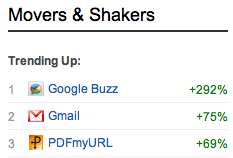
Over the last 90 days of available statistics, popular multi-network sharing service AddThis shows few surprises in its top services selected by customers. Facebook dominates all options with nearly 40 percent of all shares, with Twitter and e-mail having just under ten percent apiece. But further down the chart, while most services saw single digit moves, up or down, two Google services are seeing significant growth - with Gmail logging an increase of 76%, and its companion network, Google Buzz, spiking, up 296% from the previous 90 day period. Sharing from AddThis to Buzz was good enough for #22 overall, just ahead of others including LinkedIn, Tumblr and Wordpress.

It's tempting to write off the blip as nothing more than a blip - a rule of small numbers. After all, the total percentage of shares to Google Buzz from AddThis totaled .25%, or 1 of every 400 shares. The top 10 services, comprising of Facebook, Twitter, Email, Print, Google, MySpace, Favorites, StumbleUpon, Messenger and Delicious, comprise more than 85% of all shares, leaving scraps for the remaining services - and one knows Google services aren't supposed to be "also rans" outside the top ten in most cases.

Google Buzz Shares Started to Spike on AddThis in Mid September

To dig deeper into the surprising data, I asked AddThis for more clarification.

While the company doesn't yet expose absolute sharing statistics, they reported that the rise in both Google Buzz and its companion Gmail is likely a recovery after a slow summer. The spike in Buzz propels it to the 5th most popular social network overall.

Buzz and Gmail Trending Up on AddThis

"Kids are back in school and sharing up a storm," wrote Justin Thorp, Community Manager for AddThis. "But... even with that, Gmail & Google Buzz are still seeing growth, usage, and excitement."

Aside from the 3-month bump, Thorp reports that StumbleUpon "has been the one that's seen some of the most continuous" growth.

Buzz's Spike Pushes It to the 5th Most Active Social Network on AddThis

Additional AddThis details on Google Buzz reveal that after the United States, which leads by a large margin, the next most active countries sharing to Buzz via AddThis are the Netherlands, India, Russia, Brazil, Germany, China, Canada, the UK, and France.

In contrast, the long since purchased, but still active, FriendFeed statistics show Turkey far outpacing the United States, followed by Italy, India and Pakistan.

While the world awaits Google's next round of social updates, long rumored, but still unclear, the loyal Buzz community eagerly awaits any signs of good news that show engagement and activity in the much-dismissed social sharing network. AddThis' statistics give a glimmer of hope, even if it is small numbers relative to other social tech titans.

October 31, 2010

20 Halloween Scares to Put Fear Into Every Google Fan

20 Halloween Scares to Put Fear Into Every Google Fan

20. The development teams behind Google Reader and Blogger are unified following a reorg, under a new project called "Google Breeder".

19. The Google New project accidentally gets uploaded to the wrong set of servers and overwrites Google News with internal company project updates.

18. Twitter becomes so successful that long-form writing is considered anything which is between 135 and 140 characters. As a result, Google runs out of interesting things to index.

17. Google's goats get an agent, defect to Zynga to promote Farmville.

16. Google's book indexing project fizzles as its realized nobody actually reads any more.

15. Due to an impasse with broadcast networks and cable's fear of Google's growing impact, Google TV traction stalls as only commercials are available.

14. With the founders of Wave, YouTube, AdMob all leaving or changing roles in the last weeks, leaders of all project teams within Google dust off their resumes and post them as shared Google docs with high-priced executive recruiters.

13. Aggressive legalities determine that Google has to take another photo of your home on StreetView if you don't like the current one.

12. Somebody actually asks a question to Larry Page or Sergey Brin about the future of Google Knol or Google Base in a public forum.

11. The code base between Google's new robot cars is mixed with the Android code base, making our phones autonomous beings that call and leave messages with text to speech to anyone in our address book whenever they want.

10. Google Buzz is discontinued after unfavorable press coverage. The Lively team is persuaded to come back, and is given the keys to "social".

9. Eric Schmidt loses a bet to Carol Bartz, is forced to buy Yahoo!. The new company is called Yahoogle. It passes anti-trust scrutiny somehow.

8. Yahoo! is determined to own the patents to Pay Per Click following their acquisition of Overture, Google forced to remove PPC from their offerings.

7. AJAX is the new Flash.

6. Jimmy Hoffa is found buried in Google's famous ball pit.

5. Microsoft cracks the code behind Google's search algorithm. Using SEO, Bing results flood Google's index for all terms.

4. An overzealous team of programmers looking for career advances takes Eric Schmidt's off the cuff remarks seriously, embarks on setting up programs to help people move and change their names at age 18.

3. Paul Buchheit is determined to own the intellectual property and trademarks to Gmail and its underlying code. Thus, Gmail and its users become property of Facebook.

2. Apple's suit against HTC is successful, freezing the development and deployment of Android for all partners.

1. It is revealed that the same 50 people click on 99% of AdSense ads, and most of them are marketers just demoing the product to potential clients.

August 31, 2010

The Five Stages of Filtering, Relevance and Curation

The Five Stages of Filtering, Relevance and Curation

Tonight's news of Gmail taking on information overload directly, using a combination of intelligent algorithms and your own feedback to build in box personalization is yet another hallmark move to taking on the increasing deluge of content approaching us from all directions - be it our e-mail, static Web pages, audio and video, or the many different social streams which we have subscribed to. There is no question that content creation and sharing is exploding and people are completely incapable of giving every single message and item their full attention. And many smart folks are looking to bring solutions to find the best and ignore the rest.

As I see it, there are five major ways companies and individuals take on the topic of relevance.

1. Editorial Filtering

Loose definition: I am the smartest person. I know best for you, and I deserve to decide for you what is the most important.

Example: The New York Times, Wall Street Journal, CNN and most mainstream media outlets today, who for years have been trusted arbiters to find the most important news and bring it to us in the way that they decide.

New media examples: The Drudge Report, which has grown from one man's curation and sorting to a full team, and Techmeme, which was once almost completely algorithm driven, and now is staffed around the clock by savvy editors who pluck the best of the tech Web.

Of course, it is easy for an individual to be a curator. I share a lot of content, manually, through @lgstream on Twitter, as well as on Google Buzz, FriendFeed and Facebook.

2. Global Popularity Filtering

Loose definition: The will of the people can be trusted, and they will decide what is most important, thanks to the most votes.

Examples: American Idol, Digg and Reddit. He with the most votes wins and gains a coveted front page slot.

New media example: Twitter Trending Topics display the most frequent topics and hashtags, not necessarily the most important. Also, you can see tools like Tweetmeme and FavStar which watch for number-driven popularity online.

This would also have included RSS shared items counters of the past, such as RSSmeme and ReadBurner.

3. Social Filtering

Loose definition: What your friends like, you will like. If it's important to them, it's important to you.

New Media Examples: Facebook recommended friends and pages, which display how many friends like them, Google Social Search, which pulls results from your friends content, and FriendFeed Best of Day, which shows the items from your friends that gained the most activity over a time period.

4. Explicit Personalization

Loose definition: You told us what you like or don't like, and since you know yourself best, you know what's important.

New media examples: Netflix's star ratings and TiVo's Thumbs Up or Thumbs Down feedback mechanisms, as well as Kosmix's MeeHive project.

5. Implicit Personalization

Loose definition: Just be yourself. Read what you want, do what you want, and the system will learn from you, continuously updating.

Examples: Amazon.com, my6sense.

There is a time and place for practically all types of filtering. Mona Nomura of Pixel Bits today talked about the serendipity algorithm and what it means to marketers looking to leverage machine learning. With Gmail's announcement, ReadWriteWeb's recent coverage of TrapIt and ChatterApp in an article on consumer information overload, and the high visibility of Facebook's News Feed, against the recent feed, the challenge has grown to a level where you no longer have to convince people there is a problem in filtering, but instead, you need to make a concrete decision as to how to approach that problem.

I believe that there is a role for trusted curators of news, people who have unique access or unique insight, who can get to news more quickly than anybody else, or dive into it more deeply. I believe that social similarities are a good hint at an individual's interests, but they cannot replace your own preferences - which go beyond your ability to fill out a form and try to tell the truth on what it is that you really like. The best systems, as Gmail is trying to do (with some help from your own feedback on whether they are getting it right), happen naturally and transparently in the background.

It's natural I would think this given my work with my6sense, but I have long believed in there being a perfect place for humans to act as curators and guides, while there is another perfect place for machines to provide, to the best of their ability, resources to aid your discovery. So when you are challenged with a mountain of information coming at you from any angle, think of the best way to get it handled. Should you turn to an editor, to the will of the people, to your friends, or to code? The options are all there, and more tools are coming to help you attack the noise - because there's little chance it will fade away any time soon - and a very strong chance it could get much worse very quickly.

Disclosures: I am vice president of marketing at my6sense. ChatterApp and TrapIt are assumed competition. In addition, Kosmix.com is a client of Paladin Advisors Group, where I am a co-founder. I was also previously an advisor to ReadBurner, since closed.

August 10, 2010

Google Revamps and Simplifies Contacts In Gmail

Google Revamps and Simplifies Contacts In Gmail

Gmail's introduction in 2004 changed the way people interact with Web-based mail, moving us away from needing to carefully prune old messages to save space, and introducing a conversation-oriented interface, with new label-based hierarchies, away from the desktop metaphor of folders. But while Gmail's innovation has been clear, Google's approach to Contacts has lagged, making it the target of frustration from many users. Today, the company admits as much, saying it's the thing people "are least satisfied with" about Gmail. They hope a number of improvements, rolling out immediately, will help.

The goal of the many changes introduced to Google Contacts today is to make using Contacts as intuitive as Gmail, bringing keyboard shortcuts, automatic saving, and the ability to undo edits you may have made in error. This way, if you already are a Gmail power user, you will be a Contacts power user as well.

Sorting by Last Name in Contacts

In addition to the "Gmail-ization" of Contacts, the company added the option to sort by Last Name, the ability to add custom labels for phone numbers or other items, structured name fields, for titles and other details, and a more prominent notes field, so you can say just why somebody is in your address book in the first place. Also, with the upgrade, Contacts and Tasks also occupy a more prominent position in Gmail than before, sliding up the left sidebar to the top, just underneath the Gmail logo.

Editing A Contact in GMail

You Can Undo Changes In Contacts

The new Contacts view makes it easy to get all of a person's details from one place, and make edits. You can easily add job titles and family relationships, or "view recent conversations" to see the last time you traded e-mail or chats with the person. This, thanks to the tie in with Google Buzz, also surfaces Buzz posts that match the search criteria.

Merging Duplicates In Gmail

Also, for power users, you can now merge contacts from the "More Actions" menu, if you have made duplicates, or you can choose to "Find and merge duplicates", handy for the many of us who have made imports only to find friends' records multiplying. I myself merged 75 duplicate records, so I don't have names repeating ad nauseam when I go looking for numbers in my Android phone - closely tied to Contacts.

As somebody who was more closely tied to the Apple Mail and Address Book infrastructure, Google Contacts hadn't always taken a front seat in how I manage people and relationships. Moving to Android, adopting GMail more strongly, and seeing the rise of Buzz as a platform has made getting this right increasingly important. Today's moves will make it seem more natural and fluid - as Apple used to always get right, but for the Web, not the desktop.

April 4, 2010

Google Buzz to Users: Do You Know What You're Doing?

Google Buzz to Users: Do You Know What You're Doing?

In the company's continued efforts to reduce the impact rising from the initial confusion around Google Buzz controls and transparency following the social network's initial launch in early February, which saw many claiming privacy breaches or unsavory connections related to the initial autofollow feature, Google will ask all Buzz users to reconfirm their settings tomorrow when they enter Buzz. This move, albeit a minor one, is likely another requirement to get the network's house in order after taking numerous body blows in the press - which have helped to sully Buzz's reputation and cloud its success to date.

The settings, which are already available in the Buzz section of Gmail settings, as highlighted in mid-February, ask you to confirm:
  1. Who you are following
  2. Those who are following you
  3. If the connections can be displayed
  4. How many sites you have connected to Buzz
The changes come amid the resurfacing of stories around undesired visibility of connections, labeled as "privacy flaws", and the news that congressional representatives are asking the FTC to investigate Buzz for allegedly exposing private information from Gmail to outsiders.

All the bad news, which hasn't seemed to ebb in the two months since the service debuted, has often unfortunately overshadowed the very capabilities of that network and its activity - and has made it hard for Google, a company with assumed tremendous resources, to compete more directly with Facebook and other social sites. In a note from Google's PR team tonight, they promise the setting confirmation screens will roll out gradually to users throughout the day, and a post summarizing the move will likely appear Monday afternoon. They also promise more updates in the future through a number of Google channels including their own Buzz (of course), and on their YouTube account.

In my opinion, many of the problems have arisen from standard Gmail users who had Buzz enabled, but either ignored the network or were unfamiliar with it. The promise is to show this screen upon entering Buzz, but I believe it would be even more transparent and effective to show this announcement to all Gmail users - regardless of their Buzz history. That's a big step indeed, but one that could go beyond the series of small steps the Buzz team has had to make to step away from the brink. I have sent an e-mail to their PR team to ask if that is planned.

I know who I am connected to and what I am sharing. You can find me on Buzz here: http://www.google.com/profiles/louisgray.

March 30, 2010

Google Buzz Now Explains Why Messages Hit Your In Box

Google Buzz Now Explains Why Messages Hit Your In Box

As promised in a note a little over two weeks ago on controlling Buzzed items entering your in box, the Google Buzz team is now explaining why posts are making their way into your Gmail. For people watching the new social service closely, this is a welcome, albeit small, help, especially as seeing the same items appear repeatedly - following new updates - could get tiresome.

While some are debating the perceived success (or lack thereof) of Buzz, and whether it is seeing engagement, it's no surprise that like most social networks, active people are rewarded with more activity. Engage, and others will engage with you - just like on Facebook, FriendFeed, Twitter or anywhere else. But the more I (and others) would participate, the more posts would be delivered to my in box from Buzz. Now, I can just peek at the latest, and see the most recent comment that bumped it to my attention, rather than scrolling all the way to the bottom to get caught up, as was the previous way.

One Buzz Item's Explanation (via a Linda Lawrey Comment)

In the same note, posted March 11th, the Google Buzz team promised settings to control what items hit your in box (which are live in GMail now), the aforementioned explanations, and a "mute" link to stop further comments from getting to your in box. The mute button's not there yet, so far as I can tell, but we can expect that is coming soon - given the appearance of the other promised features.

Buzz Inbox Control In Your Gmail Preferences

On another note, I have already seen people publicly comment on the perceived slowness of innovation from the Buzz team relative to expectations. Without making excuses for them, making change at the scale of Google is proving to be hard. As the team wrote in their March 11th post, they need to make sure these features work across all 50+ Gmail languages, and as I was told at SXSW, "Gmail code is sacrosanct" and nobody wants to increase latency or worse... downtime. With Buzz and GMail being intertwined for now, we can expect movement forward to be with caution.

You can, of course, find me on Buzz here: http://www.google.com/profiles/louisgray

March 14, 2010

Gmail Failures, Crazy Ideas and Wave's Leapfrog

Gmail Failures, Crazy Ideas and Wave's Leapfrog

On the Web, there is a lot of confusion over where Google Wave fits alongside the recently-introduced Google Buzz, or even if Wave is supposed to be a companion or competitor to Gmail - which could potentially cannibalize the company's extremely visible (and profitable) e-mail business. Today at the SXSW conference, the team leading Gmail said the company has to take risks, learn from mistakes, and yes, even sometimes build products that are in conflict and may replace one another - in the name of keeping competition from doing it themselves.

As it was described this afternoon, Google Wave, which debuted in early beta last year, is a "leapfrog project", which goes beyond today's environment, but is set to impact a future Web. The team working on Wave, as discussed with the product launched, is looking to do more than just build a collaborative service, but to possibly even replace e-mail itself, something the GMail team recognized might seem at conflict to their core mission.

"When people ask if we are cannibalizing our own services, we would rather cannibalize our own services than have other people do it," said Todd Jackson, product manager for Gmail and Google Buzz.

Putting significant resources into disparate product lines that may come to future conflict might seem crazy, or even a bit paranoid, but it sounds like that is par for the course for the team, which said it likes to take big risks, which might not ever see the time of day, or die when they do. In fact, we learned today that Google Buzz's original incarnation began several years ago.

"Most of the things we try fail," said Jonathan Perlow, software engineer on the Gmail front end, responsible for GMail Chat and Mail Goggles. "We have lots of things that are false starts. We recently launched Google Buzz, and it had some false starts before it launched. We started something like Buzz around when we launched chat four years ago. Good ideas live on, and you figure it out."

Figuring things out for the Gmail team can be very quick. The team boasted of a close-knit engineering environment where ideas can be discussed and coded quickly, and where meetings are the exception rather than regular practice.

But while most failures for Gmail have occurred in testing and not made it outside of the walls of Mountain View, the initial failures for Buzz happened thanks to the team making some core mistakes and not having a testbed of real-world users, relying too heavily on their open corporate mentality.

"Gmail thought that e-mail and chat networks were also the social networks, and we missed the boat there," said Jackson. "(Autofollow) worked really well within Google in a trusted environment. Googlers rarely used block."

While Gmail's focus has changed over the last six years with the additions of Chat, Buzz, user interface updates and other features, the product initially aimed with three main goals: enable users to never delete e-mail, have a spam filter that really works, and build a Web interface with the level of quality of a desktop application - concepts that nobody knew how to do, but wanted to accomplish anyway.

"One of the lessons I learned is that when we start with ideas that are crazy at the time, but we thought we could do, they would be pretty great for users, said Perlow. "They had no idea how to build these things, but had to figure it out."

GMail's Invite Marketing Coup Was a Myth

GMail's Invite Marketing Coup Was a Myth

For the last six years, marketing teams and Web services have pointed to GMail's invite-only approach as on of the most successful examples of driving user demand in a time of scarcity. At one point, GMail invites were so sought after that account-holders were selling off their spare invites on eBay. In fact, that's where I bought mine, as well as a never again used account ID for Orkut, way back in 2004. Today, at SXSW, we learned the move to make GMail an invites-only platform was not a marketing strategy, but instead one driven by fear from engineering, who thought they might not be able to scale under tremendous potential demand.

As is well-known, Gmail's debut on April 1, 2004 was not a massive April Fool's joke that promised a gigabyte of Web-based e-mail at a time when competitors like Yahoo! offered a comparatively measly 50 megabytes. Combined with a new Web-based interface that echoed the quality of desktop apps, and integrated anti-spam, the team thought potential customer demand for the new platform could outstrip available resources - and the engineers pushed for the invite only system.

"People were selling their souls on the Internet for invites," said Arielle Reinsten, Product Marketing Manager for GMail, at SXSW Interactive today. "But it wasn't a marketing idea at all (to offer invites). We were worried about capacity. It was an engineering decision that was seen as marketing."

With GMail now having passed the initial time of scarcity, open to all, the company now focuses on how they can leverage word of mouth from happy customers, and push for activities like viral videos and fan-building activities. Reinstein did say GMail was advertised widely in 2007, in part of a wide push to highlight it's built-in spam protection, but "it was a drop in the bucket compared to the organic growth and the viral growth GMail is known for," she said.