Showing posts with label app (28 posts). Show all posts

September 12, 2011

In-App Purchases: By Account or Device?

In-App Purchases: By Account or Device?

In a world where the Web is increasingly consumed on mobile devices, and applications on iOS, Android or other platforms continue to proliferate, developers are turning to in-app purchases to drive revenue, not just for premium applications, but for free applications that often get you in the door, but entice you to pay up for additional features. But what many developers aren't preparing for is a world where consumers have multiple devices, but carry the same apps - putting the customer's data at risk, tied to a single device, even when a centralized cloud solution seems like a reasonable and much more modern, alternative.

Traditionally, premium software vendors have asked customers to pay on a per-install basis. Want to run Adobe Photoshop on multiple computers? You have to pay a multi-user license. Want to run Microsoft Office for the whole family? Get a family pack. But on the mobile side, thanks in large part to Apple's leadership on the iTunes store, and other app stores, including the Android Market (tied to one's Google account), premium and free applications are synched on a per-user basis. Want to upgrade your iPod or iPhone? A sync with iTunes should get your apps back. Purchase the latest Android tablet or phone? Log into Google with your account, and the Android Market will start feeding you your apps.

That said, synchronization of content between devices is comparatively poor. For every cloud-based app like Gmail or Spotify that recognizes your ID and displays your information on every device, one finds applications that live on your phone or tablet, and don't communicate to any parallel installs you have. (See iTunes' guidance on this issue) This leads to the very common issue known by any Angry Birds addict, who finds themselves conquering the same levels from phone to phone to computer or even on Chrome, instead of starting where they left off. If you love killing pigs and burning time, that's wonderful, but I'd bet many people would find it valuable to log in with their account on any device, and continue where they left off. Some apps, like Barnes and Noble's NOOK app, do this very well, but many miss the target.

The situation becomes even more complicated with the advent of in-app purchases. Forget about the Mighty Eagle (just one dollar per level!) in Angry Birds. You can purchase weapons and tools galore for sports games and strategy games on your smartphone, but many application developers are making the purchase much like they did in the traditional sense - assigned by device, not tied to your Apple account or your Google account. That means that not only do your premium purchases not follow you from device to device, but even worse, if you have to reinstall your mobile OS for whatever reason, you've lost the in-app purchase data, and probably a bunch of the app's history as well.

Living on the bleeding edge of early adopterdom as I do, I've learned to be flexible with the occasional bumps. I got hit with this in-app issue this summer when I had the chance to reinstall Honeycomb on my Android tablet from Samsung, only to lose the in-app purchases I'd made on the 9 Innings baseball game, along with dozens and dozens of games played and players acquired. While I didn't have to rebuy the app itself, which is great, I was starting on Opening Day all over again. That's nuts.

I can understand application developers wanting to ensure they receive appropriate payment for their apps being downloaded and enjoyed. I think the functionality of in-app purchases is a great expansion of mobile commerce. But in a Web-centric mobile world with centralized accounts, storing one's application data on the device, without backup in the cloud, seems short sighted. Many of us carry multiple devices, and may some day upgrade our phones and tablets. It'd make more sense for me that we can do so without fear of losing our progress and our premium buys.

March 12, 2010

Com2Us' 9 Innings Got Me Through Baseball's Offseason

Com2Us' 9 Innings Got Me Through Baseball's Offseason

Oakland Is Up 12-3 Over San Francisco In This 9 Innings Battle

Behind only technology, sports, specifically baseball, is my true obsession. I've dedicated a good amount of my idle time and brain power over the last 20 years absorbing statistics and remembering the sport's lore, and for several years, before we had our twins, my wife and I had season tickets to the Oakland A's. In the months when baseball isn't played, it can get very frustrating to not have the regularity of the sport, the speculation on players and trades, and the daily contests. This offseason, I cheated a bit, thanks to Com2Us' game 9 Innings, on the iPhone. Though the game doesn't deliver highest-quality graphics or have the official blessing of Major League Baseball and the Players Association, it features practically every wrinkle of the game and is challenging enough to play again and again.

Home Run! 9 Innings Gives 121 Points for This 2-Run Shot.

Like its sister game, Home Run Battle 3D, 9 Innings puts the bat in your hands and expects you to deliver results. But it's not just about hitting balls out of the yard in this game. Whether you choose an exhibition contest or start off a full 126-game season, you are expected to pitch, bat, steal bases, take a walk, and all those things that make the game of baseball a real pleasure.

You Win! Congratulations, Says The Manager.

Any sports games nut knows there are fine lines in the degree of difficulty for a game. You can make it too easy, practically guaranteeing a win every time out and rapidly becoming boring. Or, conversely, you can wrap a game in difficulty and odd combinations that eliminate the fun, as you rack up your losses. Whether on "Easy" mode or "Hard" mode, I have managed to be just good enough to feel competitive, and still growl in frustration as I popped up with the bases loaded, or saw my closer give up a 9th inning bomb to lose the game. And for every game I won by a margin of 5 or more, I have seen the 3-2 losses as well, that slipped away thanks to a misplaced pitch or mistimed swing.

A Peek At the 9 Innings Schedule With Results

Gameplay on the iPhone is relatively simple and intuitive. Instead of using a gamepad, like the Wii or Playstation, for example, 9 innings leverages a baseball diamond diagram for the up, down, left or right. You can move up or down to select pitches, and toggle left to right to determine pitch location. Hit OK to confirm and again to release the pitch. The better your timing, the better the location and chance for success. Similarly, when batting, you want to swing at pitches that get good wood on the ball and can pass by fielders.

Team Statistics Are Available for the Full Season

Just like in the real game, there are good hitters and bad, fast and slow, those prone to strike out or ground into double plays. Some pitchers have more stamina than others, and a sometimes annoying manager will urge you to put in a relief pitcher or tell you it's okay to give up one or two runs if you've gotten the bases loaded and nobody out. There are errors and stolen bases, wild pitches and hit batsmen. And practically every activity is being recorded for statistics, by player, team and league-wide. Meanwhile, the game is also tracking your team's record and standings, and there is a short postseason.

The Current Standings for Season 2 of 9 Innings

In addition to the gameplay, you gain points for specific activity. The more difficult the activity, such as a three run homer, instead of a double play or three consecutive strikes, the more points you get. You can exchange these points to improve your coaches' ability, and theoretically, your winning percentage. This can lead to intentional hit batsmen to strand the bases full and garner points, or pulling a double steal with runners on the corners to rack up a theft of home.

One 9 Innings Game's Achievements

Unlike a real baseball game, a 9 innings contest doesn't take 3 hours. It can take about 20 minutes for a full game, and as you can expect, it can take several weeks or a few months to wrap up a full 126 games, with dedicated playing. What it may lack in perfect management of defense, or cutting-edge graphics, it makes up for in sheer entertainment and bringing the most realistic flavor of the national pastime to the iPhone which I've seen. While I haven't turned my back on the real world of baseball in these cold winter months, it hasn't been that dramatic, thanks to having a methadone equivalent for my fix.

9 Innings costs $4.99 from Apple's iTunes Store. You can find it here, and it's worth the five bucks.

March 8, 2010

Step 1. Rip Off Doodle Jump. Step 2. ??? Step 3. Profit?

Step 1. Rip Off Doodle Jump. Step 2. ??? Step 3. Profit?

A year ago, I introduced you to a simple, but challenging, iPhone game called Doodle Jump. Produced by Lima Sky, the fun game, which took advantage of the iPhone's accelerometer and had you jumping from platform to platform in search of new high scores, has seen phenomenal success, passing one million downloads before the end of 2009. Thus, it's no surprise that its success has drawn what I perceived to be the highest form form of flattery - complete copying, possibly with the intention of making you think there is a new companion game to the app, called "Doodle Run".

This evening, I got a press release on the new Doodle Run, being told I could "Run, fly, and shoot your way through danger with Doodle Run for iPhone". The game's graphics even were reminiscent of the trendsetting Doodle Jump, leveraging graph paper in the background of what looked to be a hand-drawn figure and hand-drawn scenery.

From the Doodle Run Press Release...

I immediately thought Doodle Run was the companion game to Doodle Jump, and clicked through to the Web site for Doodle Run, only to find out it wasn't Lima Sky behind the application, but instead, a developer called eBattalion, whose other work includes games such as Nanoids, Love Link and FLIP, also on the iTunes store - all of which were updated on March 8th, for whatever reason. It seemed to me that the addition of the word "Doodle" to their new Run game was to seize on the popularity of Doodle Jump and trick casual visitors like me into downloading their latest 99 cents offer without thinking.

I e-mailed Igor Pusenjak, co-founder of Lima Sky, to ask if the game was theirs or if there was any affiliation. It is not, and my e-mail was the first they had heard of it. Igor responded:
"Your assumptions are correct. This is not our game nor do we have any agreement with the developers. Thanks for bringing this to my attention."
I sent an e-mail to the eBatallion team as well, and they said that "no copyrights or trademarks were violated in the development of Doodle Run and the title is very descriptive of the actual content in the product." Sam, the developer, also pointed me to other applications, such as Doodle Army and Doodle Bomb, that used the same language, going so far as to suggest Doodle Jump was "very similar" to another product, called Papi Jump.
"The word “Doodle” is intended to describe the graphic style of the game, not any association with any of the other numerous doodle-style games on the App Store."
On first blush, this seemed like bad intentions of the highest order, which could and does cause confusion in the marketplace. Even if this game is amazing, I am avoiding it on name alone. But eBatallion may have a point that Lima Sky doesn't have a monopoly on the word "Doodle".

February 4, 2010

Siri Brings Artificial Intelligence to the iPhone

Siri Brings Artificial Intelligence to the iPhone

For decades, many have dreamed of having a virtual assistant to answer our questions and do our bidding. Through advances in artificial intelligence, speech recognition and a seemingly endless array of search engines and directories, we are getting ever closer to this fantasy becoming a reality. A new application, Siri, billed as a virtual personal assistant, debuts today on the iTunes store, and promises to be a new way to interact with the mobile Web. The application takes queries from natural speaking, and does its best not just to find the right answer, but the right action as well.

Fueled by SRI International and powered by Nuance's voice recognition capability, Siri comes loaded with hooks to dozens of partners to help bring whatever you have in your mind to your phone.


Siri Sets Up Dinner and Gets You A Meal

While many of us have grown accustomed to making voice searches on Google's mobile application with the iPhone, this functionality, so far, has been limited, acting as a regular text search from the Web or any Internet-connected device. Siri doesn't just search on the terms you enter, but looks to find the correct answer, and put you in position to make a decision based on that answer.

Siri's dashboard makes it clear how to get started. It asks "what can I help you with?", and shows options including restaurants, movies, events, local businesses, taxis and weather. But rather than just having a solid directory, whereby you could click through and find options, you can just talk to the phone. Click the "Say It" button, and ask the phone anything.


Siri Presents Answers If You Ask Just Right

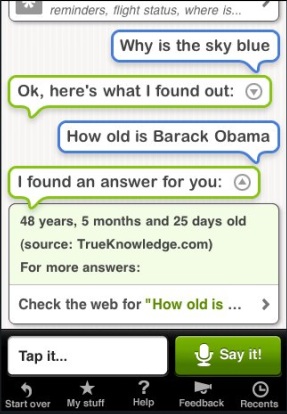
For example, if you ask why the sky is blue, or how old president Obama is, Siri will tap into the Web and find the answers, to the best of its ability.

Also, you can ask for a gourmet French restaurant near you, and it will translate what you have asked to words it can use, such as "expensive", and translate near you to restaurants in a nearby geographical area.


Directions and a Taxi to Pick You Up

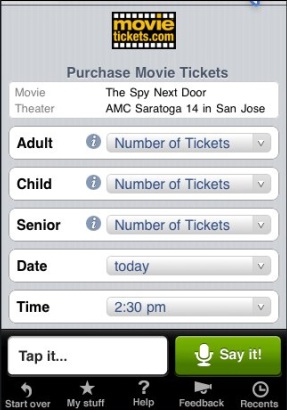
Ask Siri what movies nearby are showing Avatar, and it will tell you. Tell it to get you a pair of tickets to the 5:30 showing, and it will start that process.

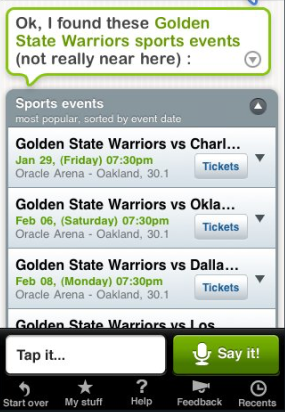
Siri didn't try to reinvent the Web by setting up dedicated services for each of its functions, connecting to a vast network of partners to bring their content to the iPhone. In tests, I could find schedules of events at popular sporting arenas, could call a cab to pick me up at a specific location, or see how far away I was from locations on a Google map.


Movie Tickets and Sporting Events on Siri

Siri works best with fast phones and fast Web connections, as you can guess, given it needs to tap into the cloud to get the data, and present it back to you in natural language. The product is optimized for the iPhone 3GS, and works best over WiFi or 3G. You can get it to work on Edge of course, just expect some latency.

Check it out at http://www.siri.com/ or on the iTunes store.

January 19, 2010

Abuzz Launches Social Media Search App for iPhone

Abuzz Launches Social Media Search App for iPhone

As social media activity becomes an increasing portion of companies' marketing focus, including finding new clients and tracking company brands or product mentions across the Web, a virtual industry of reputation and analytics firms have sprung up to try and derive value from the noise. A simple application called Abuzz just hit the iTunes store with a goal of making these social media searches simple and mobile. The result is a lightweight client that tracks keywords across multiple outlets and even lets you respond to mentions from within the application.


Abuzz Lets You Set Campaigns and Keywords to Track

Abuzz's interface is very easy to grasp. Start by creating a new campaign (such as a brand name or product), add keywords to that campaign, and choose what communities to monitor. Abuzz comes standard with the ability to search blogs, Digg, forums and Twitter, and you can select to not search any of those communities if you believe they do not drive value.


Select Where to Search and Abuzz Delivers Results

Rather than passively watching the updates stream by, you can click through to any of them, including blog posts, which are displayed within Abuzz, without having to open Safari and exiting the app. Similarly, selecting relevant Tweets puts you into a Twitter stream of sorts. If you have entered your Twitter login information, you can respond to mentions, retweet activity with a single click, tag the content for later viewing, or even e-mail it to an interested party.


Abuzz Even Tracks Twitter Mentions and Messages

While Abuzz isn't trying to replace Tweetie or whatever your favorite Twitter client is on the iPhone, its integrated client is good enough for most tasks. It knows, once you have registered, how to easily discover your mentions on the service, and brings your direct messages to the fore for easy viewing.


Take Action on Tweets From Within Abuzz

The goal of Abuzz is to let you monitor social media sites with saved searches at any time from your iPhone. Today's Twitter clients tend to be heavy on the updating and light on the searching, but Abuzz makes the process all about finding relevant content and keeping it easily accessible. As you can see from my example screenshots, Abuzz makes it easy to track clients or recent companies I have written about to watch for impact. The application is authored by Shawn Farner, who details the app as "social search, plain and simple". You can find Abuzz here.

Disclosure: The application is $2.99 on iTunes. Shawn passed me a free code to review.

August 27, 2009

My6sense's Digital Intuition Can Now Be Found on iTunes (Free)

My6sense's Digital Intuition Can Now Be Found on iTunes (Free)

A month ago, I introduced you to a new iPhone application designed to find the best of your information intake, while hiding the less-important news. My6sense's approach at utilizing what it knows about you in an effort to tackle information overload spurred a discussion around digital intuition, and now sees the company talking about where they can take their technology - including services like Twitter. But while they were working on this, there was some bad news - the product wasn't even available for download on the iTunes Store! This was due to a small issue on their part, which they took responsibility for, but it still took a month to get the revised app back through the queue and into waiting customers' hands. Yesterday, the app showed up in the iTunes store (for free).

As the founder Barak Hamachov promised last month, the application is not posted in the same area as RSS feed readers or social networking sites, but instead in "Productivity" - as he and the company believe if you can find out all the pertinent information to your industry or hobby while spending less time searching and browsing, you will be more productive.


Browsing New or Best Entries In My6sense

The core elements of My6sense have not changed since my initial review. I have used the application for the better part of six weeks now, and can rely on it to cut through the hundreds of feeds I read each day, finding the few dozen top articles that I won't want to miss. Along with some UI enhancements, the product makes it even easier to share out to Facebook, Twitter, FriendFeed or by e-mail.

While the product's algorithm is not 100% in the open, the application learns from your own behavior, including what sources you are most likely to read, what topics you are most interested in, what topics you tend to skip over, how likely you are to "stream" or "share" a post, and how much time you spend reading a specific story. And as you read more stories, the precision of My6sense improves.


Sharing an Item I Like In My6sense is Simple

While I haven't turned away from sites like Google Reader or Lazyfeed for being my initial source for data, My6sense does a great job of accurately knowing what I like. If I am visiting the product after I've seen Google Reader, often those items I had just shared are atop My6sense. If I am seeing it first, it's a good reminder of what to share when I hit Reader.


I'm Moving Up the My6sense Intuition Chain

If you don't already have My6sense, I advise you go grab it. It could make you a lot more productive.

July 26, 2009

Appsfire Wants to Make Sharing Your iPhone Apps Social

Appsfire Wants to Make Sharing Your iPhone Apps Social

With tens of thousands of different iPhone applications out there, it's doubtful that many iPhones have the same array of programs. Each time I see a friend page through their loaded iPhone apps, I discover new ones I had never heard of, and they too find surprises from what I have loaded. Appsfire, a new service from Ouriel Ohayon, creator of Topify, lets you share your favorite iPhone apps on the Web, making the iTunes App Store more social.

The service, currently available for Mac OS X clients, with a Windows version planned to debut soon, scans your iTunes library for installed applications, presents them on the Web in a faux iPhone interface, and encourages you to share your library with friends by way of social networks, including Twitter and Facebook.

The purpose? Helping solve the discovery of relevant applications - a process Ouriel says is "ignoring".

The service is in closed alpha now, but we have 50 invites available, first come, first serve to Mac OS X users. http://bit.ly/appsfireLG

You can see some example Appsfire libraries here:Each icon from the virtual iPhone is clickable to the iTunes application store. Lest you think this is a solely charitable effort, you can safely assume that Ouriel will be gaining a piece of any potential purchases, through affiliate links. If this takes off, it could be a great way to not only share new apps with friends, but a good way to send Ouriel a little bit of cash.

Also part of Appsfire? A new link shortener for iPhone developers and bloggers, who all know the usual links to the iTunes Store are a complete pain. You can find that here.


An intro to the service can also be found on YouTube.

July 16, 2009

Prowl Pushes Growl Notifications to Your iPhone for Instant Alerts

Prowl Pushes Growl Notifications to Your iPhone for Instant Alerts

For desktop applications, Growl serves to alert you when important events occur, unintrusively notifying you with a quick message on your screen. Now, with Apple's iPhone 3.0 software supporting application's ability to push updates to you in real-time, a new application called Prowl has bridged the two, bringing Growl updates, which you set on your desktop, to your iPhone, wherever you are.

There is an extensive list of applications that support Growl on the Growl team Web site, ranging from Web Browsers and E-mail to Games, Twitter Clients and Yahoo! Widgets. And if they can push Growl notifications to your Mac or PC, they can push the same notifications to your iPhone, using Prowl.


Setting Up Prowl to Alert Me On the iPhone

To get started, you need to download the Prowl application from the iTunes App Store for $2.99, and set up an account. Then after you add the Prowl plug-in to your computer, you can set up each individual Growl-enabled application to use Prowl, as you prefer. For example, you can set up Tweetie to send a note to your iPhone if you get mentioned on Twitter, or you can set up Reader Notifier to send you an update if you have new unread RSS items.


Many Applications on My Mac Support Growl


I Can Configure Prowl from My Desktop


Setting Up One Application to Alert Me Using Prowl


Notifications from Prowl on the iPhone can be as transparent or as invasive as you prefer, including sounds, alerts or badges, grabbing your attention as news comes to the foreground. Meanwhile, Prowl keeps a record of each notification in the application's history, showing you how often it was activated.


One Prowl Alert, and a History of Updates

Drew Olanoff, who highlighted Prowl on Tuesday, alerting me to the product says "the possibilities are endless". Whether or not that's true remains to be seen, but I found it very cool to get an instant update on my Google Reader share items even when I was in the car or otherwise separated from my laptop today. For all the buzz around what applications were going to leverage Push on the iPhone, Prowl just made an amazing shortcut for all the developers who already had made their applications Growl-compatible.

April 27, 2009

EatWillGrow iPhone App Lets You Tweet Your High Score

EatWillGrow iPhone App Lets You Tweet Your High Score


One Proud EatWillGrow User Tells Us His Achievement

For better or for worse, Twitter is seemingly being integrated into everything. That's both the pleasure and pain of making a service which does one thing well, and pretty much only that one thing. A new iPhone game called EatWillGrow has taken an interesting step of not only displaying global high scores, but letting you broadcast your score to Twitter, and see how other players are doing. The high scores list even features their Twitter nicknames and avatars, making the microblogging service the central database for the game!

The game itself is fairly simple. On your iPhone or iPod Touch, you guide "Blob" through a perilous space, plagued with deadly mines. You gain points by eating food, which makes you larger, and therefore, a bigger target for said mines. There are power ups that make you go faster or slower, making food eating harder or easier, as you flick your finger left or right on the iPhone's surface, navigating the gauntlet.


Playing EatWilGrow Shows Your Rank vs. Other Twitter Users

As you rack up points, a system at the bottom of the screen tells you your overall position in the scoreboard, or alternatively how many points you need to get to position #100. When you lose, and you will no doubt lose, you are informed of your position, and given the option to tweet your score via Twitter, after you have entered your user name and password.

(You can see score reports from Twitter users here.)

To prevent users from cheating and claiming ridiculous scores, EatWillGrow only counts reports from the game itself, which registers as a unique Twitter client, and even posts a screenshot of your score to TwitPic on your behalf. You can learn more about EatWillGrow on the official Web site. The author, @kode80, can of course be found on Twitter when he's not playing the game. Just don't expect to see me tweeting my score. I'm not that good.

EatWillGrow is on the iTunes Store for $.99.

April 18, 2009

Tweetie Desktop for Mac Is Clean, Simple and Robust

Tweetie Desktop for Mac Is Clean, Simple and Robust

Sending messages to and monitoring Twitter on your Mac usually requires running a RAM-intensive Adobe AIR application or dropping into Twitter's standard Web interface. And with Twitter continuing its skyrocketing usage trajectory, more and more utilities are being developed to handle the load - from TweetDeck to Seesmic Desktop, PeopleBrowsr and Tweetie, which on Monday, will debut to the masses its desktop application for the Mac, following on the success of its popular iPhone application, which I've used as my default for the last month or so.

Written in Cocoa for Mac OS X rather than Adobe's AIR platform, Tweetie looks and feels like a Mac OS X application. And like its iPhone cousin, it lets you use all of Twitter's main features, from sending updates to monitoring replies (now mentions) and direct messages. Tweetie, unlike other desktop apps, even lets you log in with multiple accounts concurrently, enabling you to toggle back and forth should you choose to.


Logging in to Tweetie Desktop

Unlike TweetDeck, arguably the most popular Twitter desktop application out there, Tweetie doesn't look like it wants to take over your entire screen. Instead, activity occurs in a single column. To gain access to replies, direct messages, and integrated search, just click on the corresponding icons in the application's left margin.


Checking Twitter Mentions In Tweetie


Seeing Who I DM Using Tweetie


Leveraging Twitter Search In Tweetie

Like any good Mac app, Tweetie even follows Apple's typical keyboard shortcuts. Command-N makes a new Tweet. Command-R refreshes your window and gets you the latest updates. And like with Safari, you can hit Command 1, 2, 3 or 4 to toggle through the available windows. (In this case, the Twitter timeline, mentions, messages and search)


Sending a New Tweet From Tweetie

I switched from TwitterFon to Tweetie on my iPhone thanks to multiple account support, and it's great to see Tweetie hasn't neglected that when looking at working on my desktop as well.

Atebits, the company behind Tweetie Desktop for Mac, has provided a video to show more about the new product, which should hold you over the weekend. Of course, they can be found on Twitter at @atebits and @tweetie.

April 13, 2009

Look Out, Ken Jennings, I Can Play Jeopardy On My iPhone

Look Out, Ken Jennings, I Can Play Jeopardy On My iPhone

The trivia game show Jeopardy isn't just a household name, it's an institution, having been on the air 25 years. The arguably antiquated answer and question show that pre-dates how most people answer trivia these days (with the Web and Google) has managed to stay interesting and relevant for decades, captivating the nation's attention when good old boy Ken Jennings reeled off a ridiculous amount of wins just a few years ago and getting himself named king trivia geek for life. Now, at least for a few minutes each day, at least, I can feel like Ken Jennings, as I dominate opponents on my iPhone.


The Jeopardy Game, Complete With My Signature

The new Jeopardy game for the iPhone, just released to the iTunes Store, lets you select two modes of gameplay - solo, where you answer every single question, and the more familiar multi-player mode, where you face off against two opponents who have wandered into the studio. You can select the strength of difficulty (from easy, medium and hard), and all the facets of game play you know from the show are there on your phone - from Daily Doubles to Double Jeopardy and Final Jeopardy.


One Right Question...


Another Correct Guess...


Betting It All on a Daily Double...

As with any good iPhone game, there are plenty of statistics as well. The Jeopardy game displays to you how well you did for each round of an individual game, and it adds up your total results, including how many questions you got right, how many Daily Doubles you nailed, and how often you got the Final Jeopardy question correct.


Rolling Up the Stats...

Of course, playing Jeopardy on the iPhone is much easier than real life. Instead of needing to form the answer and key it in on your iPhone, it's multiple choice, and you select one of three options, as the lights count down your remaining time. Choosing one correct choice of three means I'll get a lot more right than if I was at Studio City in Los Angeles, but winning still feels good.


One Jeopardy Question. Do You Know the Answer?

You can grab Jeopardy off the iTunes store for $4.99.

March 22, 2009

Doodle Jump iPhone Game is Simple, Yet Challenging

Doodle Jump iPhone Game is Simple, Yet Challenging

Some iPhone games try and recreate the traditional console experience, reminding us of older NES cartridges, or are simply ports from PC titles. Others, like Lima Sky's array of offerings, leverage the iPhone's accelerometer to the point it becomes the entire focus of the game. Such is the case with Doodle Jump, a platform jumping game that has you working ever higher, trying to jump to safety, all while avoiding falling to your demise, or running into monsters and other bad news.

Doodle Jump, unlike a myriad of other platform jumping games we've all seen, never has you standing still, and there's no running for better position. From the time you hit the start button, you are jumping and on your way. Tilt the iPhone right to jump right, and lean to the left to go left. Along the way, you can find platforms that crumble or disappear underneath your feet, ones that move side to side, or be faced with monsters, who will kill you immediately, should you be unlucky enough to cross their path.


Doodle Jumping From Platform to Platform

The sheer simplicity of the game (tilt left, tilt right and shoot by tapping the iPhone) makes the fact that I fail every single time, somehow, annoying, but always makes me feel like I will do better the next time. I found myself tilting and aiming for the springs on some platforms to vault ever higher, and jumping to wrap around the screen to find platforms on the other side that were within reach. But I always died. Something always got in my way.


Trying to Avoid Monsters and Pitfalls

While the game is easy to start, full of platforms and options, the higher you go, the more challenging it gets. You can see markers on the side of the screen, showing how far other players around the world have gone, and you can see the number of platforms disappear, or be replaced with ones that won't help you all that much, as they break away at the mere touch.


Not Always Quite Getting Away from Danger

If you get far enough, and manage to avoid the monsters, or shoot them out of your way, you run the danger of being abducted by UFOs or sucked in by black holes. Your long-nosed four-legged character might be cute, but he's in serious trouble, and you'll want to lead him to safety. You can find Doodle Jump on the iTunes store for only 99 cents.