Silicon Valley Technology Commentary & Archives · Est. 2006 3,045 Posts · 2006–2026

January 1, 2015

January 1, 2015 · 5 MIN READ · BY LOUIS GRAY

10 New Year's Resolutions (for you) for the Year 2015

10 New Year's Resolutions (for you) for the Year 2015

A new year is a somewhat arbitrary point in time to mark change. But tradition has it that we do two things when the calendar turns from December to January. We look back on the previous year, either with pride over accomplishments, or dismissal of bad experiences, and we optimistically expect the best for the coming twelve months.

In years past I've put forth fun predictions for the world in tech. And trust me, I have some predictions, but I'll hold those close to the vest. Working at Google makes predicting the future like cheating. And I won't bore you with a list of my own resolutions for 2015. Instead, I'll suggest (with bias) ten resolutions each of you (and often us too) should take this year to make our online and offline lives even better.

1. Protect yourself and your data from the bad guys.

Seemingly every week, we are seeing news about security breaches at major retail stores, or finding online databases have been impacted. And outside the headlines, bad actors are out there trying to harvest your online information. I recommend protecting yourself by using two-factor authentication wherever possible, trying to avoid the reuse of passwords, and setting up automatic alerts that tell you if your credit cards are being used anywhere, or over a certain dollar amount.

In 2014, I managed nearly 6 million steps on Fitbit.

2. Use intelligent data to make yourself a better person.

Seemingly everyone's New Year's resolution is to go to the gym more or lose weight. But those resolutions tend to fade out after a strong month or so. Instead, find a fitness tracker or application that makes sense to track what you already do, and find a way to increase those numbers. My adoption of Fitbit two and a half years ago helped me lose more than 20 pounds, encouraged me to buy a treadmill, and find the way to walk just about everywhere.

3. Use intelligent data to make your home a smarter one.

Once you know to count your data with services like Fitbit, running your home without data is kind of dumb. By adopting Nest and Sunrun to handle our energy costs, and Rachio to manage our smart sprinkler system, we've not only set ourselves up to save money each month, but we can better predict our use, and make changes when necessary.

Our Solar powered home saves money and saves the air too.

4. If you have money, put it in places with long term benefits.

In 2010, we bought our home, putting out more money than I've ever done. But with rising Silicon Valley real estate prices, that looks like a good investment. In 2011, we refinanced. In 2012, we paid off our cars and, with the exception of our home, were debt free. In 2013, we bought a treadmill, to keep us active, even if not leaving the house. And in 2014, we made two big expenditures: The first being our Sunrun solar system, which will save us more than $65,000 in the lifetime of the 20 year contract, and the second, paying off a home equity line of credit, which was taking $300 a month, every month. We paid it off 28 years early. This year, we're hoping to get rid of our external storage unit, and continuing to take costs off the top.


5. Reduce clutter, be it of physical things or your time.

One of our 'first world problems' is the accumulation of stuff that takes up space. But many of things that occupy space where we live are for temporary enjoyment. I made a choice to ditch physical items for digital ones years ago, and I don't have books or DVDs following me around. Similarly, it makes sense to cut out activities, networks, people or habits that are a time suck for you and may have stopped adding value long ago. Whether it's closing accounts, unfriending, unsubscribing, or just walking away... if you truly miss it, you can always add those things back.

6. See things from another person's perspective.

It's easy, especially online, to divide into two directly opposing camps. What you like is amazing, and what the other person likes stinks. But it's often very interesting to see why someone has made a choice, be it where they choose to spend their time, what hobbies they enjoy, what apps they use or what mobile or computer operating system they've selected. It can't hurt to ask and understand before overwhelming them with your bias.

7. Recognize a lack of diversity hurts everyone, and work to solve it.

There is bias everywhere, obvious or unconscious. The results of generations of bias have led to dramatically skewed workplaces, city makeups, perceptions and manufactured realities. 2014 saw many tech companies open up about their own diverse makeups. Recognizing the issue is just the first step, and being comfortable with the status quo isn't acceptable.

8. Don't read the comments. And if you do, don't respond.

There's a bell curve when it comes to quality commentary, and the fringes of that curve are in charge of most active conversations, be it on mainstream media sites, popular discussion boards, or video networks. Practically every time, you lose brain cells by reading them, and engaging just makes you part of the mess.

9. Do something good for people who need the help more than you do.

Not everyone feels like they can give money to charity, but practically everyone has time. 2014 saw many of my friends get cancer. Another friend lost his 11 year old son to heart disease. Close friends suffered job losses, divorces and messy breakups. The world got Ebola. Adult problems can be a real pain. Find a cause or lend an ear to a friend that needs the help and always be there. The time you give is better than money.

10. Evaluate what you've always been taught and consider whether its true.

Much like bias can be taught from one generation to the next, so can half-truths and pure make believe, from pseudoscience to religion, political leanings and the latest version of history, depending on the author. Put two people in a room and ask them a direct question on a challenging topic, and you'll get wildly different answers. Find out why you'd state yours, and see if a little research could make you update your story.

Starting here, even if you can't get to them all, will have a big impact on you - online and offline, with health, with finance, and well being. You could give yourself a crazy goal that sets you up for disappointment, or you could just start with these. I'm working on each one and have a lot more to do. Good luck to you in 2015.

December 25, 2014

December 25, 2014 · 4 MIN READ · BY LOUIS GRAY

A Successful 100k Steps Leads to a Sore, Yet Happy, Christmas

A Successful 100k Steps Leads to a Sore, Yet Happy, Christmas

Monday's personal record setting Fitbit dashboard

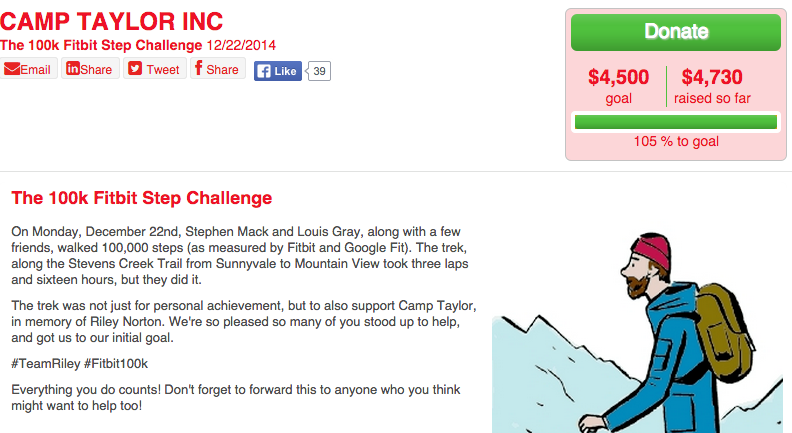
Last week, I introduced a crazy and audacious goal, of knocking out 100,000 steps (as measured by Fitbit), in the name of personal achievement and to raise money for Camp Taylor, a summer camp for children with heart disease, in honor of colleague Ken Norton's son, Riley. And I'm beyond happy to say our adventure was a success.

As chronicled on all the social channels (Twitter, Facebook and Google+ for starters), +Stephen Mack and I passed the 100,000 mark shortly before 10 pm Monday night, after 16 hours of pavement pounding fun that covered more than 46 miles - seeing us start before dawn, and keep pressing forward until daylight was a distant memory. And better yet, our efforts were not in vain as many of you were eager to support us through nearly $5,000 in donations to Camp Taylor, beating our target of $4,500.

Our fundraising goal for Camp Taylor: Achieved!

As I set out in our planning, Stephen and I got nearly all our walking in through three trips along the Stevens Creek Trail, which connects Sunnyvale to the San Francisco Bay through Mountain View, just past the Google campus. We grabbed backpacks with essential snacks and fluids, multiple phone chargers for guaranteed power, and thought ahead - bringing bandaids and Advil for inevitable pain, and head-mounted lamps to break through darkness.


Some scenes from early morning Monday, before the pain.

Our initial pace was quick, as I'm accustomed, and Stephen did a solid job adjusting, as we maintained strides through most of the day, even beyond the 10, 20 and 30 mile marks. And we were lucky enough to be joined for much of the journey by friends, each of whom did a lap with us, meaning we were marching in a group of three for about 80 percent of our trek, sharing new pains, stories and sights with one another.

Having walked greater than 50,000 steps a few times myself, I knew I could hit the 100k as a stretch goal, so long as life didn't get in the way, but as our mark neared, I absolutely felt the fatigues and aches that threatened to make finishing difficult. We were each battling aches in practically every part below our waist, and our feet were a mess of blisters and soreness that wouldn't be solved until we were done.

By the 92,000 mark, just an hour and a half away from the proverbial finish line, I was nearly overcome with dizziness and a slight spell where I was a bit concerned I'd pass out and fall short. Whether I was dehydrated or had just hit a wall, I'm not sure, but with water and about 10 minutes rest, we were able to continue marching, and eventually things settled back to where they were at a good rhythm through the end.


Hitting 100,000 Fitbit steps just before 10 p.m. Monday night.

As my math had planned, we made it back to my house the final time with 99,000 steps complete. We dropped off our heavy bags, and took one last victory lap around the block, reaching 100,000 steps at 9:52 p.m., after a momentary scare that Fitbit couldn't handle six digits and our walk would have been mocked at the very end. My tracker had stuck at 99,999 steps and then jolted forward to 100,007, so no pictures of perfection exist, but we had done it. We wearily high fived one another and then trudged home to call the event a success.

As I told Ken, I promised I would do the full 100,000 steps, and we had done it. Our promise to Camp Taylor, and those supporting us with their donations, or words of encouragement in the streams, was that we would make our full effort, despite fatigue or soreness. And of course, our momentary strains that are nearly gone a few days later are nothing like the prospect of heart disease the youth we were walking for live with each day. So we had pressed on.

Tuesday and Wednesday saw little walking at all, as you can imagine. I completed the Christmas shopping Tuesday and walked around a bit Wednesday, but didn't even crack 10,000 on Fitbit. I hope you'll understand. But I wanted to thank Stephen, and his sister Joanna, our friends Roger and Ken for walking with us, and the more than fifty people who donated to Camp Taylor and really had our back. What we did was hard and fun, and it was made easier with a real and virtual team. This is the experience I'll most remember from this year's Christmas season.

If you haven't yet made your donation to Camp Taylor count, our page is open for one full year. They need all the help they can get. https://www.firstgiving.com/fundraiser/louisgray/fitbit100k

December 18, 2014

December 18, 2014 · 3 MIN READ · BY LOUIS GRAY

Taking the 100k Steps Fitbit Challenge and Raising Money for Charity

Taking the 100k Steps Fitbit Challenge and Raising Money for Charity

On Monday, I have a crazy plan to set a new personal record for Fitbit steps. The goal? 100,000 steps in a single day, blowing away my previous personal best by more than 50 percent, and coming close to fifty miles walked - while also helping raise money for Camp Taylor, a free summer camp for children with heart disease, in memory of Riley Norton, the son of my friend and colleague Ken Norton.

Ever since getting my Fitbit and being hooked on challenging myself to walk further and compete with friends, I've seen the allure of reaching new marks. I had my first 50,000+ step day in December of 2012, and managed more than 60,000 this September, even when I stopped pounding the pavement around 10:30 that night. I've walked 40,000 steps pushing three kids in a stroller, managed more than 200 flights of stairs in an evening in my house, and know that each personal record simply put the bar higher to make the next mark even more difficult.

But as I've seen my numbers increase, the math has a strong magnetic pull toward one-tenth of a million steps in a single day. If one averages 100 steps a minute at a good walking pace, it's fairly easy to hit 6,000 steps in an hour. Given there are 24 hours in a day, managing 16 hours of walking (plus a bit) to reach 100k is absolutely doable, assuming I can push myself to keep going.

So I've been eyeing this 100k mark with some anticipation - looking for a day where I'm out of the office, where my kids are taken care of, and I can just go, walking in a straight line until the day is finished.

This week, as I told my friend (and TiVo employee +Stephen Mack) of my plan, he said he wanted to join in the adventure as well. Stephen, who I profiled on the blog more than five years ago, has been among my most consistent Fitbit competitors for the last two years, and has yet to see a fun contest that he'll turn down - especially if it can keep you in good shape. So we've made plans to set off early in the morning Monday and achieve this goal together.

My comparatively bumpy activity from September's 60k day.

To be clear, walking at a normal pace for most of a day is by no means the toughest endurance challenge one's ever seen. It's harder to run a marathon or a 50 mile or 100 mile endurance challenge. There's no swimming or biking. No weight lifting, beyond our feet. But it requires the will to keep going even if the effort seems monotonous or never-ending. And having a second person there will make the challenge more fun.


The ideal course  will allow for us to keep walking all day without crazy hills or interruptions, even as small as traffic lights. We should be close enough to food so we can refuel beyond what we can carry, and have proper rest stops where they make sense. So I've sketched out a plan for us to navigate the Stevens Creek Trail between Sunnyvale and Mountain View, all the way to the San Francisco Baylands beyond Google's Mountain View campus. With three laps of this trail, we should be more than on our way to the 100,000 mark, and if not, we'll find a way to get there.


So you might ask... why do this? Are your egos so big that you have to take the whole day for a silly hobby of virtual badges? Are you raising money for charity or something? Well, the first answer is "because we can." The math says it's possible, and data exists so we can measure it. And the second answer is also yes. While I'm doing this no matter what, it's also great to have the wind at our backs by doing this for a good cause. So I've started a page to support Camp Taylor, and extension, Riley, who passed away in October far too young after a lifelong battle.

Our walk toward inevitable soreness and personal achievement starts in the dark hours on Monday. I'll be posting our progress as often as I can, batteries depending, with the #fitbit100k hashtag on Twitter, Google+ and all our streams. Good luck to us.

December 17, 2014

December 17, 2014 · 5 MIN READ · BY LOUIS GRAY

Tablets, Touch and Talk: Technology Through the Eyes of a Child

Tablets, Touch and Talk: Technology Through the Eyes of a Child

Braden With my Nexus 5, Watching the MLB At Bat app.

My children have never known a world without high speed Internet, streaming movies on demand, and a seemingly all-knowing personal assistant, available to answer their every question when asked. They've grown accustomed to concepts which once seemed fanciful, like the ability to order all sorts of items on your tablet and have them delivered in the same day, having every photo you've ever taken available to you from any device, or having video chats with just about anyone instantly. For them, there is no such thing as technology. There's just the real world, which is directly impacted by pervasive Internet.

As the major enabler of this, and someone who largely has converted from analog to digital at every opportunity, I've been especially excited to see how this impacts the way they interact with each other, what they choose to learn, and how quickly they grasp ideas - even when, to them, there is no user manual. I'm naturally curious to see what they choose to do and choose not to do, and what simply proves too hard.

My twins are now six years old, and Braden (pictured) is four. The twins are in first grade, and Braden is in preschool. The older two can read well, and do some writing, but while Braden recognizes letters, it's not as if he's sitting down with a good book yet. Despite the mild illiteracy, all three can breeze through tablet usage - from memorizing a pin or lockscreen, to finding applications, launching apps, moving them to folders, and even downloading new ones from the Google Play store. And it's not far-fetched to say Braden is actively learning to read from applications you'd never expect, like Major League Baseball's At Bat, where he's working hard to memorize stats and names of players I've never even heard of. (See also: Wired: How Videogames Like Minecraft Actually Help Kids Learn to Read)

Braden Seeing Baseball Highlights from the Majors on my Nexus 7

Given my kids' capabilities, it should come as no surprise that their primary interaction with the Web is through touch on tablet or phones. They were exposed to iPads and Android tablets early on, and have grown familiar with the practice of touching an icon to launch and app and how to navigate the apps - including the always important ability to hit the small X in a corner to close ads. And when the app isn't what they are looking for, they just ask Google. Depending on how well they ask, Google should find them what they want, whether they are looking for "videos of cupcakes", "pictures of beagles" or whatever strikes their fancy that day.

It'd be easy to say kids, like us, use technology to be entertained. They each have favorite games, and frequently open Netflix or YouTube to watch videos - or, as Braden does, the MLB At Bat app, to see highlights from all of the previous days' games. But they also use applications to draw, or for education, whether they are matching games, flashcards, or adventures that teach them language or math. And on more than one occasion, I've found my Google Express shopping cart full, with hundreds of dollars of items, from everything to do with Disney's Frozen or Minecraft, to books, toys and food. Luckily, they haven't yet figured out the last steps of the purchase, so I've always been able to clear the cart before having to explain away crazy charges.

Sarah posts to YouTube, complete with titles and emoji.

They've each also figured out the tablets and phones are capable of creative work as well. I was recently surprised with an email notifying me that I'd successfully uploaded three new videos to YouTube. After momentarily thinking I'd been hacked, I realized my daughter had not only filmed three new videos, but correctly titled them and uploaded them to my account. Meanwhile, the automatic backup capabilities of Google+ come in handy when we want to see pictures the kids have taken with our devices, from their perspective. Sarah has also been known to tell me to take a photo of something she's proud of, with the intent of my sharing it on Google+ or Facebook, saying "Daddy, take my picture and put it on the Internet."

"My" invite to Brian to join Ingress, sent by Braden.

Last week, just before I wrote my post about Ingress, I got a note from my friend Brian Fitzpatrick, thanking me for inviting him to the game. But I hadn't. Braden did. While I was at the office, Braden had opened up Ingress, sent off a dozen or so invitations to people in my address book, and unhelpfully, dropped some of my equipment into the front yard, for me to reacquire when I got home. That was amusing, and luckily for me, he didn't mess up my account any further. And this Sunday, Braden jacked up our thermostat to 82 degrees, using the Nest app, before I realized things were more than a bit toasty.

On Sunday, we were a comfortable 80 degrees in our house. Thanks, Braden.

Just as important as seeing what they're doing with my devices is seeing what they aren't doing. Aside from the Ingress invites, I've never seen the kids interested in opening up Gmail, or posting to any of my social networks. No fun tweets or posts to delete. No mass apologies to coworkers for toddler missives to internal mailing lists, and no inadvertent likes of odd posts in the stream. They're not interested in Google Drive or browsing the Web, and they've only fired up Sonos to blast music in our house a couple times. For them, the tablets are purpose driven. They have a short time to delivery of the content they're looking for, and if they can't find it, they'll ask Google in a different way, or go back to what they know works.

Just like many of us find we struggle with handwriting after years of regular typing, I'm interested to see how my kids are going to operate with analog assignments that may require pencil and paper, or if textbooks might be the rule, instead of downloadable equivalents. I'm curious to see if they'll master speed typing at a faster age than I did, thanks to the availability of computers, or if touch and voice will rule the day so they might not have to make it a priority. But for now, they're especially handy on the tablet - be it a 5 inch phone, or my Nexus 9, which Braden calls my "big tablet", as opposed to my "medium tablet" Nexus 7. And as Google Now improves, time between what they want and what they find should even further decrease. It's a lot of fun to watch.

Disclosures: I work at Google and enjoy products of ours I mentioned in the post, from Android to YouTube, Gooogle Drive, Gmail and Ingress. So do my kids.