Silicon Valley Technology Commentary & Archives · Est. 2006 3,045 Posts · 2006–2026

May 17, 2011

May 17, 2011 · 5 MIN READ · BY LOUIS GRAY

Review: Google Music Beta On Android and the Web

Review: Google Music Beta On Android and the Web

While Apple's iTunes player and associated family of digital devices (namely iPods) is the ten ton gorilla in the digital music space today, competitors are setting up to poke holes in Cupertino's current position, with the on demand socially-oriented music streamers like Spotify and Rdio on one side, and the music lockers like Amazon and Google Music on the other, while Apple is largely expected to counter with its own cloud-based offering in the not too distant future. The music industry being what it is, a near monopoly run by people a little tired of having their businesses eviscerated by smart geeks with software for the last decade plus, no one service has been able to get everything it wants all at once. Spotify's US entrance has been slowed repeatedly, while Google and Amazon stopped short of signing all the labels, launching their service as solo silos, with later deals expected to fill holes. It's a crowded field with much riding on who gets access to what music and in what form.

On that backdrop, Google Music opened up in beta as part of Google I/O last week, not delivering the seemingly infinite music library I've enjoyed from Spotify over the last 18 months or so, but instead, giving a music player in the cloud on any modern browser - pushing me to find my non-DRM music files and transfer them into the cloud for later playing. Not limited just to Chrome, the service plays well with Safari and Firefox on the Mac, and an accompanying Android app accesses the same library - providing you access to your tunes from just about anywhere - convenient once you've achieved the task, but still feeling like homework when you first get started.
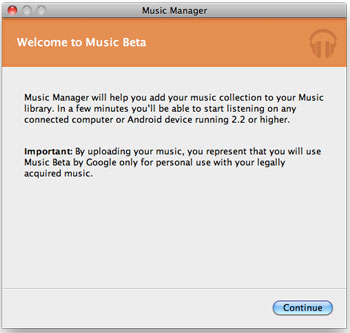
Music Manager Gets Me Started with Google Music

As noted Sunday, my main media Mac (an older generation MacBook Pro) has the lion's share of my music, with the MacBook Air having a few hundred songs only - all my activity having leaned to Spotify for the last two years. Nonetheless, I downloaded the Music Manager from Google, told it where to find my music, and for several hours this evening, the application uploaded my MP3 files to my Google Music locker, leveraging my iTunes metadata to correctly assign song details, including artist, genre, and even how many times the songs were played.
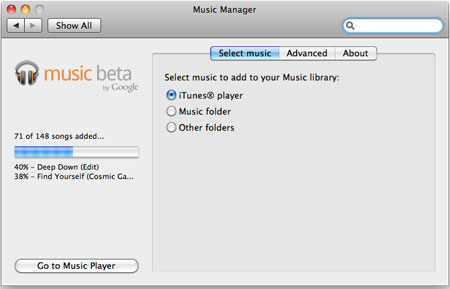
The Music Manager Uploads My Tracks to the Cloud

The Result Is All My Artists and Albums On the Web
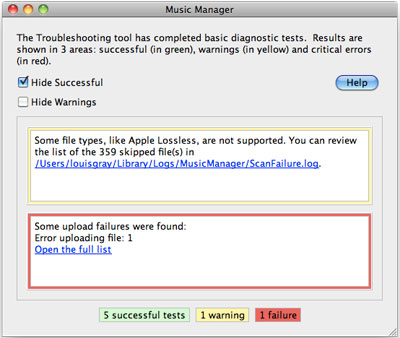
As Google Music can only post non-DRM tunes, of the 500 or so songs I have, just under 150 were found to be available without Apple's lossless formatting. Music Manager installed itself as a control panel on my Mac and uploaded tracks two at a time to the cloud in the background. I have to imagine that with larger libraries numbering thousands or tens of thousands of songs, this process will no doubt take days or weeks, so if you can use a non-production computer, or can set the job to take place overnight, you're probably better off.

If the Songs Have DRM, They're Not Going Anywhere
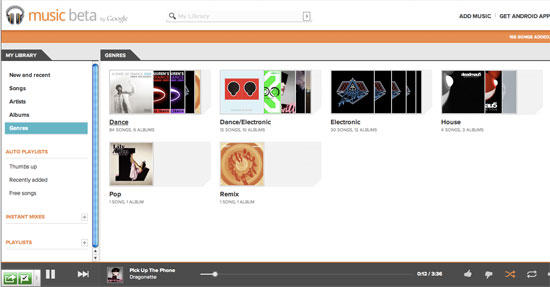
You Can Sort Songs By Genre, Artist, Name or Album

In this regards, for traditional iTunes users, Apple may have a leg up in its proposed cloud strategy, pointing to your previous iTunes purchases as being "owned" by you, while you're responsible for uploading or flagging the others from your own collection. The process of uploading seems cumbersome, but should only have to be done a single time. Alternatively, it'd have been great to check my own database of music against a central database owned by Google, who could simply "unlock" tracks or albums for me, skipping the actual data transfer process. But with no deals done, the music locker is simply an empty bin for me to fill, even if the metadata assigned to some of my songs is incorrect.

My Albums On the Galaxy Tab 10 Android App

As my songs started to populate Google Music online, the same familiar user interface most of us know from programs like iTunes, WinAmp and others is displayed, listing the song names, times, artist, albums and play count. Instead of a five star Apple-like rating, you can thumbs up or down individual tracks, but other attributes are the same - including the ubiquitous shuffle feature, and "Instant Mixes" which parallel Apple's "Smart Playlists" feature.

Seeing My Deadmau5 Songs On the Android Google Music App

Playing songs is straight forward in the browser or on the Android app. Click the track you like, and as with iTunes, you can use your keyboard to control most playback - using arrow keys to go forward or back, and hitting the spacebar to pause the song. Other aspects of the service are also similar, including editing track data, although you can't batch edit songs, and as the service is from Google, an Instant Search-like field is available at all times, so if you want to find an artist, song or album, start typing and that from your library will surface.

Searching on the Google Music App In Android

On the Android side, I tested the Google Music app on the new Honeycomb-enabled Samsung Galaxy Tab 10.1 that all Google IO attendees (press included) received last week. As the system recognized my account was tied to my own library, all songs posted to Google Music in the cloud were available on the device - with no downloads needed. On both Web and tablet, the music quality is very good, and i wouldn't expect otherwise.

Playing a Track On Android On the Galaxy Tab in Google Music

After nearly two years' experience on Spotify, the sheer nature of the cloud music is not dramatic, but getting the opportunity to convert my iTunes library from something that is currently locked down to spinning disk on a single computer and a few iPods to something I can access anywhere is no doubt going to be liberating - just like it will be when Apple finally brings their own cloud option, or when I tag my own library within Spotify to auto-add the songs I've purchased elsewhere.

From my talks with people close to the cloud music wars, the dollars and aggression being tossed about between players is intense, in a powerful cascade of one-upmanship from one player to another. Right now, it doesn't appear that Google has paid the top dollar needed to put all the labels in their court and out of Apple's hand, and Spotify is the little guy compared to a major league tug of war between Google, Apple and Amazon. Until this all gets sorted, Spotify remains the best option for me to get music I don't already own, and Google Music is an increasingly convenient option for the music I already do. For my Android-centric world that hasn't messed with iTunes much lately, it's good to know I can welcome back my old albums in my life again.

Google Music can be found in beta at http://music.google.com and the accompanying app can be found on the Android Market here.

May 15, 2011

May 15, 2011 · 4 MIN READ · BY LOUIS GRAY

AOL In the Attention Business, Mobile Getting More Of It

AOL In the Attention Business, Mobile Getting More Of It

Following HP's acquisition of Palm last year, David Temkin, the VP for the Developer Platform at the company, exited stage left to AOL, joining forces with Brad Garlinghouse, Tim Armstrong and the new management at the firm which is working to redevelop and revamp one of the best known Web brands which comes with the baggage of significant history, with more than its fair share of ups and downs. With the move, Temkin gained an incredible role, running all of mobile for the Internet giant, at a time when mobile content is growing faster than any other segment and users are more likely to add new behavior to their repertoire, unlike on desktops, where users are less likely to change their habits. On Thursday, Temkin updated members of the media on recent product launches and how the company approaches the important world of smartphones.

AOL is no slouch when it comes to the world of content and demanding users' attention - so much so that Temkin said "AOL is in the attention business," adding, "You gain attention by going to the users where they are."

AOL's Engadget App Drives More Page Views than the Web Itself

Users are increasingly going to their mobile devices to consume content, which has led the company to create 30 or more applications for iPhone and Android, with simple presentations of content, focused on delivering a "delighting user experience". With just under a year's tenure at the company, Temkin started with reaching out to all the disparate brands at the company and working with them to take the content they were already producing and making a strong mobile experience. While the most popular app, by a long shot, is Engadget, others include Moviefone, which hit iPad less than a month ago, and Popeater. In fact, the Engadget app drives more page views than the Web site itself - excellent numbers.

With dozens of popular iPhone apps on the roster, AOL recently shipped an Android-only music application, called Play, which was quickly featured on the Android Market, scoring more than 300,000 downloads in just two weeks. As users are still finding which applications deserve their time, Temkin sees the mobile market as having serious greenfield opportunity, gaining new customers and pushing others to switch their preferences.

The New Moviefone for iPad from AOL

"On mobile, people are still establishing their habits," he said. "User behavior on the desktop is fixed and difficult to change. It's an uphill battle."

That AOL is dropping dozens of new applications and new brands on multiple platforms is a far cry from the environment Temkin joined in mid-2010, when even the main company site was optimized not for smart phones but for feature phones, without rich media capability.

"AOL.com on mobile, when I joined, was a slightly upgraded WAP site," he said. "Now it's buzzword compliant and we have more than doubled in the year the number of users we have coming in. It's a nice thing to improve the product and see the kind of results we have."

Coming Soon: Editions from AOL

Still on the docket for release is the much-anticipated Editions magazine, coming for iPad in the vein of Flipboard and Zite, but driven by algorithms based on the users' interests and preferences - yes, much like my6sense and others have made their focus. As Temkin described, the application will not be an editorial publication, but driven by artificial intelligence, pulling in content as if there were an editor driving the magazine.

"Your cover will be unique to you, with the topic you are most interested in and what the publication thinks is most important," he said. "We are scanning thousands of sites. We track what you like to read based on what you click on and explicitly what you say you like by subject. Algorithms drive the layout."

If AOL is in the attention business, tracking your own attention to its properties seems like an obvious next step. As smart phones get more capable, and AOL pushes to have its content in front of as many eyes as possible, you should expect to hear the name David Temkin a lot, for he is running the strategy of the fastest growing piece of one of the biggest Web brands in the business.

As AIM head Jason Shellen quipped Thursday, AOL "has become a powerhouse for smart people, and it should become a not so quiet revolution soon. It's about bringing the brand up a level."

Disclosures: my6sense has similar functionality to that promised in Editions and other news readers with advanced personalization capability. I am VP of Marketing at my6sense. Additionally, HP is a client of Paladin Advisors Group, where I am managing director of new media.
May 15, 2011 · 4 MIN READ · BY LOUIS GRAY

Tackling My Biggest Impediments to Cloud-centricity

Tackling My Biggest Impediments to Cloud-centricity


More and more of my activity, both in desktop and mobile computing, is cloud-based. More Web services are replacing desktop applications, while activities that used to be the focus of local storage (including photos, music, video and email) are being delivered from the Web instead. But I'm not totally converted yet, and I can see how even the most forward looking of early adopters could still have some hangups in being fully cloud-enabled. To get to a cloud utopia, work has to be done not just on the operating system side, but on native apps, and peace of mind has to be delivered for users that they will lose no data or functionality in that transition.

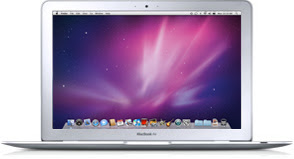
In January of last year, anticipating a more cloud-centric future, I moved to a MacBook Air, one that had about half the storage space as my previous laptop, reversing the trend of larger and larger trays of spinning disk. Using the same device 16 months later, I haven't gotten close to using up the 128 gigabytes, although I have to admit I ended up installing a lot more programs on it than I had originally hoped.


Even with this admission, I kept the older MacBook Pro around under the guise of it acting as my "media machine", the master data set of all my music, photos and video. While I walked away from iTunes for music, every few months I'd transfer the latest home photos and videos via USB from the AIr to the Pro. Some got posted online and others not. With Google Music and Picasa offering options to upload all this content to the cloud, I know I'm just a few painful uploads away from finally migrating (once I get a new battery and charge the sucker).

Google's pitch for everything being on the Web is smart and future-looking, but it neglects, for consumers anyway, the story of migration, from one OS to another and also from one frame of mind to another. As Gmail once did with its offering a gigabyte of storage space at a time when competitors offered tens of megabytes, I have to think that letting people copy their important files to the cloud in a personal storage locker would be quite compelling. Steven Levy's "In the Plex" recounts the demise of a Google project "GDrive" thanks to its file centricity, but real consumers have real files and want to know they will never lose them in the future.

For me to truly get to the cloud one hundred percent of the time, I still need to:
  1. Convert my DRM-laden Apple iTunes songs to DRM-free MP3 files
  2. Synchronize those songs with Google Music and Spotify
  3. Upload all my photos from iPhoto to Picasa and/or SmugMug
  4. Migrate all my .Mac email archives to GMail
  5. Migrate old Word documents and PowerPoints to Google equivalents
#4 and #5 are supposedly easy. Find the right file types and point them to the right place, while making them private. But in practice, these migrations take time. I've had my unfair share of IMAP migrations to and from Mac to Gmail and probably have multiple email copies all over the place at this point, but the deepest archive is in local storage.

#3 touches on emotion as much as data. There's comfort for some in burning old photos to DVD, even if DVD (and CD-Roms and floppies before that) are holdovers to a doomed era in physical media. And songs are songs. I love my Spotify, but I bumped into an old Underworld album I own on iTunes that I hadn't seen in years and was reinvigorated to reclaim all that stuff I've purchased, so I wasn't walking away from thousands of dollars in investment, but also favorite tunes I might not remember later.

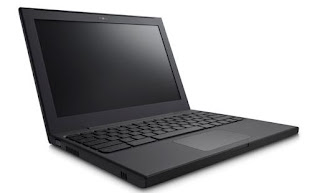
I have been using the CR-48 Chromebook more and more lately, using it exclusively at the Google I/O, SXSW and CES events, thanks to its great battery life and ease of access to 3G and WiFi connectivity. I am using the Chromebook more and more at home too, when I don't need to use Photoshop or take partial screenshots - something the Mac still does better than anything else I've seen.

I see the current state of Chrome OS as that of Mac OS X 10.0 upon Apple's launch of that operating system back in 2001. It didn't initially support DVD playing, and scads of programs were missing, forced to boot in Classic mode, including the aforementioned Adobe Photoshop and notably, Quark Express, key for the Mac's design culture. But eventually those holes were filled, and Mac OS X hasn't looked back in a decade.

Can Web apps replace Photoshop and other intense programs outright? Probably not on day one and maybe not even before the end of 2012. Google promised close tie-in with Citrix and VMware, telling the story of virtually connecting to apps outside of the cloud, and using them there. That's a really geeky solution to what would be a standard use case on a more traditional platform. I have to imagine that if Chrome and other cloud-centric options grow, traditional software makers (as Microsoft did with its Web office in response to Google Docs) have to start thinking about getting their apps into users hands on these new platforms, while the earliest users are going to have blood on their hands thanks to being on the cutting edge.

We're in the early days of a true cloud OS, and I've got a lot more room myself to go before I close the lid on my last MacBook. Agreeing in principle that I need to get my important data of rusty spinning disk, I have some work to do, and will keep up this effort. But more messaging has to address the issues of migration, storage space, compatibility and success in places where connectivity isn't pervasive.

May 13, 2011

May 13, 2011 · 2 MIN READ · BY LOUIS GRAY

MLKSHK: High Calorie Junk Food Photo Fun You'll Pig On

MLKSHK: High Calorie Junk Food Photo Fun You'll Pig On

You know what goes well with I Can Has Cheezburgers? MLKSHKs. In the vein of simple and addictive sites revolving around fun photos, images and community, MLKSHK, the brainchild of Andre Torrez of Simpleform, and formerly of Federated Media, MLKSHK opened its doors tonight (yes, on Friday the 13th) to push you to share your online findings with friends. As I found with late night discussions on Convore prior to that site's unveiling, the combination of creative friends and fun images strewn about the Web can often be side-splittingly funny, and MLKSHK hopes to capture all that in one place - organized by categories, and each share gaining the option to get user interaction in the forms of comments, saves and likes.

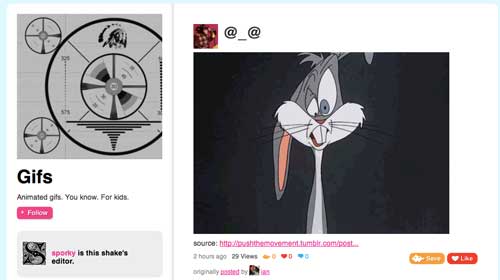
MLKSHK (obviously pronounced "Milkshake") separates grouped discussions and shares in what they call "Shakes". You can view shakes from all your friends, find featured shakes chosen by the community, or browse by collections, from animated GIFS, to comics, typography, all manner of TV shows, and of course, off the wall stuff one would expect from a @torrez or @mat project, like "Booze makes it all better" and "Roboshake 2084".


Do I expect to be a lot more productive with my life now that MLKSHK is open to the public after having early access for two months? No. Do I expect to jump in and find yet another site full of silliness and images that everybody wants to see but pretends they don't? Absolutely.


As the service's front page says, "Easily save images from everywhere on the web. The silly ones, the sweet ones, the cool ones, and the gross ones—then share them with your friends and family. Join groups of other people who like the same silly and cool stuff you do and contribute your own."


I've been in tons of silly communities, and most of them end up having a tremendous number of frothy conversations around silly images, be they started on FriendFeed or Facebook, the old Brizzly, Convore and now MLKSHK. Wrinkle your eyebrows at this entry to the world or not, but you know this is the site everybody wanted. Go forth and share.