Silicon Valley Technology Commentary & Archives · Est. 2006 3,045 Posts · 2006–2026

March 31, 2011

March 31, 2011 · 2 MIN READ · BY LOUIS GRAY

Google Launches Page Speed to Get You Loading Faster

Google Launches Page Speed to Get You Loading Faster

One thing I often hear from Google employees is that what's good for the Web is good for the company. The more people browsing the Web at faster speeds with more capable devices, the more people are using Google services and products. Of course, a corollary to this is that even more people will be seeing Google hosted ads and hosting those ads themselves. Last year, Google's Matt Cutts made waves by saying faster-loading sites would gain better results in Google's important search index, and you've seen the Chrome browser team talk about speed being a major differentiator for them. In that vein, today we see the launch of Page Speed, which analyses any domain and provides feedback to help you run even more quickly. The focus is not on total page load time per se, but to eliminate any pieces that introduce latency.

Page Speed Online, hosted in the company's Google Labs, looks at content of the Web page, and generates suggestions that could make the page load even more quickly. As they explain, reducing page load times "can reduce bounce rates and increase conversion rates".


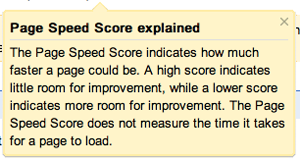
You can post any URL and see feedback for either desktop or mobile use. For example, this blog scored an 83 of 100, which does not mean it loads quicker than 81 percent of pages on the Web, but instead that the code could use almost 20 percent improvements. Page Speed then chunks the recommended improvements into low, medium and high priority, for example, suggesting I losslessly compress my images, leverage browser cashing, or reduce the amount of HTML and JavaScript code in the page.

Recommendations from Page Speed Online

In comparison, TechCrunch received a 70 out of 100, Google gave itself 100 out of 100, Apple scored a 78 and Digg received an 87.

Many of the suggestions referred to third party scripts for widgets and other trackers, which are largely out of my control, but there are some helpful tips that if followed could likely take seconds off every page load. To get your site a quick review, go to http://pagespeed.googlelabs.com.
March 31, 2011 · 3 MIN READ · BY LOUIS GRAY

Seesmic: My Go-To Twitter Client on Android (and #Wp7)

Seesmic: My Go-To Twitter Client on Android (and #Wp7)

Twitter's guidance earlier this month strongly suggested that developers working on their ecosystem bring additional value to the company, rather than trying to compete with them on a dedicated client. While assurances were made to entrenched players like TweetDeck, Seesmic and others that their products were safe, it's come with a subtle hint that Twitter's own applications are not only the market share leaders, but are also the best. But for me, I've not always agreed that's the case.

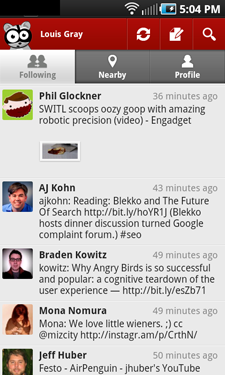
While I rely heavily on Twitter for Mac (originally Tweetie) on the desktop, my choice on mobile for Android (and Windows Phone 7) has been Seesmic - both due to its intuitive and lengthy feature set, but the constraints put on Twitter's own client.

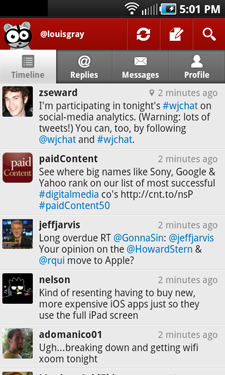
   
Many Supported Seesmic Accounts and the Twitter Timeline


Twitter has stated (and likely they've done so rightly) that they want to appeal to more of a mainstream audience - one just coming to grips to a 140-character world full of weird languages that contain hashtags, RTs, replies, lists and other oddities. They also have a business premise of promoting their service as the exclusive place for news and social discovery. This has left an opening, taken by both TweetDeck and Seesmic, to provide a client that supports both multiple services and multiple accounts - on both desktop and mobile. For the power user who needs to use multiple accounts, you simply cannot do that on the official Twitter client for Android today, full stop. And forget about using Facebook, Google Buzz, or any other service. It's not their interest. So I've had to shop around.


Facebook Streams and Google Buzz In Seesmic for Android


Since the company's pivot from video comments to major social media client, Seesmic has forged an interesting role of being available on practically every mobile platform and OS, adding Ping.fm for broadcast to multiple services simultaneously, and recently, doubling down on enterprise efforts with early support for Salesforce Chatter and keeping close ties to Microsoft with one-off deployments for the Windows platform.
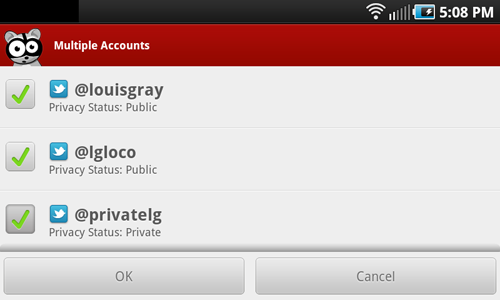

Updating Multiple Twitter Accounts Via Seesmic for Android
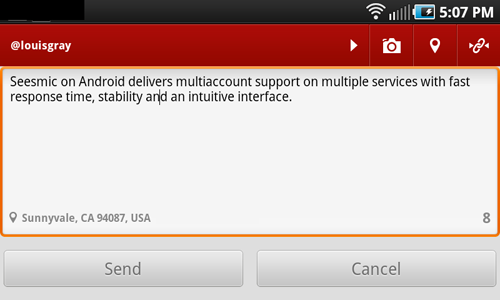
Posting an Update to Twitter on Seesmic With Geolocation


Seesmic first gained praise from me about 2 years ago with the launch of Seesmic Web, which was much more fully featured than the Twitter alternative. With Twitter having revamped to "#NewTwitter", the gap is less clear, but on mobile, Seesmic still reigns supreme. Having gotten frustrated with slowness, application timeouts and the inability to use more than one account on the official Twitter account, I turned to Seesmic, and the application not only did more, but was faster and extremely stable. No more failed searches and force quits.
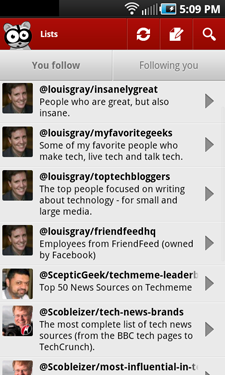

   
Twitter Lists and Saved Searches Support In Seesmic


Beyond the standard Twitter functionality, from timelines, mentions, profile browsing, saved searches and list support, Seesmic's acquisition of Ping.fm means I can post to multiple accounts across services simultaneously, and the services are more than just "check the box" implementations. I was surprised to see how deeply you could monitor fan pages on Facebook, and the addition of Google Buzz support is welcome for me.

Amusingly, one of the boons of Android also turned out to be a detraction, for after Seesmic's installation, I would not only receive notifications from the native Twitter app that replies and messages were waiting, but the same activity would double down my alerts, coming from Seesmic as well. So I did the unthinkable and the official Twitter app is off my Android devices, which eliminates duplication. Meanwhile, on Windows 7, Seesmic was the first app I downloaded, comfortable the experience would be familiar and very useful.

To paraphrase the fun line of commercials from Dos Equis, I don't always tweet from my mobile device, but when I do, I use Seesmic. If you need multiaccount and multiservice support, it's the best dedicated client for the job. I even told them so myself for an article Wednesday on the company's blog, one of many folks who told Seesmic why they were the choice.

Disclosure: my6sense, where I am VP of Marketing, has an Android client, of course, and our app contains the ability to share updates to Twitter, Facebook and Google Buzz. If you're trying really hard, you could consider Seesmic a competitor. :)

March 30, 2011

March 30, 2011 · 2 MIN READ · BY LOUIS GRAY

The Social Graph Is Not Enough to Find a True Me

The Social Graph Is Not Enough to Find a True Me

Last week, I gave a presentation at the Kynetx Impact conference just outside of Salt Lake City, Utah, talking with the developer audience about the Third Wave of the Web, and my continued belief that true personalization in both the Web and in our mobile content consumption is what will drive the most dramatic changes to the future of the Internet, following on to the first wave (Information Retrieval and Search), and the second wave (Social Networking). Most directly, I believe that the current approach taken by many leading Web companies, to assume that your friends' recommendations and shares constitute personalization for you, is not enough. True personalization is about your own interests and preferences.


The most well known example of recommendation services that rely almost exclusively on your social graph is that of Facebook, where it's generally assumed that if many of your close friends like a topic, that you will as well. My common example is that if your friends like Mamma Mia, it's assumed you like Broadway plays and if many of your friends have given a like to one establishment or another that you would of course be more interested in that. This is extended with tools like Foursquare and others, who give the social connections a big push to bring you new stuff you might like.

There's no question that collaborative filtering brings value. But it's not enough. What's more accurate is that you are driven by your own preferences and just because your friends like something doesn't guarantee that you will. Only you have your unique makeup and interests, and the knowledge of how to rank those interests. For example, you may like both Katy Perry and Depeche Mode, and you might prefer Depeche Mode to Katy Perry, or specifically prefer one song of Depeche Mode or the entire album continuous. That's your preference, and what's needed is the ability to learn from your own behavior. The Web sites and applications that do this in the right way will start to separate themselves from the competition.

So look at the news just from the past few days. Google is now going to personalize your Ad experience based on your activity in Gmail. That's a good move, based on your own implicit history. But in parallel, we have more chances to tap social signals with +1 in the search results (for starters). At my6sense, we talk a lot about the best signals to watch for to deliver a real human experience that's personal. And it takes more than just collaborative filtering. See the embedded presentation to see just what I mean.

Disclosure: I am vice president of marketing at my6sense. I was not compensated by Kynetx for my presentation, but they did cover expenses for the trip.
March 30, 2011 · 2 MIN READ · BY LOUIS GRAY

Google's +1 Is For Much More than Just Search Results

Google's +1 Is For Much More than Just Search Results

This morning, Google is introducing a new feature within the company's search results aiming to provide social recommendations to one's extended connections. The +1 feature lets you tag results and Web sites you find valuable with the expectation that friends of yours see your +1 and can take that into account when making a follow-up decisions. At first glimpse, this doesn't appear to be too dramatically different than previous attempts to show intent, with starring results, social search and other methods, but one can see where +1 is landing to hint at the future of the program.

In the company's introductory blog post today, Google talks about sharing recommendations with the world. The idea is that if you find a result you like in search, just hit +1. Theoretically, follow-on searchers will see the right recommendations at the right time in the right format.

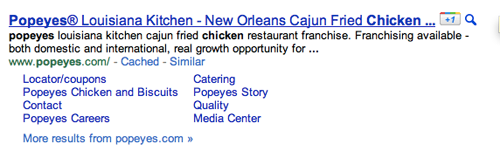
A +1 Next to Popeye's Fried Chicken

So who are your friends and how do they see your inputs? Well, for starters, they are looking at those people in your Google social graph, including chat friends and contacts. The company hints at using connections from Twitter as well, notably excluding Facebook, who hasn't historically wanted to play nice with Google in sharing data. The +1 data is also closely tied to your Google Profile, which is a sibling to Google Buzz, which also has following and friend-like attributes.

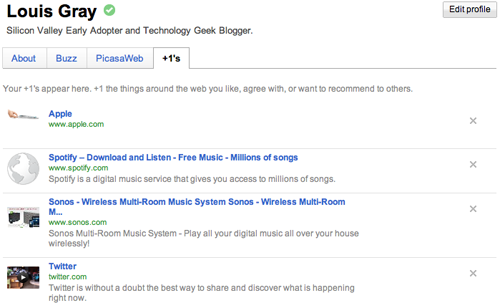
My +1s Are Displayed on My Google Profile

The introductory video for +1, almost a minute through says:
"Soon you'll be able to +1 more than just search results. You'll also find the +1 button on sites across the Web, making it easy to +1 pages after you've visited them. The Web's a big place. Sometimes it helps to have a tour guide."
This makes it sound more like a Delicious-style bookmarking tool (outwardly facing) than a RT-style Twitter endorsement. So where do these +1's go? Well, they're immediately posted to your Google profile, in a tab that you can make private or public. Says the dedicated site: "Your +1’s are stored in a new tab on your Google profile. You can show your +1’s tab to the world, or keep it private and just use it to personally manage the ever-expanding record of things you love around the web."

You can start seeing the +1 button on Google search results now by signing in to the search experiment in Google Labs. More detail on the +1 button is now available on a dedicated microsite. I would assume we might start seeing "+1" buttons all over sites that want to get more Google juice from social recommendations soon.

You can find all my +1s here: https://profiles.google.com/louisgray/plusones.