Silicon Valley Technology Commentary & Archives · Est. 2006 3,045 Posts · 2006–2026

June 10, 2011

June 10, 2011 · 1 MIN READ · BY LOUIS GRAY

Quora Hits the Shuffle Button for Q&A Randomness

Quora Hits the Shuffle Button for Q&A Randomness

The stickiness of Quora for engaged users has been the ability to rapidly find discussions of interest on topics you've selected to follow, or from people you've connected with on the network. But while that alone can provide you with plenty of both information and entertainment, the question and answer service took a queue from services like iTunes, Tumblr and StumbleUpon by adding a Shuffle function tonight, which brings you to random pages within the site. Let the hilarity ensue.

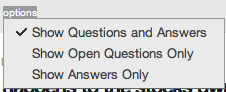
The Shuffle button, which appears at the bottom of any question and answer page, has three options, including showing both questions and answers, showing only open questions which lack answers, or just showing answers. You can also get to a random Quora page by going to the dedicated URL: http://quora.com/shuffle. Quora cofounder Charlie Cheever credited the new feature to two Quora employees, Shu Uesugi and Tracy Chou.

Quora's New Shuffle Button In Action

You Can Select What to See When You Shuffle On Quora

Using the Shuffle feature brings you to a random page on Quora, on any topic, be they posted by friends of yours or not, in topics you may follow or those you don't. Like StumbleUpon, there's certain to be a high bounce rate of people scanning quickly and hitting the "Next" button to get the next Shuffle. But it does have the option to spring people out of a self-reinforcing echo chamber and being exposed to more serendipity. No doubt Marc Bodnick loves it. Start shuffling at http://quora.com/shuffle.
June 10, 2011 · 5 MIN READ · BY LOUIS GRAY

Chromebooks Poised for First Look Under the Microscope

Chromebooks Poised for First Look Under the Microscope

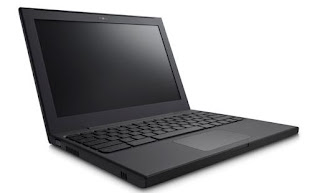
Google's browser-centric Chrome OS will be getting its first reviews from those outside of the company's beta program starting this week as units from Samsung and Acer reach the first buyers on OEM hardware. Already, reviews have started flowing in, with the first observations offering a mixed set of feedback, as many struggle to find a way to assess the products - either comparing them to traditional OS-based laptops, or thanks to the pricepoint, against low end netbooks.

Unsurprisingly, the responses are typically positive about the ease of use and access, but eyes are quickly drawn to what's missing, namely, the host of traditional software applications that live beyond the browser today.

Browsing my Mac Mail on Chrome OS With Google Music Playing


When launching a new product into a very crowded space with tons of history, a new challenger needs to determine a few things, including:
  • Does the product accomplish something altogether new, never done before?
  • Does the product improve upon existing systems in capability or performance?
  • Does the product save people money while offering similar capability?
For those curious about ChromeOS or iOS or Android or any new technology, the basic questions revolve around whether the new product will help them achieve more, or avoid problems with what's already in place. In my initial review of the beta CR-48 unit, I said the browser lock-in felt like I "had been placed on house arrest," adding "serious efforts will need to be taken to convince people why putting everything in the cloud, and abandoning (for the most part) applications they know well, will help their lives." This is the age-old conundrum of marketing in general - tell us why it's better, not just that you've introduced something, but why this will help me.

In the ensuing months, I have increasingly been using my ChromeOS notebook (and am writing this post on it now, while streaming tunes on Google Music). The device's built-in 3G connection, thanks to Verizon, and incomparable battery life has made it a must for events and practically any time I leave the house. I've taken to calling it my "car computer", much like the carphones of old, as instead of lugging a heavy laptop bag complete with power cords, I just put the CR-48 under my arm and then place it on the passenger seat. I'm often stopping before or after meetings to use the laptop from the parking lot, or catching up on email before I drive to the next place. It's incredibly convenient. That said, it's still playing the role of the "second computer" for me and will likely for most people until they get more accustomed to cloud-based Web apps, and as those apps increase in number and quality.

Google's team hasn't said ChromeOS is for everyone. For designers bound to Final Cut Pro and PhotoShop, abandoning those apps is a practical impossibility. At Google IO the company instead spoke to the worker bees who primarily use their company laptops for email, Web access and word processing, all of which can be done on ChromeOS with solid quality, even if Google Docs still takes some getting used to for the Microsoft Office whiz. The company's initial marketing forays speak to fast boot up (which is yes, very fast), the elimination of viruses so common on Windows (but don't scare most Mac users), and the future being the Web. As I wrote on Tuesday, the definition of cloud differs between tech companies these days, but Google's approach, where all user data is on the Web, and the hardware is interchangeable, seems the most pure.

My Current Array of Browser Apps Is a Start for ChromeOS

A Web centric world is one that takes some getting used to, but once you've gotten used to having 3G networking everywhere, and battery that goes all day, typical limitations seem substandard. My wife borrowed my CR-48 to take with her to a meeting at church (which has no WiFi) and while on 3G, she was able to download the membership directory and edit a spreadsheet for upcoming meeting schedules. On the CR-48, all we had to do was make a new user for her on my machine, tied to her own Google account, and her activity didn't get in the way of my own.

Initial feedback on the CR-48's flaws, including the much-maligned trackpad and perceived pokiness, have pretty much been eliminated after months of quick driver updates over the air. I now routinely have Google Music running in one browser window, Seesmic or Twitter in another, and in a third, multiple tabs open to my multiple email accounts. Instead of a cluttered interface, however, Chrome OS has adopted to let me quickly rotate screens, either from a dedicated key for "Next Window" or the familiar alt-tab, used more commonly to switch apps in Mac or Windows. And knowing what I know about Samsung's high quality hardware, which is behind my Android tablets, my Android phone and the TVs in our house, I am looking forward to seeing what they do with their first Chromebooks.

With this first volley, you can anticipate media reaction, which will no doubt be eager to claim success or failure of the project, with box counters and trend spotters alike looking for initial sales numbers and market share penetration. My bet is you won't get sales numbers from Google directly, while Samsung, Acer and others will give insight into the results, or Best Buy might report the data from their online store. It's also extremely likely that Google is in this game for the long haul. Chrome is one of the pillars of the company, so if there is anything resembling slowness, they'll listen and iterate fast, as they're known to. Meanwhile, you can look forward to headlines like those from PC World who eagerly said Chromebooks are "doomed to fail". Everybody wants their bets in early, in the chance they might be right.

What I know is that after initially relying on MacBook Air for more than 90 percent of what I do with my laptops, the Chromebook is taking more and more of my time and it's liberating to take it with me to the park or anywhere I need to go and know my data and my Web will be with me. I look forward to apps I've had to leave behind, like Spotify and others, making the leap to the Web and away from the desktop metaphor. I'd bet, just like the transition from Mac OS 9 to Mac OS X a decade ago, those laggards will get there. And you just might see people increasingly taking to Chromebooks for low-cost access to the Web.

June 10, 2011 · 2 MIN READ · BY LOUIS GRAY

OneTrueFan Unveils Fan Engagement Analytics for Blogs

OneTrueFan Unveils Fan Engagement Analytics for Blogs

Even if you run the most sophisticated visitor analytics software, connecting impersonal IP address data and browsing history to real people can be a challenge. Only through external activity on social networks, or through blog comments can you get a real picture of the people who take in your content. OneTrueFan, which I've happily sported on this blog practically since the product's launch, continues to try and eliminate the mystery, helping content providers connect with their community, and for the visitors, find others with similar interests across the Web. In that vein, OneTrueFan has introduced detailed fan engagement analytics that go a step beyond traditional visit statistics, helping you get an idea of which of your regular readers' took in a specific story, or shared it downstream. In time, you can get a great picture of what stories resonate with which readers, making the impersonal personal.

OneTrueFan Fan Analytics for ReadWriteWeb

On launch of the new fan engagement analytics, OneTrueFan has also unveiled a list of the top 25 tech sites as measured by fan engagement - giving you a look into these site's live statistics, day over day changes, and a live scrolling of all the content being shared downstream.

Top Pages Visited by LouisGray.com Fans In the Last Day

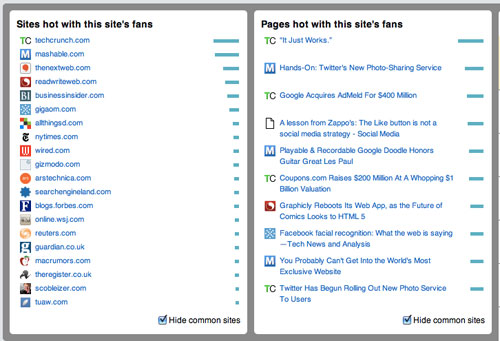
The stats, which you can preview for these top 25 properties, highlight the most popular pages in the last 24 hours, along with avatars of these top fans who engaged with the content, and shows which sites are popular with that site's fans. Unsurprisingly, especially in the world of tech, you can see many people are fans of multiple sources. For those running the OneTrueFan bar, you can dive deeper into the data, seeing impressions, fan reach, new users, shares and even data on how the bar is being used or hidden.

Sites Popular With LouisGray.com Readers and Top Pages

OneTrueFan is a lot more than a simple bar that shows you the top ten fans of the site. I make the bar a must install on all my browsers on all my computers to help me share content downstream and track my browsing history. There's value to the viewer, and now, increasing value to the content provider who gets a real live look in to what their most engaged fans are doing with site content.

For months, I've gotten questions about why I've given OneTrueFan such prominent space on this site, all free of charge. I've done it not just because I like the team, who brought MyBlogLog to the world seemingly ages ago, but because I like seeing real faces and encouraging sharing of my content. The world may be built on ones and zeros, but it doesn't have to look like it.

If you have a blog, I would encourage you to add their bar and start getting real fan analytics. If you browse the Web, check out the browser extension, and find out what people like you have been sharing. It's a thinly spread social network for the entire Internet. OneTrueFan, as always, is here: http://www.onetruefan.com/

June 9, 2011

June 9, 2011 · 2 MIN READ · BY LOUIS GRAY

Graphicly Expands Website With HTML5 Comics, Sharing

Graphicly Expands Website With HTML5 Comics, Sharing

Boulder based Graphicly, best known for its comics reading and purchasing platform on mobile devices, desktop and the iPad, is expanding its reach to the Web with the relaunch of a brand new Web site which brings comic book reading to the browser, along with expanded community features and the new option to share comics and stories around the Web for fellow fans. The Web launch, on the foundation of HTML5, hopes to not sacrifice any of the user experience while making access to all the digital media independent of the device.

Graphicly, whose most visible advocate is well known social Web personality Micah Baldwin, the cofounder who has led the charge for the company since officially joining at the start of 2010, has doubled its user base over the last six months, and is now seeing a new comic book downloaded every minute. True to form, Graphicly reports every social action taken by a member of the community is viewed more than 400 separate times. This tight connection with community and inherent virality of comics is a major reason the company has doubled down on sharing capabilities with its new site, which goes live today.

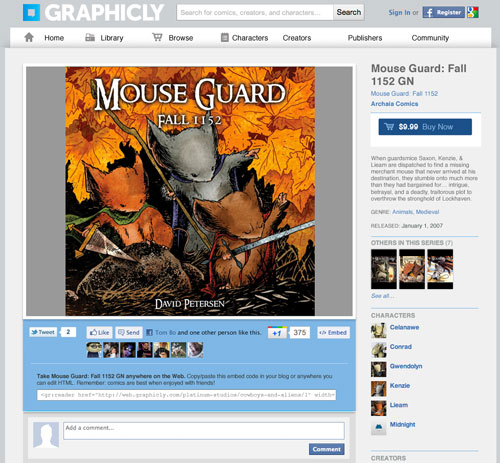
An HTML5 Comic With Sharing Features on Graphicly

Starting today, comics and other Graphicly content can be shared across the Web, putting publisher content in front of more viewers, all of whom can convert to paying Graphicly users with some effort. Graphicly's approach has been to bring the same consumption, buying, social and sharing experience across all screens.

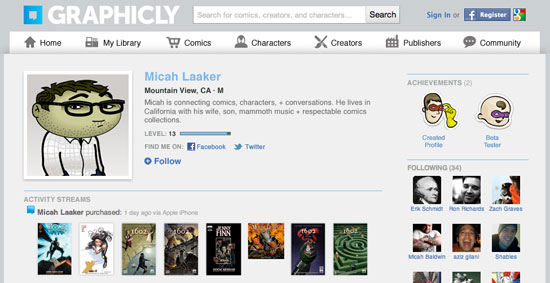
A Standard Graphicly Profile With Purchase History and Connections

“With our focus on HTML5, storytelling, collaboration and sharing that you can be done anywhere online or mobile, Graphicly’s full vision is becoming a reality," said Baldwin. "over the past year, we have met a lot of awesome fans, creators and stories, and they have no place to truly interact online. This release is the first move towards allowing all that awesome to connect in one place."

Sharing Functionality on Graphicly

The Graphicly Chrome Web App

With the battle over the definition of the cloud raging between the major Web giants, Graphicly has sided with both approaches - building dedicated apps and even being featured at Google IO for its Chrome Web app, but now moving into the full Web, backed by HTML 5. This sets them up nicely for reaching any mobile or desktop device its users want to leverage to read content. In fact, they promise in a release today to help bring author content to Kindle, Barnes and Noble Nook, or "any platform they choose".

You can find the new Graphicly at http://www.graphicly.com, or just search for Graphicly in practically any app store.